

SaneBox (sanebox.com) is an AI-powered email management service that integrates directly with your existing email provider — rather than replacing your email client — to automatically declutter your inbox. Originally founded in 2010, SaneBox uses machine-learning algorithms that analyse your email patterns and historical behaviour to determine which messages are genuinely important and which can be moved out of your primary inbox into designated folders, leaving only priority correspondence front and centre. Because SaneBox works at the email provider level, it functions identically across Gmail, Outlook, iCloud, and virtually any other email service or client, on any device.
SaneBox's signature feature is SaneLater, a folder where lower-priority emails are automatically diverted based on the platform's learning of your habits — emails you rarely open or respond to quickly get moved there, while messages from people and topics you regularly engage with stay in your main inbox. SaneBlackHole lets users permanently banish unwanted senders with a simple drag-and-drop, ensuring future emails from that sender never reach the inbox again. NoResponse tracks emails you've sent that haven't received a reply and reminds you to follow up, while a daily or weekly digest summarises everything SaneBox has filtered, so nothing important slips through unnoticed. The system continuously improves through simple training: if SaneBox misclassifies an email, dragging it to the correct folder teaches the algorithm your preferences going forward.
How SaneBox Works
Users connect SaneBox to their existing email account — no new app or interface to learn, as SaneBox operates by creating and managing special folders within your existing email provider, accessible from whatever email client or device you already use. SaneBox's algorithms analyse historical email patterns: who you reply to quickly, who you ignore, which newsletters you read versus delete unread. Based on this analysis, incoming email is automatically sorted — important messages stay in the inbox, while lower-priority messages are moved to SaneLater and other SaneFolders (such as SaneNews for newsletters or SaneAttachments for messages with attachments). Users can correct misclassifications by simply dragging an email to the right folder, which trains the system further. NoResponse monitors sent emails for replies and surfaces reminders for follow-up. A digest email (sent on a schedule the user controls) summarises what's been filtered, so users can quickly scan and rescue anything important without opening every folder.
Key Features
- SaneLater intelligent filtering — automatically moves lower-priority emails out of the inbox based on learned sender and topic patterns
- SaneBlackHole — permanently blocks unwanted senders with a simple drag-and-drop, removing their emails from the inbox going forward
- NoResponse follow-up tracking — monitors sent emails for replies and reminds users to follow up on messages that haven't received a response
- Digest summaries — periodic email digests summarising everything filtered into SaneFolders, so nothing important is missed
- SaneAttachments — consolidates email attachments into a dedicated folder for easy access without searching through individual emails
- Training via drag-and-drop — correct misclassifications by dragging emails to the right folder, improving accuracy over time
- Universal email provider compatibility — works with Gmail, Outlook, iCloud, and virtually any email provider or client, on any device
- Multiple SaneFolders — additional smart folders for newsletters, receipts, and other categories beyond the main SaneLater filter
- Multi-account support — manage filtering across multiple email accounts depending on plan tier
- Browser extensions — Chrome and Outlook extensions improve visibility into SaneBox's filtering and digest preferences
SaneBox Pricing
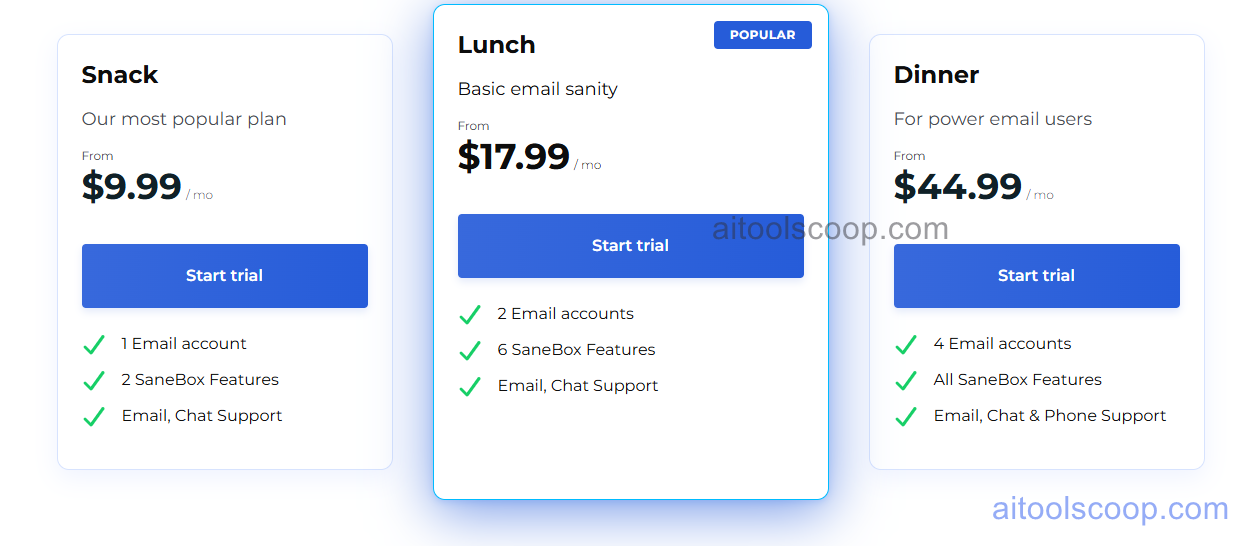
- Snack — $9.99/month ($5.99/month billed annually) — 1 email account, SaneLater filtering, SaneBlackHole, and core SaneFolders. Suited to individuals with a single inbox wanting basic intelligent filtering.
- Lunch — $17.99/month ($9.99/month billed annually) — 2 email accounts and an expanded set of SaneFolders, including NoResponse follow-up tracking, for users managing both personal and work inboxes.
- Dinner — $44.99/month ($29.99/month billed annually) — Up to 4 email accounts and every available SaneBox feature, including SaneAttachments and the full SaneFolder set, for users managing multiple inboxes who want complete functionality.
SaneBox does not offer a permanent free plan but provides a 14-day free trial with full features and no credit card required. Educational institutions, non-profits, and government agencies are eligible for a 25% discount. Always verify current rates at sanebox.com/pricing.
Who Should Use SaneBox?
SaneBox is well suited to professionals receiving 50 or more emails per day who want a cleaner inbox without switching away from their existing email client — its provider-agnostic approach means it works alongside Gmail, Outlook, or any other service the user already relies on. The Lunch and Dinner plans are particularly useful for consultants, freelancers, and professionals managing multiple email accounts (personal and work) who want consistent filtering across all of them. Because SaneBox's filtering is rule-based and learns from behaviour rather than using generative AI, it won't draft replies or take autonomous action — users wanting an AI that actively works on their behalf (drafting responses, summarising threads) will need a generative AI email tool in addition to or instead of SaneBox. For pure inbox decluttering and follow-up tracking across any email provider, however, SaneBox remains a focused and effective solution.
Frequently Asked Questions
What is SaneBox?
SaneBox is an AI-powered email management service that integrates with your existing email provider to automatically sort low-priority emails out of your inbox. Using machine learning based on your email habits, it moves unimportant messages to folders like SaneLater, blocks unwanted senders with SaneBlackHole, and tracks follow-ups with NoResponse — all without requiring you to switch email clients.
Does SaneBox have a free plan?
No, SaneBox does not offer a permanent free plan. However, it provides a 14-day free trial with full feature access and no credit card required, allowing users to evaluate the platform's filtering before committing to a paid subscription starting at $9.99/month (or $5.99/month billed annually).
What is SaneLater in SaneBox?
SaneLater is SaneBox's primary filtering folder, where lower-priority emails are automatically moved based on the platform's analysis of your email habits — such as how quickly you typically respond to a sender or whether you read certain newsletters. Emails from contacts and topics you regularly engage with remain in your main inbox, while less important messages are diverted to SaneLater for review at your convenience.
Does SaneBox use generative AI to draft email replies?
No. SaneBox's filtering is rule-based machine learning that learns from your behaviour over time to sort your inbox more intelligently — it does not draft replies, extract tasks, or take autonomous actions on your behalf like generative AI email assistants do. Its focus is purely on inbox organisation, sender blocking, and follow-up tracking.
How many email accounts does SaneBox support?
The number of supported email accounts depends on the plan: the Snack plan supports 1 email account, the Lunch plan supports 2 accounts, and the Dinner plan supports up to 4 accounts. All plans share the same core SaneBox filtering technology, with higher tiers adding more accounts and additional SaneFolders.