

Glasp (glasp.co) is a social web and PDF highlighter and AI summarisation tool built around a simple conviction: the knowledge people accumulate while reading online shouldn't disappear into private silos. Founded in 2021 in San Francisco by Kazuki Nakayashiki and Kei Watanabe — the name standing for "Greatest Legacy Accumulated as Shared Proof" — Glasp has attracted over one million users who use it to highlight web pages, annotate PDFs, generate AI-powered summaries of YouTube videos and articles, and share their curated insights with a community of like-minded learners. The platform's social layer lets users discover what others highlighted on the same article, follow readers whose tastes overlap, and build a public learning legacy over time.
Glasp's AI engine supports multiple models — ChatGPT, Claude, Gemini, and Mistral — and applies them across all content types: web articles, PDFs, images, YouTube videos, audio files, and Kindle highlights. For YouTube specifically, Glasp generates timestamped summaries from any video transcript, with customisable length and output language, and adds interactive transcript highlighting so users can annotate specific moments without leaving the video. Highlights and notes export in one click to Notion, Obsidian, Roam Research, and other knowledge management apps, with full source metadata preserved for attribution. Daily Auto-Sync to Notion (available on Pro and above) keeps the export pipeline automated without manual intervention.
How Glasp Works
Users install the Glasp browser extension (Chrome or Safari) and begin highlighting text on any web page by selecting it — Glasp's pop-up colour picker appears, the highlight is captured with source metadata, and it's saved to the user's Glasp profile. For YouTube, Glasp overlays a sidebar panel on the video page, generating an AI summary of the transcript with timestamps and allowing highlights to be placed on specific moments. For PDFs, users upload or open the file and highlight directly within Glasp's interface. AI summaries for articles, PDFs, and videos can be generated with a single click, with a choice of AI model (ChatGPT, Claude, Gemini, or Mistral) and configurable summary length and language. Kindle highlights are synced and reviewed daily through the Glasp dashboard. All highlights, notes, and summaries are accessible from the user's profile and can be exported to note-taking apps in one click with full metadata.
Key Features
- Multi-model AI summaries — generate summaries of YouTube videos, web articles, and PDFs using ChatGPT, Claude, Gemini, or Mistral with customisable length and language
- Web and PDF highlighting — highlight and annotate web pages, PDFs, images, and YouTube video transcripts with multiple colours and notes
- YouTube transcript highlighting — summarise any YouTube video, navigate by timestamp, and highlight specific moments in the transcript
- Audio file transcription and summarisation — transcribe and summarise audio content, with 30 minutes/month on free and 1,500 minutes/month on Unlimited
- PDF chat — ask questions about the content of PDF documents using AI (20 messages/month free, up to 5,000 on Unlimited)
- Kindle highlight sync — import and review Kindle highlights alongside web highlights in the Glasp dashboard
- One-click export to Notion, Obsidian, and Roam — export highlights and notes with source metadata to popular knowledge management apps
- Daily Auto-Sync to Notion — automatically syncs new highlights to Notion on a daily schedule (Pro and above)
- Social learning and community — discover what others highlighted on the same articles, follow readers with similar interests, and build a public knowledge profile
- Quoteshot generation — turn highlighted passages into visually formatted quote images for sharing on social media
Glasp Pricing
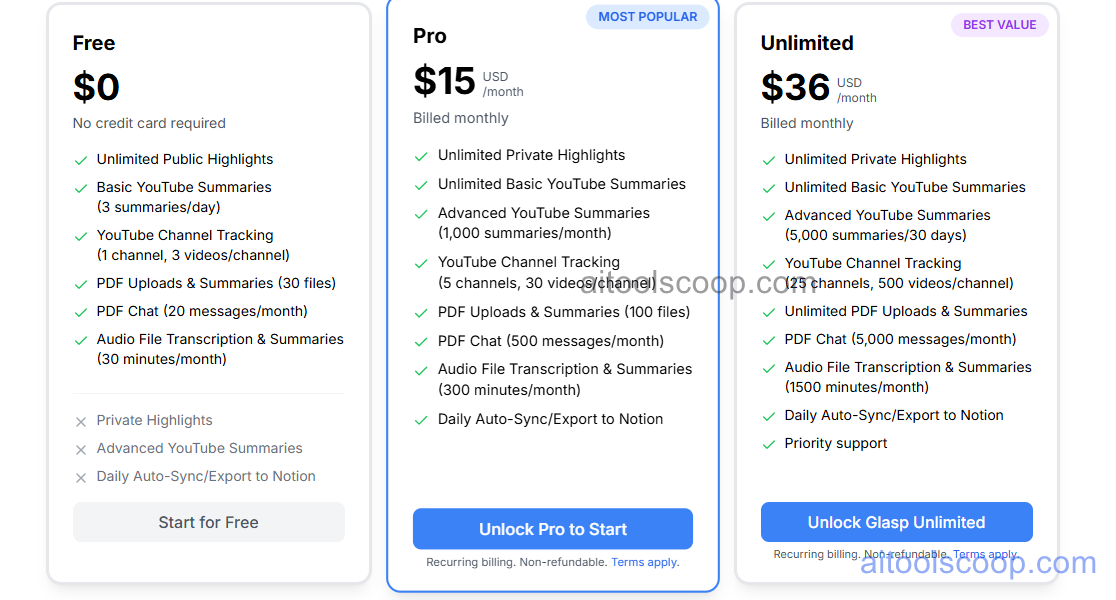
- Free — $0/month — Unlimited public highlights, basic YouTube summaries (3 per day), YouTube channel tracking (1 channel, 3 videos/channel), PDF uploads and summaries (30 files), PDF chat (20 messages/month), and audio transcription (30 minutes/month). No credit card required.
- Pro — $15/month ($12.50/month billed annually) — Unlimited private highlights, unlimited basic YouTube summaries, advanced YouTube summaries (1,000/month), YouTube channel tracking (5 channels, 30 videos/channel), PDF uploads and summaries (100 files), PDF chat (500 messages/month), audio transcription (300 minutes/month), and Daily Auto-Sync to Notion. Most popular plan.
- Unlimited — $36/month ($30/month billed annually) — Everything in Pro plus: advanced YouTube summaries (5,000 per 30 days), YouTube channel tracking (25 channels, 500 videos/channel), unlimited PDF uploads and summaries, PDF chat (5,000 messages/month), audio transcription (1,500 minutes/month), and priority support.
Annual billing saves approximately 17% on Pro and 17% on Unlimited versus monthly pricing. Always verify current rates at glasp.co/pricing.
Who Should Use Glasp?
Glasp is an excellent fit for students, researchers, content creators, and knowledge workers who consume large volumes of web content, PDFs, and YouTube videos and want a systematic way to capture, organise, and retain insights from that reading. The free plan is genuinely usable for moderate highlighting and daily YouTube summarisation; the Pro plan is worth the upgrade for anyone who needs private highlights, daily Notion sync, and higher AI summarisation volumes. Glasp's social layer is a distinctive differentiator — for users who value discovering what thoughtful readers are highlighting and building a public learning legacy, there's no equivalent tool. Users who need purely private note-taking without a social dimension, or who want a full read-later and book annotation workflow, may find the combination of Glasp and a dedicated read-later app (like Readwise Reader) works better than either tool alone.
Frequently Asked Questions
What is Glasp?
Glasp is a social web and PDF highlighter with AI summarisation capabilities, used by over one million people to highlight web pages, annotate PDFs and YouTube videos, generate AI summaries using ChatGPT, Claude, Gemini, or Mistral, and share insights with a community of learners. Highlights export to Notion, Obsidian, and Roam Research.
Is Glasp free?
Yes — Glasp offers a free plan with unlimited public highlights, basic YouTube summaries (3 per day), PDF uploads and summaries (30 files), PDF chat (20 messages/month), and audio transcription (30 minutes/month). No credit card required. Paid plans starting at $15/month unlock private highlights, higher AI usage limits, Daily Notion sync, and priority support.
How does Glasp summarise YouTube videos?
Glasp overlays a sidebar on YouTube video pages that generates an AI summary of the video transcript, with customisable length and output language, using a choice of AI models including ChatGPT, Claude, Gemini, and Mistral. Summaries are timestamped so users can navigate to specific points in the video, and the transcript can be highlighted directly for capturing specific quotes or moments.
Can Glasp export highlights to Notion and Obsidian?
Yes — Glasp supports one-click export of highlights and notes to Notion, Obsidian, Roam Research, and other note-taking apps, with source metadata preserved for attribution. The Pro and Unlimited plans add Daily Auto-Sync to Notion, which automatically exports new highlights on a daily schedule without manual intervention.
What makes Glasp different from other highlighting tools?
Glasp's social dimension distinguishes it from purely private tools. Highlights are public by default on the free plan, so users can see what others highlighted on the same article, discover readers with similar intellectual interests, and build a public learning legacy over time. Combined with multi-model AI summarisation across YouTube, web pages, PDFs, audio files, and Kindle highlights, Glasp is one of the most versatile free knowledge capture tools available.