Stoplight (stoplight.io) is an API design and documentation platform centred on the design-first philosophy — the idea that APIs should be thoroughly designed and reviewed before a single line of code is written. Built around the OpenAPI specification (formerly Swagger), Stoplight gives technical and non-technical stakeholders a visual interface to create, edit, and collaborate on API designs without needing deep YAML or JSON expertise. It is owned by SmartBear, the same company behind Swagger, and supports both OpenAPI v2 and v3 alongside JSON Schema modeling.
Stoplight's core value is consistency at scale: as an API portfolio grows, keeping designs coherent across teams becomes increasingly difficult. Stoplight addresses this with style guides and linting rules that automatically flag deviations from defined standards, reusable components that can be shared across endpoints and projects, and a hosted documentation platform that auto-generates interactive API references from OpenAPI specs. The free tier supports individual developers with one project, making it a genuine entry point for teams exploring design-first API workflows before committing to a full subscription.
How Stoplight Works
You create a project in Stoplight and connect it to a Git repository (GitHub, GitLab, Bitbucket, or Azure DevOps), or work directly in the Stoplight web editor. APIs are designed using a form-based visual editor — you define endpoints, request parameters, request bodies, and response schemas by filling in fields rather than hand-editing YAML. Stoplight simultaneously shows the raw OpenAPI YAML in a split-screen "write" mode alongside a visual "read" mode for reviewing the rendered API design. Style guide rules run automatically and highlight violations inline. Once design is complete, Stoplight generates hosted interactive documentation and a mock server, allowing frontend teams to start building against the API contract before the backend is implemented.
Key Features
- Visual OpenAPI editor — form-based design interface for creating OpenAPI v2 and v3 specifications without hand-editing YAML or JSON
- Style guides and linting — define and enforce API design standards automatically across the entire API portfolio with inline violation highlighting
- Reusable components — shared models, parameters, and response schemas that propagate changes across all endpoints using them
- Mock servers — automatically generated mock servers from OpenAPI specs, enabling parallel frontend and backend development
- Interactive documentation — hosted API reference documentation with a built-in "Try It" console generated automatically from the OpenAPI spec
- Git integration — sync with GitHub, GitLab, Bitbucket, and Azure DevOps to keep API specs version-controlled alongside source code
- JSON Schema modeling — visual interface for building and managing JSON Schema definitions shared across API endpoints
- Portfolio-wide visibility — overview of all API projects, their design quality scores, and style guide compliance across teams
- SmartBear community support — backed by SmartBear's global API tooling community for documentation, tutorials, and peer support
- Free tier — one user, one project, full visual editor, mock servers, and interactive documentation at no cost
Stoplight Pricing
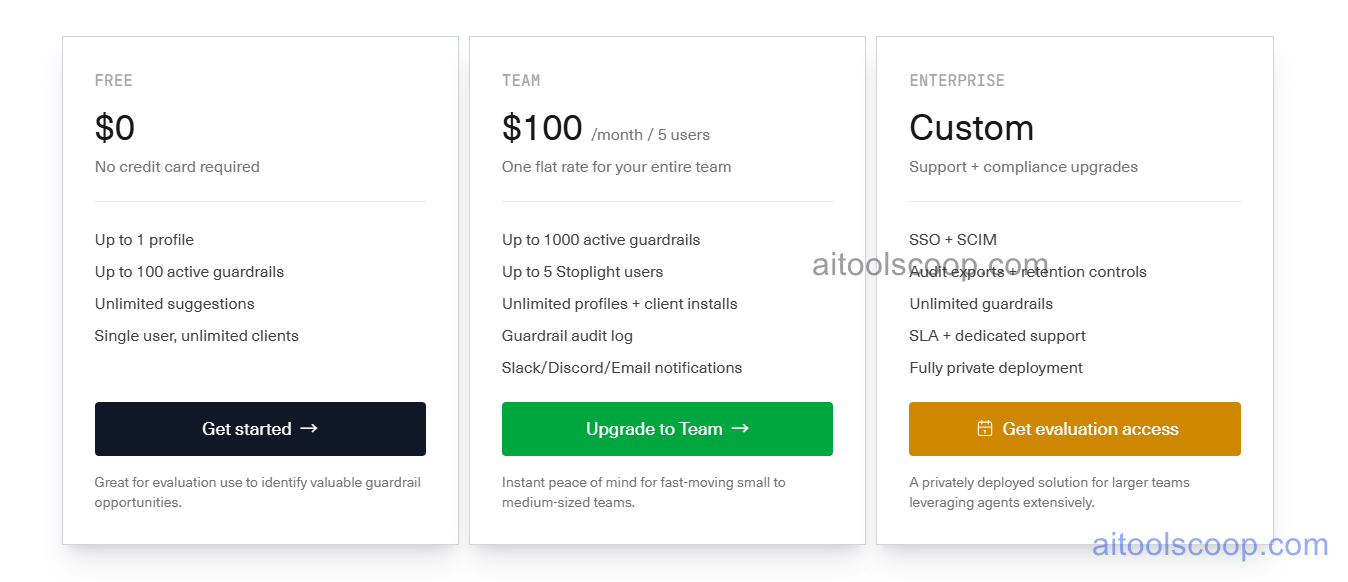
- Free — $0/month — 1 user, 1 project. Full visual API designer, mock servers, interactive documentation, and Git sync. Ideal for individual developers evaluating the design-first workflow.
- Professional — $100/month — Multiple users and projects, team collaboration features, advanced style guide governance, private documentation hosting, portfolio-wide visibility, and priority support.
Enterprise plans are available for large organisations requiring custom SSO, advanced access controls, and dedicated support. Always verify current rates at stoplight.io/pricing.
Who Should Use Stoplight?
Stoplight is ideal for API-first product teams, developer experience (DevEx) teams, and platform engineering groups who want to standardise API design across multiple teams and enforce consistent contracts before development begins. Its visual editor makes it accessible to product managers and technical writers who need to contribute to API design without writing raw YAML. It is particularly strong when used alongside a backend framework or API gateway — Stoplight handles design, governance, and documentation, while the gateway handles runtime traffic management. Stoplight is not a full API management platform and does not handle request routing, rate limiting, or runtime policy enforcement; teams needing those capabilities should pair it with a gateway like Gravitee or Kong.
Frequently Asked Questions
What is Stoplight?
Stoplight is an API design and documentation platform built around the OpenAPI specification. It provides a visual editor for creating API designs without writing YAML, auto-generates interactive documentation and mock servers from those specs, and enforces design standards through style guides and linting. It is owned by SmartBear and supports both OpenAPI v2 and v3.
Is Stoplight free?
Yes — Stoplight offers a free plan for one user with one project. The free tier includes the full visual API designer, mock servers, interactive documentation, and Git repository sync. Teams needing multiple users, multiple projects, or advanced governance features require the Professional plan at $100/month.
What is the design-first API approach?
Design-first means defining and agreeing on the API contract (the OpenAPI specification) before writing any backend code. This approach reduces rework by catching design issues early, enables parallel development (frontend teams can build against mock servers while the backend is built), and produces better documentation because the spec is written intentionally rather than reverse-engineered from code.
Does Stoplight work with GitHub and GitLab?
Yes. Stoplight integrates with GitHub, GitLab, Bitbucket, and Azure DevOps. API specifications are stored in Git repositories and synced with Stoplight, keeping the OpenAPI spec version-controlled alongside application source code. Changes in the repo are reflected in Stoplight and vice versa.
Is Stoplight an API management platform?
No — Stoplight is an API design and documentation platform, not a runtime API management or gateway platform. It does not handle request routing, rate limiting, authentication enforcement, or production traffic. For those capabilities, Stoplight is typically paired with a dedicated API gateway such as Kong, Gravitee, or AWS API Gateway.