Krea AI (krea.ai) is an AI creative suite that combines real-time image generation, video creation, 3D object generation, upscaling, generative editing, and custom model fine-tuning into a single subscription. Founded in San Francisco and backed by $83 million in funding — including a $47 million Series B in 2025 — Krea has grown to serve over 30 million users from 191 countries, with enterprise clients including Lego, Samsung, Nike, Microsoft, and Shopify. Rather than building a single proprietary model, Krea takes an aggregator approach, bundling 64+ models from providers like Flux, Runway, Luma, Ideogram, and Veo alongside its own proprietary Krea 1 model into one unified interface.
Krea's headline feature is its Realtime Canvas — an interactive interface where users sketch or place elements on one side of the canvas and watch AI-generated imagery update live on the other side as they draw. A major interface redesign in March 2026 introduced unified navigation, drag-and-drop workflows, a customisable workspace, and a voice mode that lets users speak instructions while drawing. The platform also includes a Nodes system for building automated multi-step generation workflows, functioning as a no-code alternative to direct API integration for many use cases, alongside LoRA fine-tuning that lets users train custom models on their own images for consistent brand, product, or character generation.
How Krea AI Works
Users start a project in Krea's unified workspace and choose from text-to-image, image-to-image, video generation, 3D generation, upscaling, or the Realtime Canvas. In Realtime Canvas mode, users sketch shapes or place reference images on one half of the screen while Krea's diffusion models generate a matching, refined image on the other half in near real time — at roughly 3 seconds per 1024px Flux-based image. For consistent outputs across a brand, product line, or character, users on Pro and above can upload 10–50 images (up to 2,000 on Max, 20,000 on Business) to train a custom LoRA model that Krea applies to future generations. The Nodes system allows users to chain multiple generation and editing steps into automated workflows, while API access on Business and Enterprise plans enables direct integration into external applications, including Slack connectivity and an analytics API.
Key Features
- Realtime Canvas — interactive live-generation interface where sketches and references update into AI-generated imagery in near real time
- 64+ aggregated AI models — access to models from Flux, Runway, Luma, Ideogram, Veo, and Krea's proprietary Krea 1 model in one unified interface
- 1,000+ styles and native 4K output — extensive style library with high-resolution generation for production-ready output
- Text-to-image and image-to-image generation — generate new images from prompts or transform existing images into different styles
- Text-to-video and video generation — create and edit AI-generated video content using aggregated video models
- 3D object generation — generate 3D assets directly within the platform for game design, product visualisation, and more
- LoRA fine-tuning — train custom models on your own images (up to 50 on Basic/Pro, 2,000 on Max, 20,000 on Business) for consistent branded output
- Upscaling and image enhancement — increase resolution and enhance image quality for any generated or uploaded image
- Nodes automated workflows — chain generation, editing, and enhancement steps into repeatable, automated multi-step pipelines
- Voice mode and customisable workspace — speak instructions while drawing on the canvas, within a redesigned, drag-and-drop unified interface (added March 2026)
Krea AI Pricing
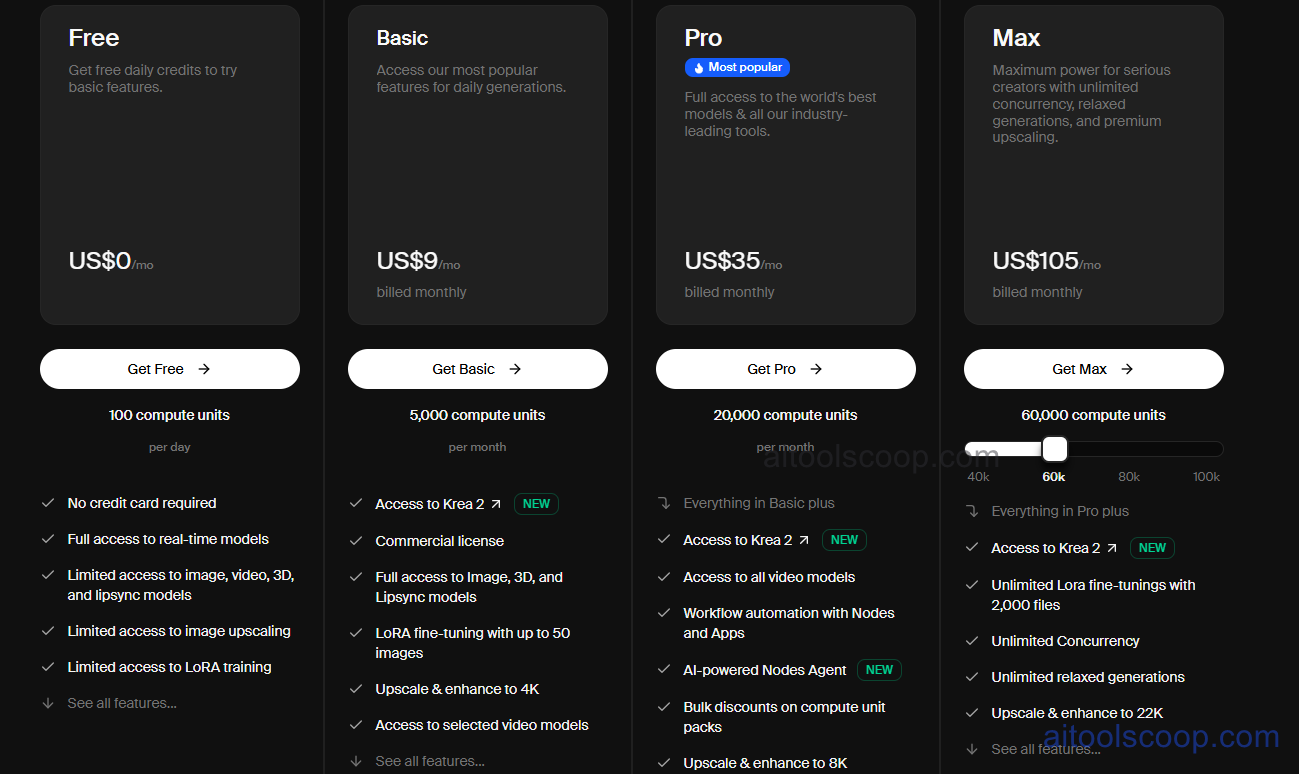
- Free — $0/month — Limited daily generations across real-time image tools, with access to the core canvas experience. No payment required to start.
- Basic — $9/month (around $5/month billed annually) — Image and video generation with compute-unit credits, LoRA fine-tuning on up to 50 training images, and access to the core model library.
- Pro — $35/month (around $21/month billed annually) — Expanded compute-unit credits for higher-volume image and video generation, LoRA fine-tuning, and priority access to new features.
- Max — $105/month (around $63/month billed annually) — Roughly 3x the generation volume of Pro, LoRA fine-tuning on up to 2,000 training images, early access to new models and features, and the highest individual-plan generation priority.
Business ($200/month) and Enterprise plans add API access, Slack integration, LoRA fine-tuning on up to 20,000 images, and team collaboration features. Krea uses a compute-unit credit system where different actions (image, video, 3D, upscaling) consume different amounts of credit. Always verify current rates at krea.ai/pricing.
Who Should Use Krea AI?
Krea AI is well suited to designers, marketers, and creative professionals who want one subscription covering image generation, video, 3D, upscaling, and fine-tuning rather than juggling multiple specialised tools. Its Realtime Canvas is particularly valuable for creatives who iterate visually and want immediate feedback while sketching or composing a scene. The LoRA fine-tuning capability makes it strong for brands and creators needing consistent visual identity across large volumes of content. Users focused purely on stylised artistic image generation may find Midjourney produces more consistently distinctive outputs, while those prioritising cost-per-generation for simple image tasks may find Leonardo AI more economical — Krea's strength is breadth and real-time interactivity across an entire creative workflow, not necessarily the cheapest option for any single task.
Frequently Asked Questions
What is Krea AI?
Krea AI is an AI creative suite that aggregates 64+ image, video, and 3D generation models — including Flux, Runway, Luma, Ideogram, Veo, and its proprietary Krea 1 model — into a single platform. It is known for its Realtime Canvas, which generates AI imagery live as users sketch, alongside upscaling, LoRA fine-tuning, and automated Nodes workflows.
Is Krea AI free?
Yes — Krea AI offers a free tier that provides limited daily generations across its real-time image tools and core canvas experience, with no payment required. Paid plans starting at $9/month (around $5/month billed annually) unlock higher generation volumes, video generation, and LoRA fine-tuning.
What is the Realtime Canvas in Krea AI?
Realtime Canvas is Krea AI's signature feature: an interactive interface where users sketch shapes or place reference images on one side of the screen, and AI-generated imagery updates live on the other side in near real time — at roughly 3 seconds per 1024px image using Flux-based models. It allows for fast visual iteration without waiting for full generation cycles.
What is LoRA fine-tuning in Krea AI?
LoRA fine-tuning lets users train a custom AI model on their own images — a specific face, product, or visual style — by uploading a set of training images. Once trained, that custom model can be applied to future generations for visual consistency. Basic and Pro plans support up to 50 training images, Max supports up to 2,000, and Business supports up to 20,000.
Does Krea AI offer API access?
API access is available primarily on Krea AI's Business and Enterprise plans, including analytics API capabilities and Slack integration. For users on lower tiers, the Nodes system provides a no-code alternative for building automated multi-step generation workflows without direct API integration.