

Home/ AI Tools /AI Productivity Tools /Loom
Loom Freemium
🤖 AI Productivity Tools
#9 in AI Productivity Tools

Loom

Loom is an async video messaging platform that lets teams record, share, and collaborate on screen and camera videos. Free plan available; paid plans from $18/month.

4.5 / 5 Freemium From $18/mo
Quick Info
💰 Pricing$18/mo
⭐ Rating4.5 / 5
🆓 Free Plan✅ Yes
🌐 WebsiteVisit ↗
🕐 Last UpdatedApr 17, 2026
🔀 Alternatives40 tools
Verified Data Updated Apr 17, 2026
Independently Reviewed No paid placements
Detailed Analysis Hands-on testing
Key Features
  • One-click screen and camera recording capturing screen, webcam, or both simultaneously
  • Instant shareable links with video ready to share within seconds of stopping the recording
  • AI transcription and summary automatically generated for every video recording
  • Timestamped comments allowing viewers to leave text reactions tied to specific video moments
  • Emoji reactions providing lightweight engagement tools for quick viewer responses
  • Team video workspace organizing recordings into folders and shared libraries across teams
  • Atlassian integrations with native embed and workflow connections for Jira and Confluence
  • Viewer analytics showing who watched, how long they watched, and where they dropped off
  • Video trimming and editing for removing filler moments directly in the Loom editor
  • Custom branding applying company logos and colors to video player pages on Business plans
4.5
Overall Rating
Ease of Use
4.7
Features
4.5
Value
4.2
Performance
4.6
Support
4.4
Pros & Cons
👍 Pros
  • Instant shareable link generation eliminates upload and rendering wait completely
  • AI transcript makes every video searchable and accessible to viewers who prefer reading
  • Atlassian integration makes Loom the natural async video choice for Jira and Confluence users
  • Free Starter plan generous enough for individuals evaluating async video communication
  • No viewer software installation required keeps sharing friction nearly zero
  • Viewer analytics provide insight into whether recipients actually watched your video
  • Emoji and comment system creates genuine engagement loop without scheduling another meeting
👎 Cons
  • Free plan 25-video and 5-minute limits too restrictive for regular professional use
  • Business plan at $18/month per seat adds up quickly across larger teams
  • No annual pricing option listed which removes a common cost-saving route for teams
  • AI summaries and advanced analytics require paid plan upgrade
  • Video editing capabilities basic compared to dedicated video production software
  • Large video libraries can become disorganized without disciplined folder management
  • Business+ plan required for custom branding limiting white-label use on the base Business tier
📖

About Loom

Loom (loom.com) is a leading asynchronous video messaging platform that enables individuals and teams to communicate through short recorded videos instead of long meetings or written messages. With one click, Loom captures your screen, camera, or both simultaneously, and instantly generates a shareable link the moment recording stops. Viewers watch on any device without downloading anything, can react with emoji and leave timestamped comments, and teams can build searchable video libraries for knowledge sharing. Acquired by Atlassian in 2023, Loom integrates natively into Jira, Confluence, and the broader Atlassian ecosystem — making it the async video standard for engineering, product, and distributed teams worldwide.

How Loom Works

Install the Loom desktop app or Chrome extension and click the record button to start capturing. Choose to record your screen only, your camera only, or both simultaneously. Narrate your walkthrough, feedback, or update as you record. When you stop, Loom automatically uploads the video and generates a shareable link within seconds — no rendering wait, no manual upload. Share the link via Slack, email, Notion, Confluence, or any communication tool. Viewers watch the video in their browser and can leave emoji reactions and timestamped text comments. Loom automatically generates an AI transcript and summary, making videos searchable and enabling viewers to jump to specific moments. Teams organize videos into folders and workspaces accessible to all members.

Key Features

  • One-click screen and camera recording — capture screen, webcam, or both with a single click
  • Instant shareable links — video link ready to share seconds after stopping the recording
  • AI transcription and summary — automatic transcript and video summary generated for every recording
  • Timestamped comments — viewers leave text reactions tied to specific moments in the video
  • Emoji reactions — lightweight engagement tool for quick viewer responses
  • Team video workspace — organize videos into folders and shared libraries for teams
  • Atlassian integrations — native embed and workflow connections with Jira and Confluence
  • Viewer analytics — see who watched your video, for how long, and where they dropped off
  • Video trimming and editing — trim clips and remove filler moments in the Loom editor
  • Custom branding — apply company logos and colors to video player pages on Business plans

Loom Pricing
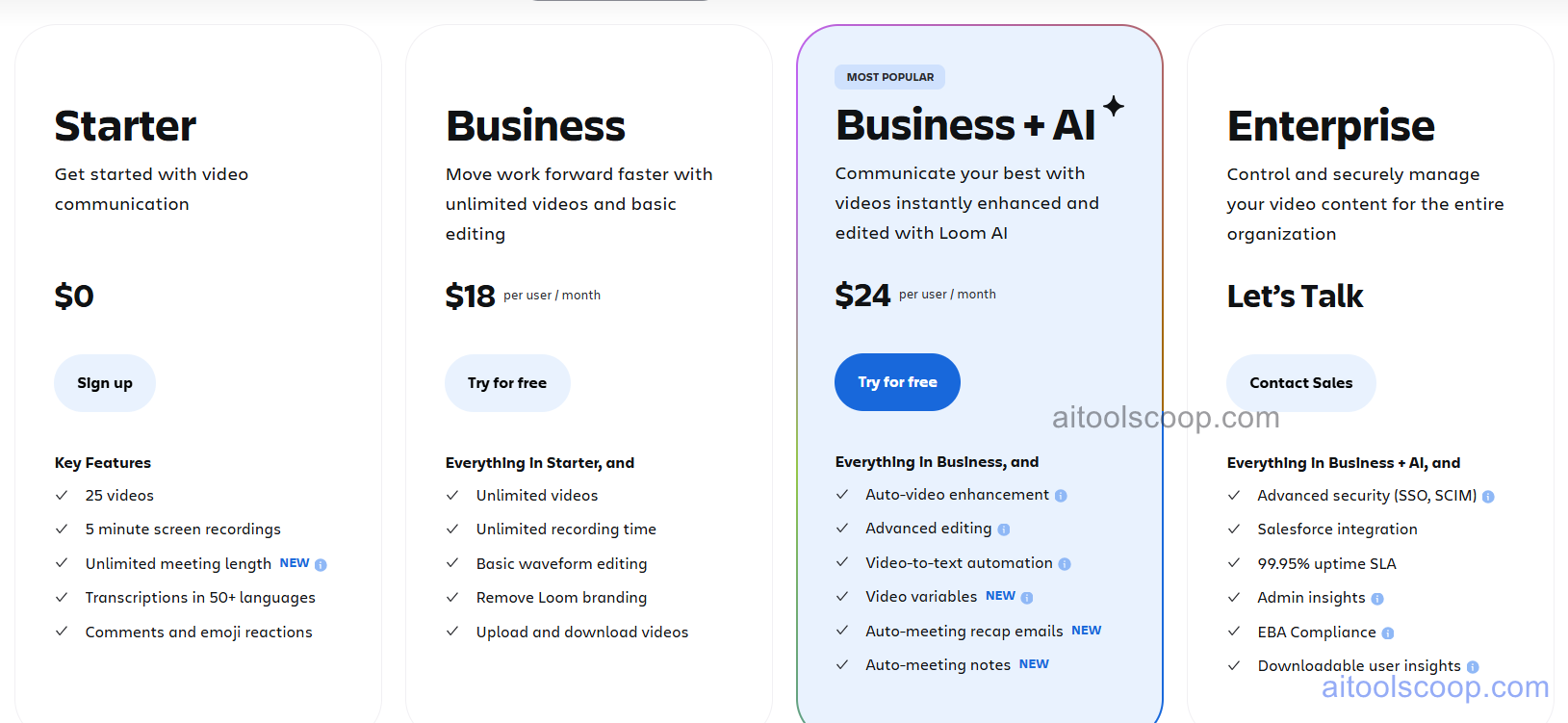
Loom pricing plans
Loom pricing — screenshot from loom.com
Plan Monthly Key Inclusions
Starter $0 25 videos, 5-minute recording limit, basic sharing, AI transcription
Business $18/mo Unlimited videos, unlimited recording length, AI summaries, analytics, team workspace, integrations
Business+ $24/mo All Business features, custom branding, advanced analytics, priority support
Enterprise Custom All Business+ features, SSO, advanced security, SLA, dedicated support

Always check the latest rates on the official website. For more AI tool reviews, visit aitoolscoop.com.

Who Should Use Loom?

Loom is the ideal solution for distributed and remote teams replacing unnecessary synchronous meetings with async video updates, engineering teams giving code review walkthroughs and bug explanations, product managers sharing feature demos and roadmap updates without scheduling calls, customer success teams sending personalized video responses to client inquiries, and sales professionals delivering custom product demos to prospects on their own timeline. The Starter plan works for individuals exploring async video communication, the Business plan fits active teams needing unlimited recording, and Enterprise serves large organizations requiring SSO and compliance controls.


💰

Pricing Plans

Plan Price Includes
Pro $18/mo Full access + priority support
Check Current Pricing →
Affiliate Disclosure: This page contains affiliate links. If you click and make a purchase, we may earn a small commission at no extra cost to you. We only recommend tools we genuinely believe in.

🎯 Explore More

Discover other curated resources from our platform

🛠️ AI Tools View All →
Otter.ai
Otter.ai
★ 4.2
Bolt.new
Bolt.new
★ 4.3
PicWish
PicWish
★ 4.0
⚔️ VS Comparisons View All →
ChatGPT vs Gemini: Which AI Writing Tool Wins in 2026?
ChatGPT vs Gemini: Which AI Writing…
ChatGPT vs Gemini: 2026 Comparison — Pricing, Features & Verdict
ChatGPT vs Gemini: 2026 Comparison —…
ChatGPT vs Gemini
⚔️
ChatGPT vs Gemini for Writing in…
ChatGPT GPT-4o vs Gemini 1.5 Pro
💡 Free Prompts View All →
💡
Gemini for Education Content Creators: Advanced…
🔥 7.5K uses
💡
Expert Guide: Fix Brand Voice Inconsistency…
🔥 3.4K uses
💡
Healthcare Partnership Manager's Referral Request Template…
🔥 3.6K uses
💡 Free Prompts