

Beginner-Friendly AI Video Editor
Wondershare Filmora (filmora.wondershare.com) is a desktop video editing application that balances professional features with beginner-friendly design. Combining traditional timeline editing with AI-powered tools including auto-reframe, background removal, speech-to-text, and silence detection, Filmora serves creators from hobbyists to small production teams. The software includes extensive libraries of effects, transitions, titles, and royalty-free music, alongside direct export to YouTube, Vimeo, and social platforms. Available for Windows and macOS, Filmora emphasizes intuitive workflows without sacrificing creative control.
How Wondershare Filmora Works
Download and install Filmora for Windows or macOS. Launch the application and create a new project, selecting aspect ratio for your target platform. Import media files, or record directly within Filmora using screen and webcam capture. Drag clips onto the timeline and arrange them sequentially. Use AI tools to automatically remove silences, generate subtitles via speech-to-text, or remove backgrounds without green screens. Apply effects, transitions, and color grading from the extensive built-in library. Add animated titles and lower thirds with customizable templates. Insert royalty-free music from Filmora's licensed library with automatic beat detection. Use keyframing for advanced animations and motion graphics. Preview in real-time and export in resolutions up to 4K, or publish directly to YouTube and Vimeo with metadata.
Key Features
- AI auto-reframe — automatically crops videos to different aspect ratios with motion tracking
- AI silence detection — removes quiet sections and awkward pauses automatically
- Speech-to-text — generates subtitles from audio with editable transcription
- AI background removal — eliminates backgrounds from videos without green screen
- Effects library — 1,000+ effects, transitions, titles, and overlays included
- Royalty-free music — licensed audio library with beat detection and sync
- Screen recording — capture desktop and webcam simultaneously for tutorials
- Color grading — professional color correction tools and LUT support
- Speed controls — time remapping, slow motion, and speed ramping
- Direct publishing — export to YouTube, Vimeo, and social platforms with metadata
Wondershare Filmora Pricing
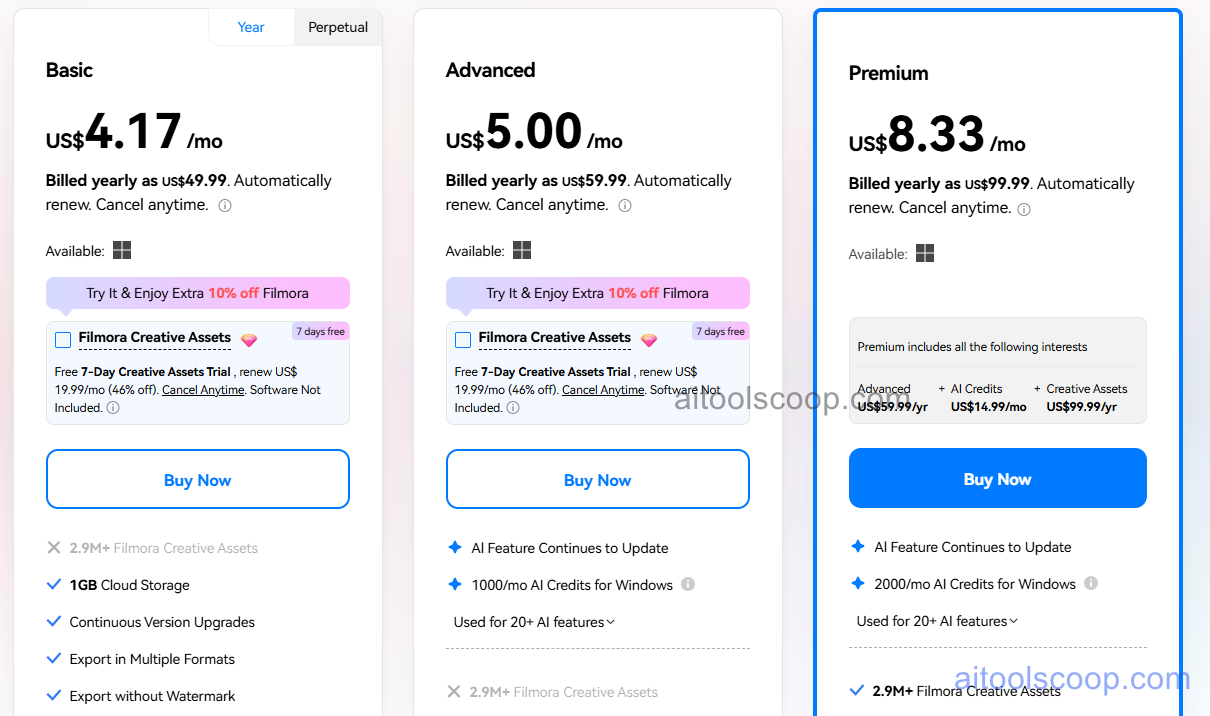
- Annual Plan — $49.99/year ($4.17/month) — full software access, all effects and music, AI features, 4K exports, updates for subscription period.
- Perpetual Plan — $59.99 one-time — lifetime license for current version, all effects and music, AI features, 4K exports, 1 year of free updates.
- Perpetual + Upgrade — $99.99 one-time — lifetime license with perpetual free upgrades, all effects and music, AI features, 4K exports, priority support.
Always check the latest rates on the official website. For more AI tool reviews, visit aitoolscoop.com.
Who Should Use Wondershare Filmora?
Wondershare Filmora is perfect for YouTube creators needing professional editing tools without Final Cut or Premiere complexity, small business owners producing marketing videos and social content in-house, educators creating course materials and tutorial videos, hobbyist filmmakers developing personal projects and portfolios, content creators transitioning from basic editors like iMovie or Windows Video Editor, and freelancers offering video editing services to small clients. The Annual Plan suits users wanting ongoing updates and support, while the Perpetual Plan serves those preferring one-time purchases. The Perpetual + Upgrade plan fits long-term users committed to the Filmora ecosystem.