

Harvest (getharvest.com) is a time tracking and invoicing platform designed for freelancers, consultants, and project-based service teams that need a streamlined way to track billable hours, invoice clients, and monitor project health — without the complexity of a full project management or ERP system. Harvest's approach is deliberately focused: it does time tracking and client invoicing exceptionally well, integrates with accounting platforms to connect tracked time to financial workflows, and keeps the interface simple enough that team adoption is high without extensive training. The platform offers a permanently free plan for one seat covering up to 2 projects — which serves individual freelancers well — with paid plans starting from $9 per seat per month (billed annually) for unlimited seats and full team features, both with a 30-day free trial.
Harvest's Teams plan adds unlimited seats, team-level reporting across projects and team members, and accounting and payment integrations — connecting tracked billable hours to QuickBooks, Xero, Stripe, and PayPal for a complete client billing and payment cycle. Pricing on Teams scales as teams grow: additional invoices, projects, clients, and tasks are billed based on actual usage rather than a flat unlimited fee, so teams never pay for capacity they are not using. The Enterprise plan extends this with profitability reporting (comparing revenue to costs at the project level), timesheet approvals, activity logs, custom reports and exports, SAML-based SSO, a notes requirement feature, and custom onboarding support for teams of 50 or more seats.
How Harvest Works
Users track time against projects and tasks using the Harvest web app, Mac app, iOS app, Android app, or browser extension. Timers can be started with a single click and paused or stopped when switching tasks. Time can also be entered retrospectively on a weekly timesheet view. Tracked hours are categorised as billable or non-billable and assigned to specific clients, projects, and tasks. Invoices are generated directly from tracked billable hours with a single action — pulling time entries into a formatted invoice sent to the client by email. Clients can view and pay invoices online through Stripe or PayPal integration. Budget and project health indicators show whether projects are on track against estimated hours and budgets, alerting managers when thresholds are approaching.
Key Features
- Free plan — 1 seat, 2 projects — time tracking, invoicing, expense tracking, and Mac and iOS apps at no cost, forever
- Time tracking — single-click timers across web, Mac, iOS, Android, and browser extension with retrospective entry support
- Invoicing — generate client invoices directly from tracked billable hours and send by email with online payment options
- Expense tracking — log project expenses alongside time for comprehensive client billing (all plans including free)
- Team reporting — track time across all team members and projects with aggregated reporting (Teams and Enterprise)
- Accounting integrations — connect to QuickBooks and Xero for seamless time-to-accounting data flow (Teams and Enterprise)
- Payment integrations — Stripe and PayPal integration for online invoice payment (Teams and Enterprise)
- Profitability reporting — compare project revenue to costs to identify the most and least profitable client work (Enterprise)
- Timesheet approvals — structured approval workflow for submitted timesheets (Enterprise)
- SAML-based SSO — enterprise single sign-on with SAML for secure team access management (Enterprise)
Harvest Pricing
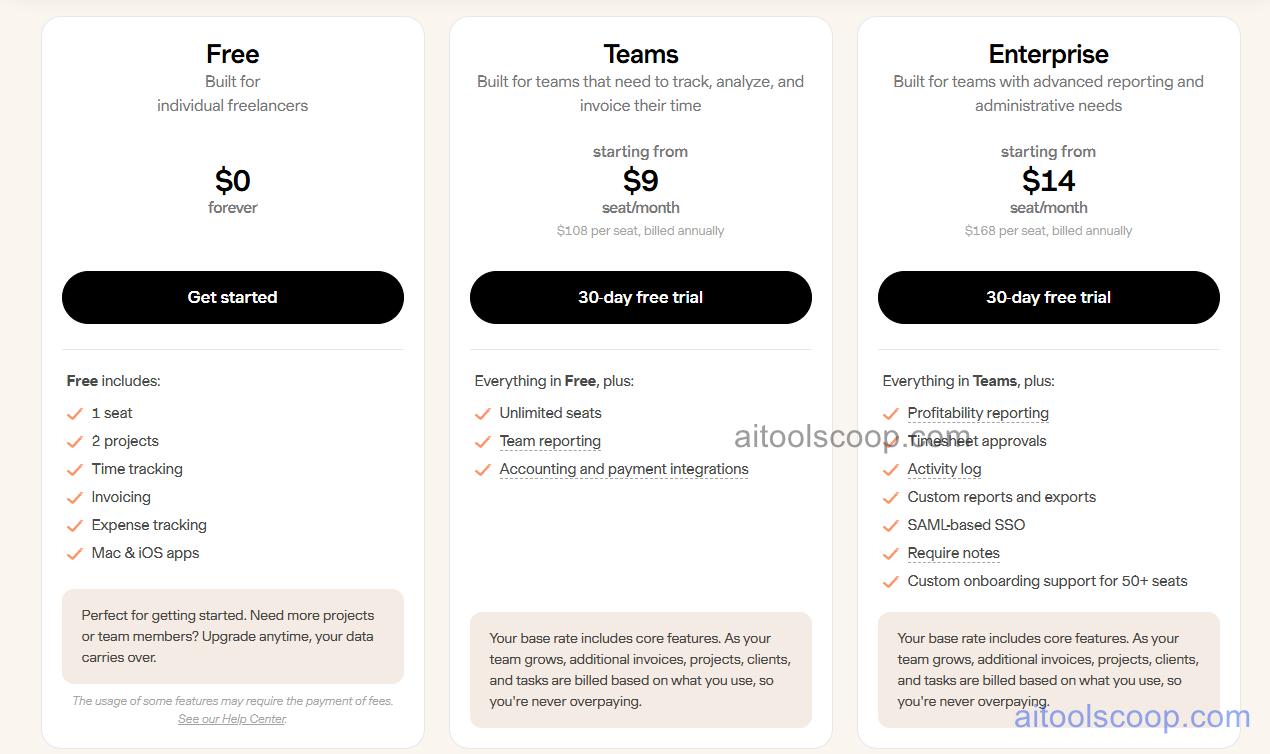
- Free — $0/forever — 1 seat, 2 projects. Time tracking, invoicing, expense tracking, and Mac and iOS apps. No time limit. Perfect for individual freelancers getting started.
- Teams — starting from $9/seat/month (billed annually at $108/seat/year; approximately $11/seat/month on monthly billing) — Everything in Free plus unlimited seats, team reporting, and accounting and payment integrations. 30-day free trial. Base rate includes core features; additional invoices, projects, clients, and tasks billed on usage.
- Enterprise — starting from $14/seat/month (billed annually at $168/seat/year; approximately $17.50/seat/month on monthly billing) — Everything in Teams plus profitability reporting, timesheet approvals, activity log, custom reports and exports, SAML-based SSO, require notes, and custom onboarding support for 50+ seats. 30-day free trial.
Free plan permanently available for 1 seat and 2 projects. 30-day free trial on Teams and Enterprise. Always verify current rates at getharvest.com/pricing.
Who Should Use Harvest?
Harvest is ideal for individual freelancers and project-based service teams — agencies, consultancies, design studios, and professional service firms — that bill clients by the hour and need a clean, reliable connection between tracked time and client invoices. The free plan serves solo freelancers with up to 2 active projects at zero cost. The Teams plan is the appropriate upgrade for any team with more than one member or more than 2 active projects, adding team reporting and the accounting integrations that bring time data into financial workflows. Enterprise suits larger agencies and firms that need profitability analysis, formal timesheet approvals, and SSO. Teams that need heavy project management features, task dependency tracking, or resource capacity planning alongside time tracking should evaluate whether pairing Harvest with a dedicated project management tool better serves their needs.
Frequently Asked Questions
What is Harvest?
Harvest is a time tracking and invoicing platform for freelancers and project-based service teams. A permanently free plan is available for one seat covering up to 2 projects with time tracking, invoicing, and expense tracking. Paid plans add unlimited seats, team reporting, accounting integrations (QuickBooks, Xero), and payment integrations (Stripe, PayPal), with a 30-day free trial on both paid tiers.
Is Harvest free?
Yes. Harvest offers a permanently free plan for one seat covering up to 2 projects with no time limit. The free plan includes time tracking, invoicing, expense tracking, and Mac and iOS apps — sufficient for individual freelancers managing a small number of active projects. Paid plans starting from $9/seat/month (annually) add unlimited seats and team features, both with 30-day free trials.
Can Harvest create and send invoices?
Yes. Invoicing is one of Harvest's core features and is available on all plans including the free plan. Users generate invoices directly from tracked billable hours — Harvest pulls the relevant time entries into a formatted invoice that can be sent to the client by email. On Teams and Enterprise plans, clients can pay invoices online through Stripe or PayPal integration, and payments sync to connected accounting platforms.
What accounting platforms does Harvest integrate with?
Harvest integrates with QuickBooks and Xero on the Teams and Enterprise plans, allowing tracked billable hours, invoices, and expenses to sync with accounting software automatically. This eliminates duplicate data entry between time tracking and accounting workflows and keeps financial records current with the latest project billing data.
What is profitability reporting in Harvest?
Profitability reporting is an Enterprise plan feature that compares the revenue generated by a project (from billed hours and expenses) against the internal cost of delivering it (based on team member rates and hours worked), producing a profit margin view at the project or client level. This allows agency owners and managers to identify which clients and project types are most profitable and where delivery costs are eroding margins.