

Sunsama (sunsama.com) is a daily planning tool designed around the idea that effective work requires intentional planning — not just a long task list. Founded in 2019, Sunsama guides users through a structured morning planning ritual each day: pulling tasks from connected tools, estimating time, scheduling them into the calendar, and setting a realistic goal for the day. The tool is built for knowledge workers who want to work sustainably — finishing the day with clear progress rather than feeling overwhelmed by an ever-growing backlog.
Sunsama integrates with the most common productivity and project management tools — Asana, Todoist, Notion, Linear, GitHub, GitLab, Jira, Trello, ClickUp, Gmail, and Outlook — and syncs tasks bidirectionally with Google Calendar and Outlook Calendar. Its AI features assist with the daily planning workflow by suggesting task duration estimates, helping write clear task descriptions, and summarising the previous day's work to inform the next morning's plan. Sunsama's emphasis on work-life balance is built into the product: users set a daily working hour limit, and Sunsama warns when they are over-scheduling.
How Sunsama Works
Each morning, Sunsama prompts users with a guided planning session. Users pull in tasks from connected tools — Asana projects, Todoist lists, GitHub issues, Gmail threads — and add them to the day's plan. Each task gets a time estimate, and Sunsama time-blocks the tasks into the calendar alongside meetings pulled from Google Calendar or Outlook. AI assists by suggesting time estimates and helping clarify task descriptions. At the end of the day, Sunsama prompts a brief shutdown ritual — reviewing completed work, rolling unfinished tasks to tomorrow, and closing the workday intentionally. Weekly reviews surface trends in how time is being spent across different projects and goals.
Key Features
- AI-assisted daily planning — guided morning planning ritual with AI time estimates and task description assistance to structure the workday
- Unified task pull — import tasks from Asana, Todoist, Notion, Linear, GitHub, GitLab, Jira, Trello, ClickUp, Gmail, and Outlook into daily plan
- Time-blocking calendar — schedule tasks into time slots alongside calendar meetings for a complete view of the day
- Google Calendar and Outlook sync — bidirectional sync so Sunsama time blocks appear in the primary calendar and meetings pull into Sunsama
- Daily shutdown ritual — end-of-day guided review to roll unfinished tasks, reflect on progress, and close the workday intentionally
- Working hour limits — set a daily hour cap; Sunsama warns when the planned workload exceeds the limit to prevent over-scheduling
- Weekly review — summary of time spent across projects, goals, and channels to identify where hours are actually going
- Channel organisation — group tasks by project, client, or area of focus (channels) to see time allocation across work streams
- Task notes and subtasks — add context, notes, links, and checklist items to individual tasks
- Recurring tasks — set tasks to recur daily, weekly, or on custom schedules with automatic planning prompts
Sunsama Pricing
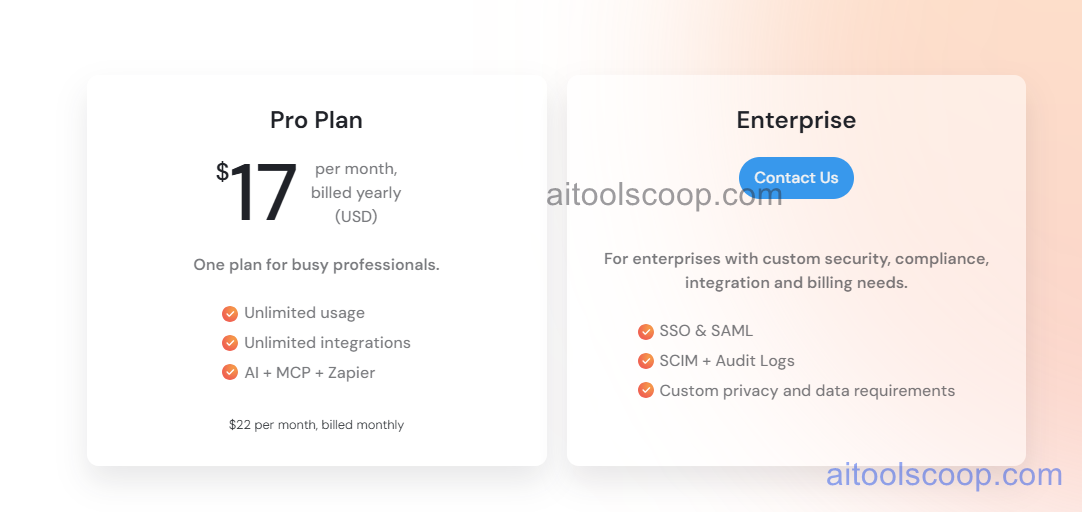
Sunsama offers a single all-inclusive plan with annual billing only. There is no free plan, but a free trial is available.
- Annual — $17/month (billed as $204/year) — full access to all Sunsama features including all integrations, AI planning assistance, time-blocking, calendar sync, daily rituals, working hour limits, and weekly reviews.
A free trial is available with no credit card required. Sunsama is annual-only with no monthly billing option. Always verify current rates at sunsama.com/pricing.
Who Should Use Sunsama?
Sunsama is a strong fit for knowledge workers — particularly managers, freelancers, consultants, and remote workers — who want to bring intention and structure to their workday without working excessive hours. Its guided planning rituals and daily shutdown routine make it especially appealing to people who struggle with finishing the day feeling accomplished rather than behind. The working hour limit feature reflects a genuine philosophy about sustainable productivity that distinguishes Sunsama from pure efficiency tools. At $17/month (annual only), it is reasonably priced for individuals who will use it daily. It is not suitable for teams needing collaborative task management, users who prefer a monthly billing option, or people who find structured daily rituals rigid rather than helpful.
Frequently Asked Questions
What is Sunsama and how is it different from other planners?
Sunsama is a daily planning tool that guides users through a structured morning planning ritual and end-of-day shutdown routine, pulling tasks from tools like Asana, Todoist, and GitHub into a time-blocked daily plan. Unlike generic task managers, Sunsama is built around intentional daily planning and sustainable working hours — it includes a daily hour cap that warns users when they are over-scheduling. The guided ritual approach makes it more structured than Akiflow or Todoist, and its focus on work-life balance differentiates it from pure efficiency tools.
How much does Sunsama cost?
Sunsama costs $17 per month, billed annually at $204 per year. There is no monthly billing option and no free plan. A free trial is available with no credit card required, allowing users to experience the full product before committing to an annual subscription.
Does Sunsama have a free plan?
No. Sunsama does not offer a free plan. It provides a free trial — no credit card required — so users can try the full product before subscribing. After the trial, an annual subscription at $17/month ($204/year) is required. Users looking for a free daily planning tool may want to consider alternatives like Notion, Todoist (free tier), or Google Tasks combined with Google Calendar.
What tools does Sunsama integrate with?
Sunsama integrates with Asana, Todoist, Notion, Linear, GitHub, GitLab, Jira, Trello, ClickUp, Gmail, and Outlook for task import. It syncs bidirectionally with Google Calendar and Outlook Calendar so time blocks created in Sunsama appear in the primary calendar and meetings from the calendar pull into the Sunsama daily view. All integrations are included in the single subscription plan.
Is Sunsama good for remote workers?
Yes. Sunsama is particularly well suited to remote workers who lack the natural structure of an office environment. The guided morning planning ritual creates a clear start to the workday, the working hour limit helps prevent the overwork that commonly affects remote workers, and the end-of-day shutdown ritual provides a deliberate close to the workday. Remote workers who use tools like Asana, Jira, or GitHub for team projects benefit from Sunsama's ability to pull those tasks into a unified personal plan without switching apps.