

Best AI Website Builder for Designers Who Want Code Control
Framer (framer.com) started as a prototyping tool and quietly became one of the most powerful website builders available in 2026. What sets it apart from Webflow, Squarespace, and Wix is its design philosophy: Framer gives designers a freeform canvas with pixel-level control — closer to Figma than to a traditional website builder — while handling responsive behavior, performance optimization, and hosting automatically. In 2026, Framer added a suite of AI features that make it the fastest path from idea to published site for designers and creative teams who do not want to compromise on visual quality.
How Framer's AI Works
Framer's AI tools operate at the page level, not just the component level. Wireframer — Framer's AI layout generator — converts a single text prompt into a fully structured, responsive page complete with layout, navigation, and starter content. Unlike AI builders that generate a generic template you then customize, Wireframer produces a layout tailored to the prompt's specific context. You describe a SaaS pricing page, a portfolio, or a hotel landing page, and the output reflects that context in hierarchy, spacing, and content placement.
AI Translation translates an entire Framer site into multiple languages with a single click — no plugins, no manual copy-paste into a translation service. Text Rewrite refines existing copy with AI while preserving brand tone. AI Style lets you define your brand voice, key context, and excluded terms so every AI-generated or AI-edited piece of copy sounds like the same brand regardless of which team member triggered the feature.
Key Features
- Wireframer AI layout generation — prompt-to-responsive page in seconds, not templates
- Freeform design canvas — pixel-level visual control with no layout constraints, closer to Figma than to Webflow
- Built-in CMS — manage and update content without touching design; supports up to 10,000 CMS items on paid plans
- AI Translation — translate entire site into multiple languages with one click, no third-party plugin required
- On-Page Editing — edit live pages directly in the browser; updates publish instantly without returning to the canvas
- A/B testing with custom distribution — roll out design variants to a controlled percentage of visitors before full deployment
- Built-in Analytics — traffic, conversion, and A/B test performance without installing a third-party analytics tool
- AI plugins — build or install third-party AI plugins connecting to OpenAI, Anthropic, or Gemini for image generation, alt text, and content operations
Framer Pricing
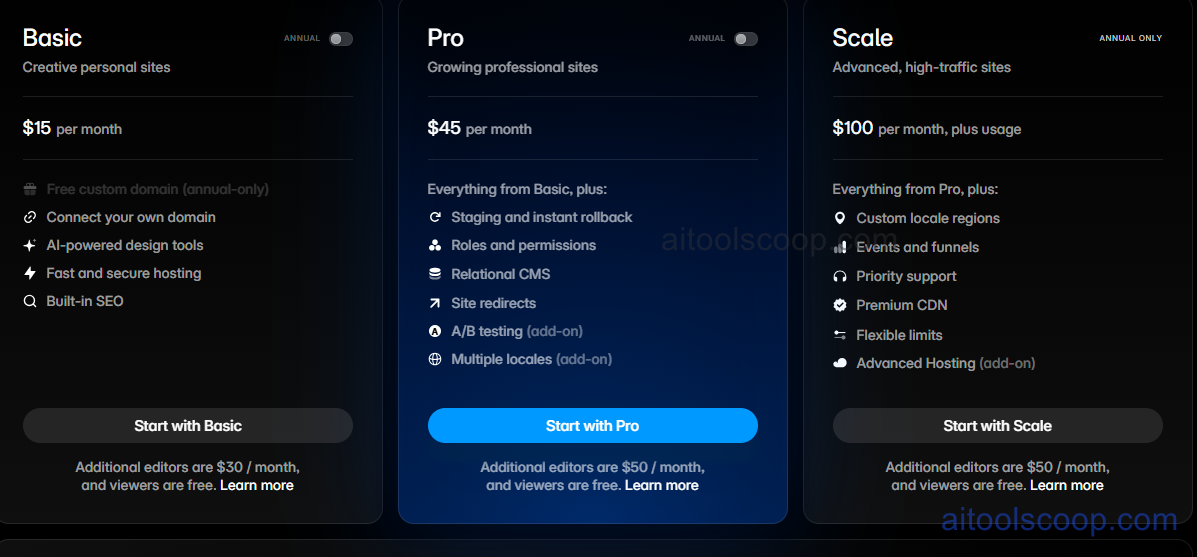
- Free — $0/month — Up to 1,000 pages, 10 CMS collections, 5 MB file uploads, Framer subdomain, built-in hosting. No custom domain. Suitable for personal projects and platform evaluation.
- Basic — $15/month — 10,000 pages, 10 CMS collections, 10,000 CMS items per collection, password protection, staging environment, advanced SEO controls.
- Pro — $45/month — Unlimited pages, unlimited CMS collections, 100,000 CMS items, A/B testing, custom analytics integrations, priority support, multiple collaborators.
Pricing is subject to change. Always check the latest rates on the official website. For more AI tool reviews, visit aitoolscoop.com.
Framer vs Webflow vs Squarespace
Webflow is more powerful for complex CMS-driven sites with extensive custom interactions, but has a steeper learning curve and a more developer-oriented interface. Squarespace is easier to get started with but constrains design significantly — every layout decision is made within a template boundary. Framer sits between the two: it gives designers Webflow-level visual control with a significantly more intuitive interface, and its AI features accelerate the initial build phase more than either competitor. The trade-off is that Framer is best suited for design-forward sites — marketing pages, portfolios, landing pages — rather than complex e-commerce or content-heavy publications that benefit from Webflow's more mature CMS.