

One Workspace to Replace Docs, Sheets, and Apps
Coda (coda.io) is a powerful collaborative workspace platform that merges documents, spreadsheets, and lightweight applications into a single flexible tool. Unlike traditional word processors or separate database tools, Coda allows teams to build rich, interactive documents — called Docs — that contain embedded tables, formulas, buttons, automations, and views that respond to data in real time. Teams use Coda to build product roadmaps, project trackers, OKR systems, CRMs, meeting notes, and operational wikis — all in one interconnected Doc. With Coda AI integrated throughout the workspace, users can generate content, summarize pages, extract data from tables, and automate repetitive tasks using natural language prompts.
How Coda Works
Create a new Coda Doc and begin building with a combination of text blocks, tables, and interactive elements. Tables in Coda work like database tables — each row can be filtered, grouped, sorted, and viewed as a list, kanban board, calendar, or Gantt chart without duplicating data. Use formulas to connect data across tables and trigger automations based on conditions or schedules. Embed buttons that execute actions — update a row, send a Slack message, or trigger a webhook. Invite team members to collaborate in real time with granular page-level permissions. Use Coda AI to generate first drafts, summarize long pages, classify table data, or build automations by describing what you want in plain language. Publish Docs as internal wikis or external-facing resources for stakeholders.
Key Features
- All-in-one docs and databases — combine rich text, tables, and formulas in a single flexible document
- Multiple data views — display the same data as table, kanban, calendar, Gantt, and more without duplication
- Coda AI — generate content, summarize pages, classify data, and build automations with natural language
- Buttons and automations — create interactive actions that trigger workflows on click or on schedule
- Cross-doc data connections — reference and sync data between multiple Coda Docs
- Granular permissions — control access at the page level across the entire Doc
- 600+ integrations — connect with Slack, Jira, GitHub, Salesforce, Google Workspace, and more
- Publishing — share Docs as internal wikis or external web pages with controlled access
- Real-time collaboration — simultaneous multi-user editing with live presence indicators
- Templates — hundreds of pre-built templates for product, ops, HR, and project management workflows
Coda Pricing
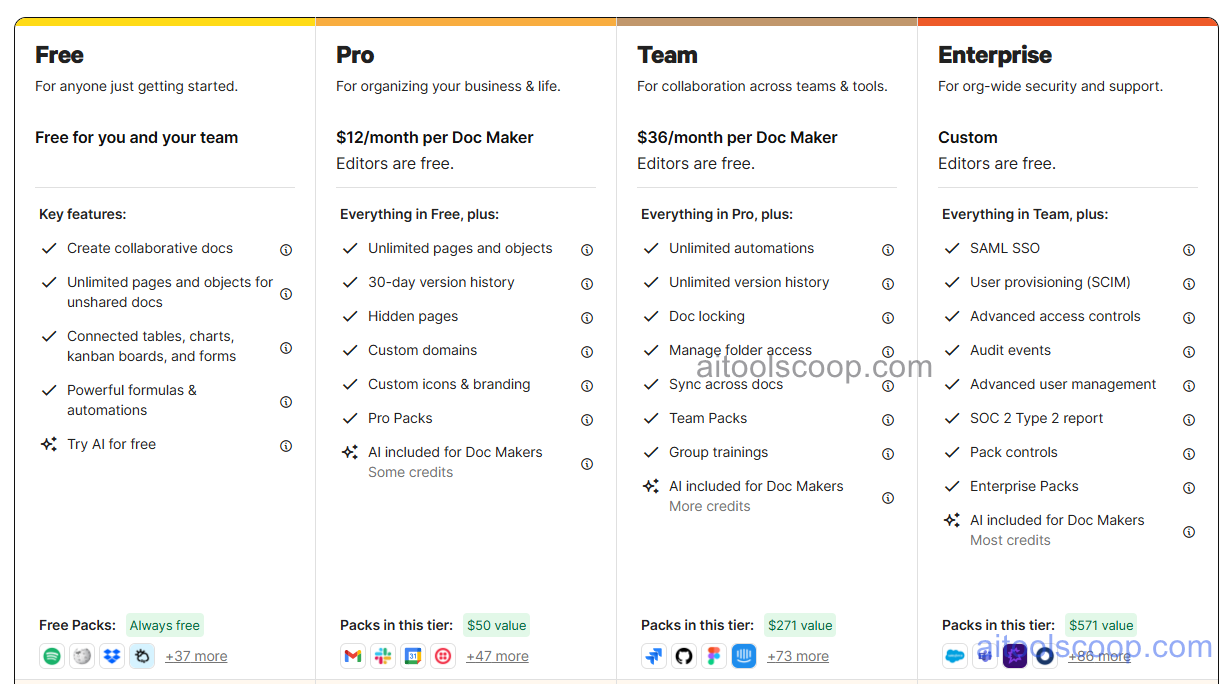
| Plan | Monthly | Annually | Key Inclusions |
|---|---|---|---|
| Free | $0 | $0 | Unlimited Docs with row limits, core features, templates, real-time collaboration |
| Pro | $12/mo | $10/mo | Unlimited rows, Coda AI, automations, page permissions, priority support |
| Team | $36/mo | $30/mo | All Pro features, advanced integrations, cross-doc connections, admin controls, audit logs |
| Enterprise | Custom | Custom | All Team features, SSO, advanced security, SLA, dedicated support |
Always check the latest rates on the official website. For more AI tool reviews, visit aitoolscoop.com.
Who Should Use Coda?
Coda is the right tool for product teams building roadmaps and tracking feature requests alongside documentation, operations teams replacing fragmented spreadsheets and docs with a unified workflow system, startup teams wanting a single workspace for project management, wikis, and planning, HR teams managing hiring pipelines and onboarding documents together, and technical teams needing automation and API integrations within their documentation. The Free plan works well for individuals and small teams exploring the platform, the Pro plan fits power users needing Coda AI and unlimited data, the Team plan suits organizations needing advanced integrations and admin governance, and Enterprise covers large companies with security requirements.