

Home/ AI Tools /AI Writing Tools /Lex
Lex screenshot Paid
Lex thumbnail
🤖 AI Writing Tools
#17 in AI Writing Tools

Lex

Lex is an AI-powered word processor with a clean distraction-free interface, inline AI editing, Ask Lex feedback assistant, and AI writing checks. Pro from $24.99/month.

4.1 / 5 (16 reviews) Paid From $24.99/mo
Quick Info
💰 Pricing$24.99/mo
⭐ Rating4.1 / 5 (16 reviews)
🆓 Free Plan❌ No
📂 CategoryAI Writing Tools
🌐 WebsiteVisit ↗
🔄 Last UpdatedMay 21, 2026
🔀 Alternatives38 tools
Verified DataUpdated May 21, 2026
Independently ReviewedNo paid placements
Detailed AnalysisHands-on testing
Key Features
  • Distraction-free editor with dark mode and fullscreen focus mode for deep writing sessions
  • AI continuation (+++) generates next sentences from your existing context anywhere in the document
  • Ask Lex sidebar with pre-loaded feedback prompts for structure, argument strength, and writer's block
  • AI Checks for grammar, brevity, clichés, readability, passive voice, and confidence with one-click fixes
  • Custom AI checks let you write your own analysis prompts for bespoke text evaluation
  • Real-time multi-user document collaboration similar to Google Docs
  • Model selection between GPT-3.5 and GPT-4 with creativity slider
  • Multi-language support for English, French, German, Italian, Korean, Portuguese, and Spanish
4.1
Overall Rating — based on 16 reviews
Ease of Use
4.3
Features
4.1
Value
3.8
Performance
4.2
Support
4.0
Pros & Cons
👍 Pros
  • AI feedback is notably more honest and direct than using ChatGPT to critique your own writing
  • Clean distraction-free interface reduces cognitive load for long writing sessions
  • AI checks run inline — no copy-pasting to a separate tool
  • Custom check prompts allow bespoke editing rules tailored to your writing style
  • Backed by True Ventures with $2.75M seed funding — stable development trajectory
👎 Cons
  • No free tier beyond 30 monthly AI checks — limited for serious evaluation before paying
  • Pro at $24.99/month is expensive relative to tools with more feature breadth
  • Not a content generator for marketing or SEO — focused on editing existing writing
  • No mobile app — browser-only access limits writing on mobile devices
  • Some users report occasional bugs with document formatting
📖

About Lex

AI Document Editor That Gives Real Writing Feedback

Lex (lex.page) is an AI-powered word processor built by the Every team that combines a clean, distraction-free writing environment with deeply integrated AI editing tools. Unlike tools that require you to copy text to a separate AI interface, Lex's AI lives inside the editor itself — accessible through keyboard shortcuts and inline commands. Backed by $2.75 million in seed funding from True Ventures, Lex is designed for writers, journalists, academics, and professionals who want an AI co-editor that provides honest, actionable feedback rather than generic praise.

How Lex Works

You open a document in Lex and begin writing in its clean interface. Type +++ anywhere to trigger AI continuation, generating the next sentences based on your context. Press Command+K (or Ctrl+K) to open the command bar for generating content, creating lists, or changing headings. The Ask Lex sidebar opens a built-in AI assistant with pre-loaded prompts for getting feedback, sharpening introductions, and identifying weak arguments. AI Checks run grammar, brevity, cliché, readability, passive voice, and confidence analysis — each flagged in pink with one-click application or explanation.

Key Features

  • Distraction-free editor — clean word processor interface with dark mode and fullscreen focus mode
  • AI continuation (+++) — type +++ anywhere to generate the next sentences from your existing context
  • Ask Lex sidebar — built-in AI assistant with pre-loaded prompts for feedback, structure, argument strength, and writer's block
  • AI Checks — grammar, brevity, clichés, readability, passive voice, and confidence analysis with one-click fixes
  • Custom AI checks — write your own prompts to run bespoke analysis on your text
  • Collaboration — real-time multi-user document collaboration similar to Google Docs
  • Model selection — choose between GPT-3.5 and GPT-4, with a creativity slider for output variety
  • Multi-language support — supports English, French, German, Italian, Korean, Portuguese, and Spanish

Lex Pricing
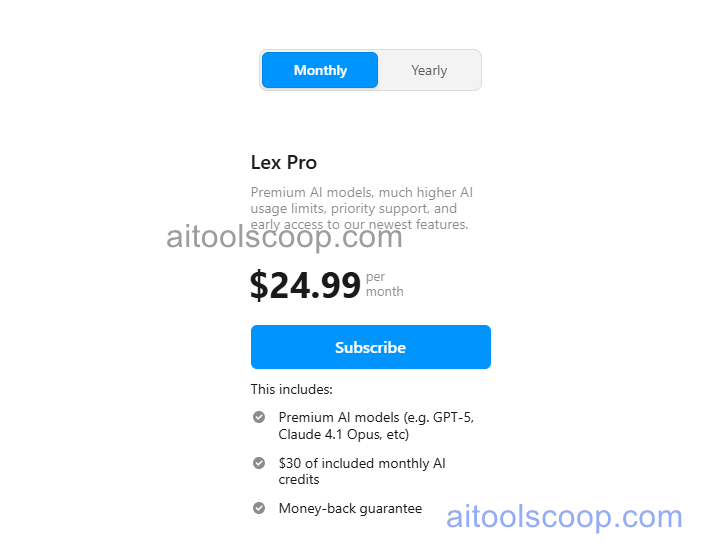
Lex pricing plans
Lex pricing — screenshot from lex.page
  • Pro — $24.99/month — unlimited AI checks, premium AI engines (GPT-4), full Ask Lex access, collaboration, and all language support. Annual plan at $14.99/month.

A free plan with access to GPT-3.5 and 30 AI checks per month is available for testing the platform before upgrading.

Always check the latest rates on the official website. For more AI tool reviews, visit aitoolscoop.com.

Who Should Use Lex?

Lex is built for writers, journalists, academics, and professionals who want a clean, focused writing environment with AI feedback built directly into the editor. It is particularly valuable for writers who want AI that provides honest critical feedback — Lex is notably less sycophantic than using ChatGPT or Claude directly to critique writing. The annual plan at $14.99/month is competitive for daily writers who value the distraction-free environment alongside AI editing capabilities.


💰

Pricing Plans

Plan Monthly Annual (billed yearly)
Starter $24.99/mo $14.99/mo Save 40%

Pro $24.99/mo · Annual $14.99/mo

Check Current Pricing →
Affiliate Disclosure: This page contains affiliate links. If you click and make a purchase, we may earn a small commission at no extra cost to you. We only recommend tools we genuinely believe in.

🎯 Explore More

Discover other curated resources from our platform

🛠️ AI Tools View All →
The ChatGPT Arc: From Quiet Demo…
Axiom
★ 4.2
Higgsfield
★ 4.2
⚔️ VS Comparisons View All →
ChatGPT vs Claude: 2026 Comparison —…
ChatGPT vs Claude
ChatGPT vs Grok: 2026 Comparison —…
ChatGPT vs Grok
Claude vs ChatGPT
Claude 3.7 Sonnet vs ChatGPT GPT-4o
💡 Free Prompts View All →
💡
Employment Contract Clause Explainer and Risk…
🔥 17.6K uses
💡
Gemini for Employment Law Associates: Beginner…
🔥 4.4K uses
💡
AI Prompt to Write FAQ Pages…
🔥 13.8K uses
💡 Free Prompts
SUBMIT TOOL FREE