Akiflow (akiflow.com) is a personal task management and time-blocking tool designed for knowledge workers who want to bring structure to their daily work. Launched in 2021, Akiflow takes a unified planning approach — it pulls tasks from more than 10 productivity and project management tools including Notion, Asana, Todoist, Linear, Jira, Gmail, Slack, and GitHub into a single inbox, then helps users schedule those tasks into their calendar using time-blocking. The result is a combined task-and-calendar workspace where every commitment, meeting, and to-do is visible on one timeline.
Akiflow's AI features assist with daily planning by suggesting task prioritisation, estimating time requirements, and helping users fill open calendar slots with high-priority work. The platform is built around the concept of time-blocking — scheduling specific tasks into dedicated calendar slots to protect focus time and prevent reactive, unplanned workdays. Akiflow integrates natively with Google Calendar and Outlook Calendar, and its desktop app (Mac and Windows) runs in the menu bar for quick task capture and planning throughout the day.
How Akiflow Works
Users connect their existing tools — Notion databases, Asana projects, Gmail inbox, Slack messages — to Akiflow, which aggregates all tasks and action items into a unified inbox. Each morning, users open Akiflow's daily planner and drag tasks from the inbox onto their calendar timeline to time-block their day. Akiflow syncs these time blocks back to Google Calendar or Outlook so scheduled tasks appear alongside meetings. AI suggestions help prioritise the inbox and identify the best open slots for deep work. A quick-capture shortcut (available system-wide) lets users add tasks from any app without interrupting their workflow. Akiflow's task detail view supports notes, checklists, due dates, priorities, and labels.
Key Features
- Unified task inbox — aggregates tasks from 10+ tools including Notion, Asana, Todoist, Linear, Jira, Gmail, Slack, and GitHub into one inbox
- AI daily planning — AI-assisted prioritisation suggestions and time estimates to help plan the day efficiently
- Time-blocking calendar — drag tasks from the inbox onto a daily calendar timeline to schedule focused work blocks
- Google Calendar and Outlook sync — time blocks sync bidirectionally with calendar apps so scheduled tasks appear with meetings
- Global quick capture — system-wide keyboard shortcut to add tasks instantly from any app without context switching
- Multi-source integrations — connects Notion, Asana, Todoist, Linear, Jira, ClickUp, Gmail, Slack, GitHub, and more
- Desktop menu bar app — Mac and Windows app runs in the menu bar for persistent, low-friction access throughout the day
- Task detail with checklists — each task supports notes, sub-tasks, due dates, time estimates, labels, and priority flags
- Recurring tasks and habits — schedule recurring tasks and daily habits with automatic rescheduling
- Focus mode — distraction-free single-task view to work on the current time block without seeing the full task list
Akiflow Pricing
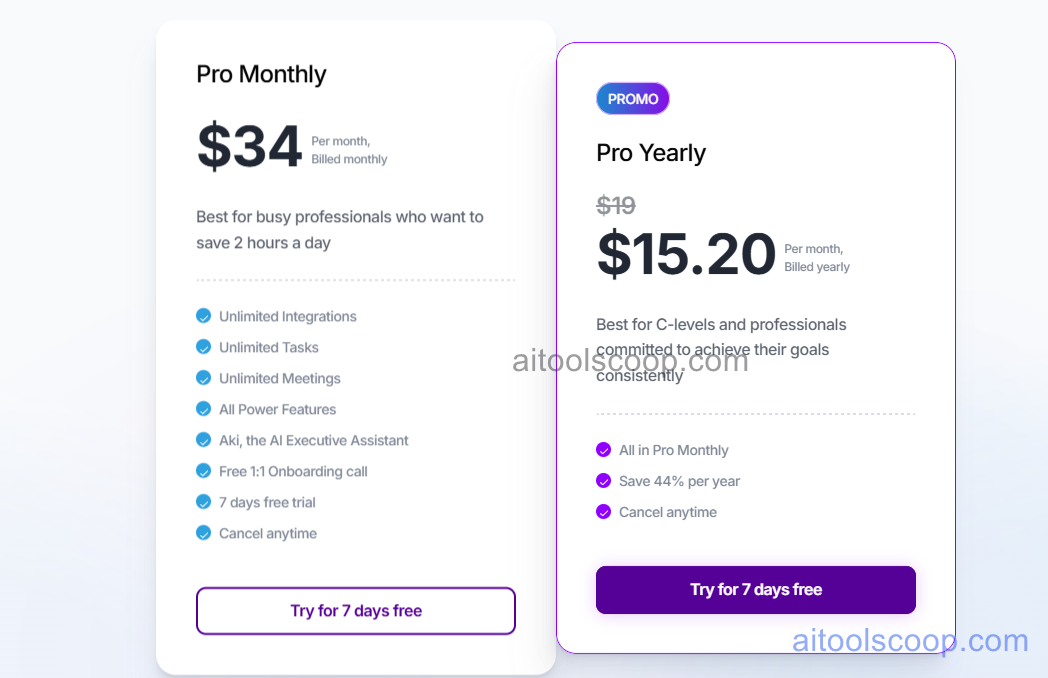
Akiflow offers a single all-inclusive plan with a significant discount for annual billing. There is no free plan, but a free trial is available.
- Monthly — $34/month — full access to all Akiflow features including all integrations, AI planning, time-blocking, calendar sync, and desktop app.
- Annual — $15.20/month (billed as ~$182.40/year) — same full feature set as monthly, with a ~55% discount for committing annually.
A free trial is available. Always verify current rates at akiflow.com/pricing.
Who Should Use Akiflow?
Akiflow is best suited to individual knowledge workers — managers, product managers, engineers, consultants, and freelancers — who use multiple productivity tools and struggle to consolidate their tasks into a coherent daily plan. It is particularly valuable for people who believe in time-blocking as a productivity method and want a tool that bridges task management and calendar scheduling. The annual plan at $15.20/month is competitive for what it offers; the $34/month monthly price is steep for casual users or those still evaluating whether time-blocking works for them. Akiflow is a personal productivity tool — it does not have team collaboration features, making it unsuitable as a shared project management platform. Teams looking for collaborative task management should consider Asana, Linear, or ClickUp instead.
Frequently Asked Questions
What is Akiflow used for?
Akiflow is a personal task manager and time-blocking tool for knowledge workers. It pulls tasks from tools like Notion, Asana, Gmail, Slack, and Jira into a single inbox, then helps users schedule those tasks into their calendar using time-blocking. The goal is to give individuals a consolidated daily plan where every task and meeting is visible on one timeline, reducing context switching and protecting focus time.
How much does Akiflow cost?
Akiflow costs $34 per month on a monthly subscription, or approximately $15.20 per month when billed annually (around $182/year). There is no free plan, but a free trial is available. The annual plan offers roughly 55% savings compared to monthly billing, making it the better value for users who commit to the tool after their trial.
Does Akiflow integrate with Notion and Asana?
Yes. Akiflow integrates with Notion databases and Asana projects to pull tasks directly into the Akiflow inbox. Changes made in Akiflow (such as marking a task complete or updating a due date) sync back to the source tool. Akiflow also integrates with Todoist, Linear, Jira, ClickUp, Gmail, Slack, GitHub, and more — making it a central hub for tasks scattered across multiple platforms.
Is Akiflow good for teams?
Akiflow is designed as a personal productivity tool and does not include team collaboration features such as shared projects, team boards, or collaborative task assignment. It is best used by individual contributors who want to manage their personal workload across multiple team tools. Teams looking for shared task management should use tools like Asana, Linear, or ClickUp, while individuals on those teams can use Akiflow on top to manage their personal daily planning.
What is time-blocking and how does Akiflow support it?
Time-blocking is a productivity method where you schedule specific tasks into dedicated time slots on your calendar, rather than working from an open-ended to-do list. Akiflow supports time-blocking by showing your task inbox alongside your calendar timeline, letting you drag tasks directly onto time slots. These blocks sync with Google Calendar or Outlook, so your scheduled tasks appear alongside meetings. AI suggestions help identify the best open slots for high-priority work and estimate how long tasks will take.