

Fastest Diagramming Tool for Product Teams
Whimsical (whimsical.com) is a clean, opinionated visual collaboration tool that combines flowcharts, wireframes, mind maps, sticky notes, and documents in a single fast workspace. Unlike Miro's open-ended canvas approach, Whimsical is deliberately focused — each tool is designed to be immediately productive without configuration, making it the preferred diagramming and wireframing tool for product managers, designers, and engineers who value speed and simplicity over feature overload. With Whimsical AI, users can generate flowcharts and mind maps from text prompts in seconds, turning rough ideas into structured diagrams without manual drawing. Whimsical's elegant interface and instant collaboration have made it a beloved tool among product teams and indie creators worldwide.
How Whimsical Works
Create a free Whimsical workspace and open a new file. Choose the tool type — Flowchart, Wireframe, Mind Map, Sticky Notes, or Docs — and begin building immediately with an intuitive drag-and-click interface. In Flowcharts, nodes connect automatically as you draw. In Wireframes, drag pre-built UI components onto the canvas to sketch product screens at high speed. In Mind Maps, branches expand freely from a central idea. Use Whimsical AI to generate complete flowcharts or mind maps by typing a description — the AI builds the diagram structure instantly. Share files with teammates for real-time collaboration, leave comments on specific elements, and embed Whimsical files in Notion, Confluence, and other tools via the shareable embed link.
Key Features
- AI diagram generation — generate complete flowcharts and mind maps from text descriptions
- Flowcharts — fast node-and-connector diagramming with automatic snapping and alignment
- Wireframes — rich UI component library for sketching product screens and prototypes
- Mind maps — radial branching diagrams for brainstorming and topic exploration
- Sticky notes — collaborative canvas for ideation and workshop facilitation
- Docs — lightweight document editor for combining text with embedded diagrams
- Real-time collaboration — simultaneous multi-user editing with live presence indicators
- Comments and reactions — leave contextual feedback on specific diagram elements
- Notion and Confluence embeds — embed live Whimsical diagrams in external documents
- Export options — download diagrams as PNG, SVG, and PDF for sharing and documentation
Whimsical Pricing
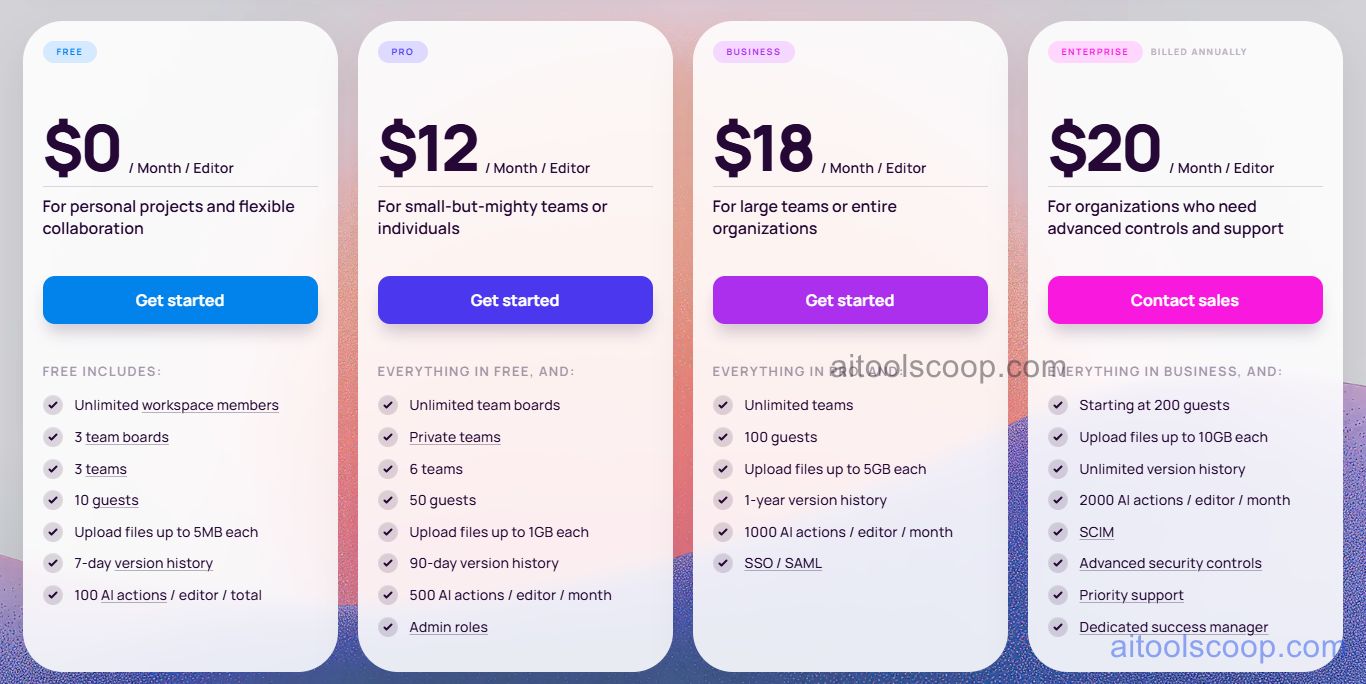
| Plan | Monthly | Annually | Key Inclusions |
|---|---|---|---|
| Free | $0 | $0 | Limited files, all tool types, real-time collaboration, shareable links |
| Starter | $12/mo | $10/mo | Unlimited files, Whimsical AI, all export formats, priority support |
| Pro | $18/mo | $15/mo | All Starter features, team workspace, admin controls, advanced permissions, SSO |
| Enterprise | $20/mo | $20/mo | All Pro features, dedicated support, SLA, advanced security, custom integrations |
Always check the latest rates on the official website. For more AI tool reviews, visit aitoolscoop.com.
Who Should Use Whimsical?
Whimsical is ideal for product managers who need to quickly sketch user flows, feature maps, and process diagrams without learning a complex tool, UX designers creating low-fidelity wireframes for rapid prototyping and stakeholder reviews, engineering teams documenting system architectures and data flows, startup founders mapping business processes and pitch deck visuals, and anyone who finds Miro overwhelming but needs more diagramming power than a basic drawing tool. The Free plan covers individuals and small teams, the Starter plan suits active creators needing AI and unlimited files, the Pro plan fits teams requiring shared workspaces, and Enterprise serves larger organizations.