

Fastest Graphic Design Tool for Social Media Marketers
Snappa (snappa.com) is a streamlined online graphic design tool built specifically for marketers, bloggers, and social media managers who need to produce polished visual content quickly without complex design software. Snappa focuses on speed and simplicity — its template library covers every common marketing graphic format with exact pre-set dimensions, its stock photo library provides instant access to millions of professional images, and its one-click background removal and resize tools eliminate the most time-consuming steps in content production. With direct integration for sharing to social media and Buffer scheduling, Snappa is designed to sit at the end of a content production workflow rather than the beginning of a design process.
How Snappa Works
Select a graphic type from Snappa's format menu — Facebook post, Instagram story, Twitter header, blog post image, YouTube thumbnail, display ad, or dozens of other pre-sized formats. Browse the template library and click a design to open it in the editor. Replace placeholder text with your own copy, swap the background image from the 5 million+ stock photo library or upload your own, adjust colors and fonts to match your brand, and add icons or shapes as needed. One-click background removal instantly isolates subjects from any photo. Resize the design to different dimensions without starting over. Download as PNG or JPG, or share directly to connected social accounts and Buffer queues.
Key Features
- Pre-sized format templates — templates sized exactly for every social media platform and ad format
- 5M+ stock photo library — instant access to millions of professional photos without leaving Snappa
- One-click background removal — instantly remove photo backgrounds for clean product and portrait images
- Magic resize — resize any graphic to different format dimensions without redesigning from scratch
- Brand kit — save brand colors, fonts, and logos for instant consistent application
- Social media sharing — share finished graphics directly to connected social accounts
- Buffer integration — schedule social media posts with graphics directly from Snappa
- Team collaboration — share designs and asset libraries with teammates on team plans
- Custom graphic dimensions — create graphics at any custom pixel dimensions beyond pre-set formats
- PNG and JPG download — export finished graphics in web-optimized file formats instantly
Snappa Pricing
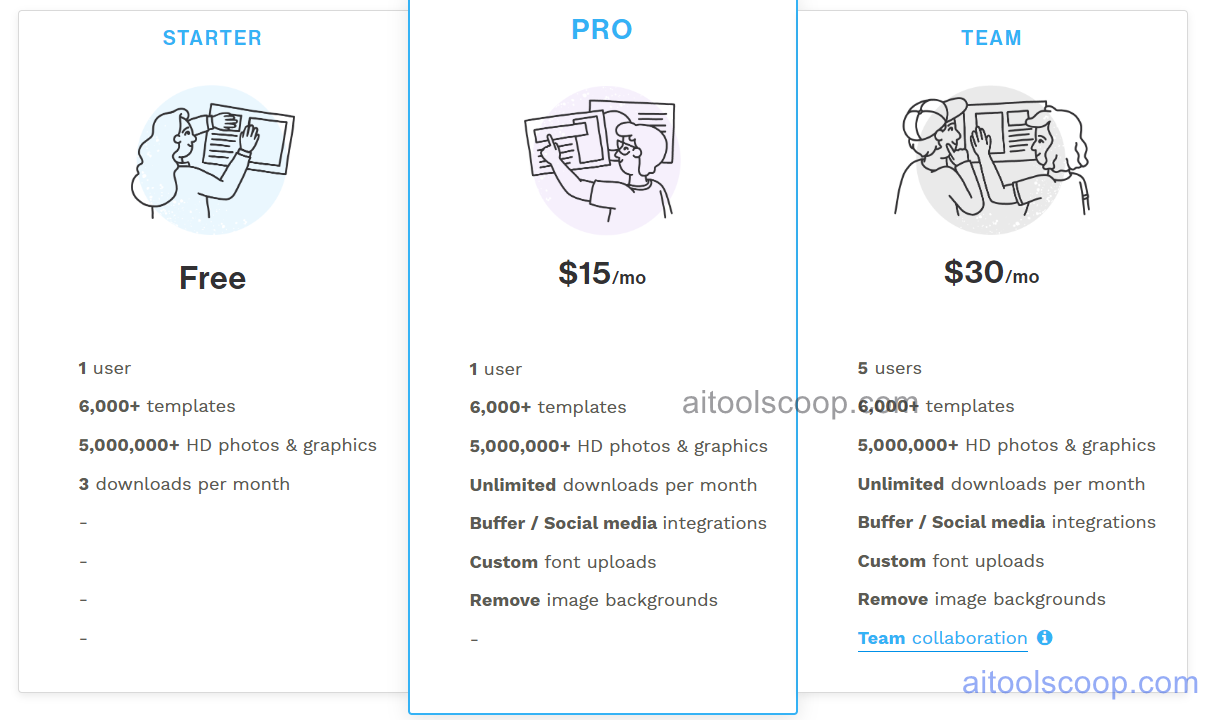
| Plan | Monthly | Annually | Key Inclusions |
|---|---|---|---|
| Free | $0 | $0 | 3 downloads per month, core templates, limited stock photos, basic editor features |
| Pro | $15/mo | $10/mo | Unlimited downloads, full stock library, background removal, magic resize, brand kit, Buffer integration |
| Team | $30/mo | $20/mo | All Pro features for up to 5 users, shared brand kit, team asset library, collaboration tools |
Always check the latest rates on the official website. For more AI tool reviews, visit aitoolscoop.com.
Who Should Use Snappa?
Snappa is ideal for social media managers producing platform-specific graphics daily, bloggers who need professional featured images and thumbnails for every post, small business owners managing their own social presence without design experience, email marketers producing header images for campaigns, and marketing teams needing quick branded graphics for time-sensitive announcements. The annual Pro plan at $10/month is one of the best-value graphic design subscriptions for individual creators.