

TexAu (texau.com) is a growth automation platform that helps sales teams, marketers, and growth hackers automate repetitive prospecting and outreach tasks across LinkedIn, Twitter/X, Instagram, Google, and other web platforms. The platform offers more than 200 pre-built automations — called "spices" — covering LinkedIn connection requests, profile visits, message sequences, data scraping, email finding, and multi-step workflow chaining. TexAu is designed for users who want the power of custom automation without needing to write code or manage their own scraping infrastructure.
TexAu runs automations either in the cloud (using TexAu's managed infrastructure) or locally via a Chrome extension, giving users flexibility depending on their LinkedIn account safety preferences. The cloud execution mode keeps automations running 24/7 without requiring the user's computer to be on, while the Chrome extension mode runs automations through the user's own browser session, which many users prefer for LinkedIn safety. TexAu also supports building multi-step workflow pipelines where the output of one automation feeds directly into the next.
How TexAu Works
Users select an automation from TexAu's library — for example, "LinkedIn Search Export", "LinkedIn Profile Visitor", or "LinkedIn Message Sender" — configure its inputs and settings, and run it either in the cloud or via the Chrome extension. Automations can be scheduled, chained into multi-step workflows, and integrated with Google Sheets, HubSpot, Pipedrive, or webhook endpoints. TexAu's spice library covers the full prospecting workflow: finding leads, visiting profiles to trigger notifications, sending connection requests, following up with messages, scraping contact data, and finding emails. Results are exported as CSV or pushed directly to connected tools.
Key Features
- 200+ pre-built automations — library of automation "spices" covering LinkedIn, Twitter/X, Google, Instagram, and web scraping tasks
- LinkedIn outreach automation — automate connection requests, profile visits, message sequences, and InMail sending with human-like delays
- Cloud and Chrome extension execution — run automations on TexAu's cloud infrastructure or through your own browser session for LinkedIn safety
- Multi-step workflow builder — chain automations so output from one step feeds directly into the next without manual data transfer
- Email finder integration — find and verify business emails for scraped LinkedIn contacts as part of the automation workflow
- Google Sheets and CRM sync — push automation output directly to Google Sheets, HubSpot, or Pipedrive with field mapping
- Scheduled automation runs — schedule automations to run at set times or on recurring schedules for continuous prospecting
- LinkedIn Sales Navigator support — automations compatible with both standard LinkedIn and Sales Navigator accounts
- Data enrichment spices — enrich scraped profiles with company data, technology stacks, and contact information from multiple sources
- Webhook output — send automation results to any external system via webhook for integration with custom data stacks
TexAu Pricing
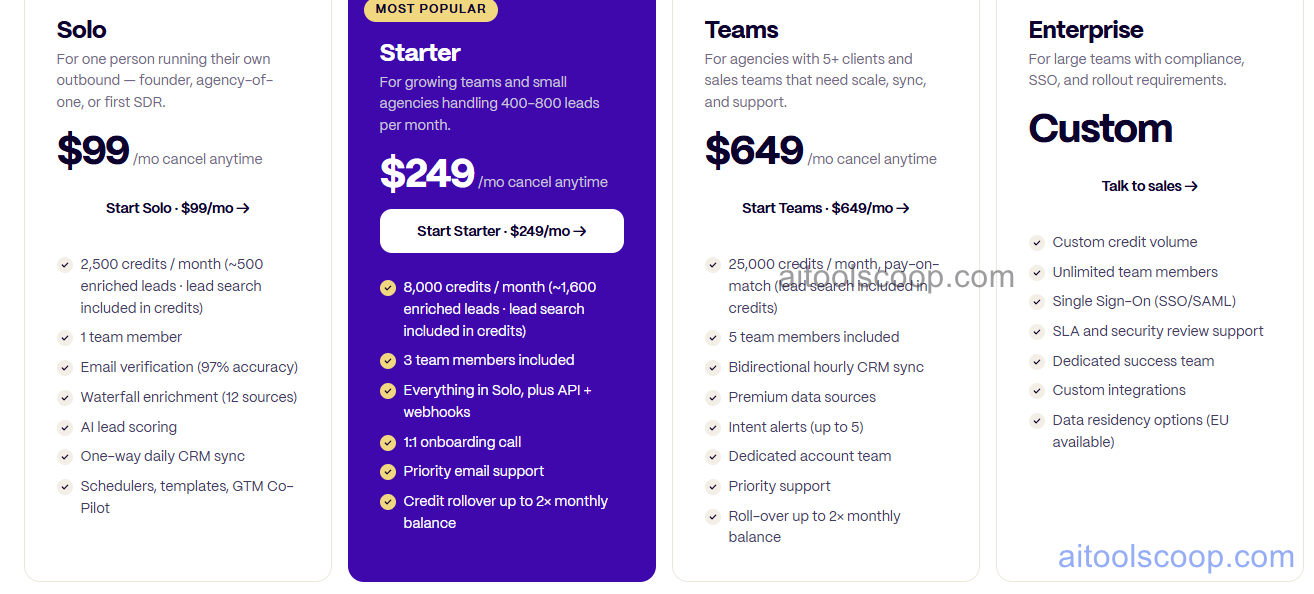
TexAu offers three plans with significant annual billing discounts.
- Starter — $99/month (annual: $79/month) — cloud automation with limited execution time, core spice library, email finder, and Google Sheets integration. Suited for individual users and small teams.
- Growth — $249/month (annual: $199/month) — more execution time, full spice library, multi-step workflows, CRM integrations (HubSpot, Pipedrive), and priority support.
- Agency — $649/month (annual: $549/month) — maximum execution time, multiple LinkedIn account management, team seats, white-label options, and dedicated support. Designed for agencies managing prospecting for multiple clients.
Always verify current rates at texau.com/pricing.
Who Should Use TexAu?
TexAu is well suited to sales development reps, growth marketers, and lead generation agencies who need to automate LinkedIn prospecting and multi-channel outreach at volume. Its 200+ automation library covers a wider range of tasks than more specialised tools, making it a good fit for teams with diverse automation needs across multiple platforms. The Chrome extension execution mode appeals to users who are cautious about LinkedIn account safety with cloud-based automation. The Agency plan serves outbound agencies managing multiple client LinkedIn accounts from a single dashboard. TexAu is less suited to users looking for a simple, beginner-friendly tool — its breadth of options requires some learning investment to get the most value.
Frequently Asked Questions
What is TexAu used for?
TexAu is a growth automation platform used primarily for LinkedIn lead generation and outreach automation. It automates tasks like sending connection requests, visiting profiles, sending message sequences, scraping lead data, and finding emails — using a library of 200+ pre-built automations. It also covers automation across Twitter/X, Instagram, Google, and other web platforms, making it useful for multi-channel prospecting and data extraction workflows.
How much does TexAu cost?
TexAu's Starter plan costs $99/month ($79/month annually), the Growth plan costs $249/month ($199/month annually), and the Agency plan costs $649/month ($549/month annually). Annual billing saves roughly 20% across all plans. There is no free plan, but a trial period may be available — check the TexAu website for current trial offers.
Is TexAu safe to use with LinkedIn?
TexAu builds in safety features designed to reduce LinkedIn account risk: human-like random delays between actions, daily activity limits, and the option to run automations through the user's own Chrome browser session rather than TexAu's cloud infrastructure. Using the Chrome extension mode (rather than cloud mode) is generally considered safer for LinkedIn accounts because actions originate from the user's own IP and browser session. No automation tool can guarantee zero risk of LinkedIn account restriction, so following TexAu's recommended daily limits is important.
Does TexAu support multi-step workflows?
Yes. TexAu's workflow builder allows users to chain multiple automations together so the output of one step feeds directly into the next. For example, a workflow could scrape LinkedIn search results, visit each profile, find their business email, and push the enriched data to Google Sheets or HubSpot — all in a single automated pipeline without manual data transfer between steps. Multi-step workflows are available on Growth and Agency plans.
How is TexAu different from Phantombuster?
Both platforms offer LinkedIn automation and web scraping with pre-built automations. TexAu's key differentiators are its larger automation library (200+ spices), the choice between cloud and Chrome extension execution for LinkedIn safety, and its Agency plan for managing multiple client accounts. Phantombuster has a longer track record and a slightly lower entry price. The two tools are closely competitive — the best choice often depends on which specific automations a team needs and whether the Chrome extension execution mode is a priority for LinkedIn safety.