
Final Draft (finaldraft.com) is the most widely used professional screenwriting application in the film and television industry. First released in 1991, Final Draft has been the de facto standard for script formatting across Hollywood studios, production companies, and broadcast networks for over three decades. It combines automatic industry-standard screenplay formatting with a suite of story development, production, and collaboration tools that take a script from first draft through production-ready delivery.
Final Draft 13, the current major version, introduced Beat Board AI and Script Notes AI — AI-powered features that help writers develop story structure, generate beat suggestions, analyse pacing, and receive contextual script feedback within the application. These AI tools are integrated directly into Final Draft's existing story development workspace, allowing writers to use them alongside the beat board, scene navigator, and outline tools without switching to a separate application.
How Final Draft Works
Writers draft scripts in Final Draft's editor, which automatically formats each element — scene headings, action, character names, dialogue, parentheticals, and transitions — as they type, using the tab and enter keys to navigate between elements exactly as trained screenwriters expect. The ScriptNotes panel allows collaborators to leave inline notes directly in the script. Beat Board provides a corkboard-style visual story planning interface where story beats can be arranged and connected before and during drafting. The new AI features in Final Draft 13 analyse the current script and beat board to generate structural suggestions, identify pacing issues, and propose scene-level improvements. Scripts export to PDF, Final Draft XML (.fdx), and plain text, and are universally accepted by studios and production companies.
Key Features
- Beat Board AI — AI-assisted story development that analyses the beat board and suggests structural improvements and missing story beats
- Script Notes AI — AI that reads the current script and generates contextual development notes covering pacing, structure, and character arcs
- Automatic screenplay formatting — industry-standard formatting for feature films, TV pilots, stage plays, and audio dramas applied automatically as you type
- Beat Board — visual corkboard for arranging story beats, connecting them to scenes, and planning narrative structure before drafting
- Scene Navigator — sidebar panel listing every scene for quick navigation, reordering, and scene-level notes in long scripts
- Revision mode — industry-standard coloured revision pages (blue, pink, yellow, green) for tracking changes through production drafts
- ScriptNotes — inline collaborative notes system for producers, directors, and development executives to annotate scripts
- Production features — scene breakdown tagging, character reports, and page count tools for pre-production planning
- Collaboration and sync — real-time co-writing mode and Final Draft file sync across Mac and Windows desktop apps
- Universal .fdx export — Final Draft's .fdx format is the industry-standard file type accepted by all major studios and production tools
Final Draft Pricing
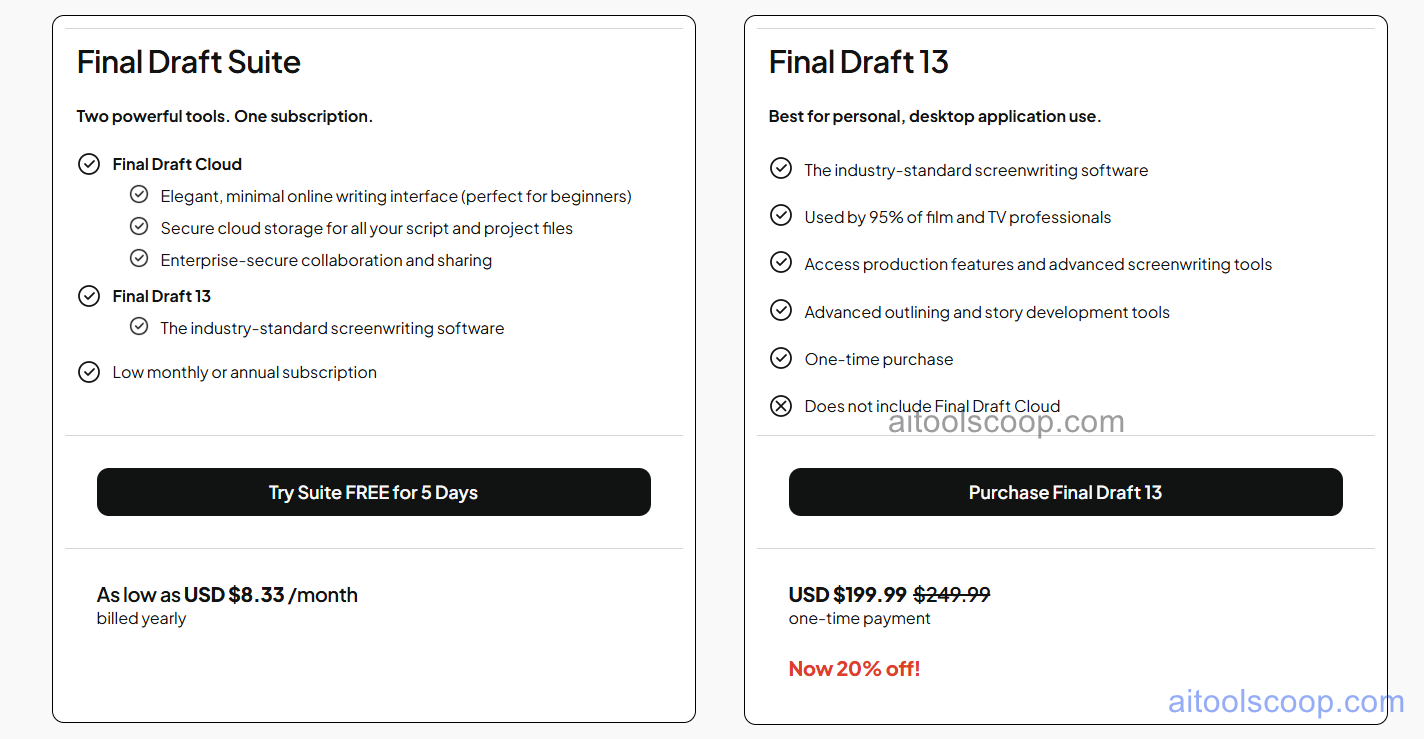
Final Draft offers an annual subscription plan. A one-time perpetual licence has historically also been available; the subscription model provides access to the latest version including all AI features.
- Annual subscription — $8.33/month (billed as ~$100/year) — full access to Final Draft 13 including Beat Board AI, Script Notes AI, all formatting tools, production features, Beat Board, Scene Navigator, revision mode, and desktop apps for Mac and Windows.
A 30-day free trial is available. Always verify current rates and licence options at finaldraft.com/store.
Who Should Use Final Draft?
Final Draft is the essential tool for professional screenwriters working in film and television, and for anyone delivering scripts to studios, networks, or production companies that expect .fdx format. Its AI features in version 13 make it competitive with newer browser-based tools while retaining the desktop-first workflow and production-grade features that professionals depend on. Film school students and aspiring screenwriters benefit from learning on the same software used by industry professionals. Final Draft is less suited to novelists, playwrights who need specialised stage formatting beyond what it offers, or budget-conscious writers who want a free or very low-cost option — tools like WriterDuet (free plan) or Fade In are strong alternatives at lower price points.
Frequently Asked Questions
What is Final Draft used for?
Final Draft is the industry-standard screenwriting software used by professional writers, directors, and production teams in Hollywood and the global film and television industry. It automatically formats scripts to industry standards, supports production-ready revision tracking and scene breakdown, and now includes AI features for story development and script analysis. It is the most widely recognised and accepted screenwriting application for professional script delivery.
How much does Final Draft cost?
Final Draft offers an annual subscription at approximately $8.33 per month, billed as around $100 per year. This includes the latest version (Final Draft 13) with all AI features including Beat Board AI and Script Notes AI. A 30-day free trial is available. A one-time perpetual licence option may also be available — check the Final Draft store for current pricing and licence types.
What AI features does Final Draft 13 include?
Final Draft 13 includes two AI features: Beat Board AI, which analyses the story beats on the Beat Board and suggests structural improvements, missing beats, and story arc refinements; and Script Notes AI, which reads the current script and generates development notes covering pacing, structure, character arcs, and scene-level feedback. Both AI features work within Final Draft's existing story development interface and do not require switching to an external AI tool.
Is Final Draft available on Mac and Windows?
Yes. Final Draft is available as a native desktop application for both Mac and Windows. A single licence covers installation on multiple devices. Final Draft also offers a companion iOS app (Final Draft for iPad) for reviewing and annotating scripts on tablet, though the full feature set including AI tools is available on the desktop versions only.
How does Final Draft compare to WriterDuet?
Final Draft is a desktop-first application with a decades-long track record as the professional industry standard — its .fdx format is universally accepted by studios and production companies. WriterDuet is browser-based with stronger real-time collaboration and a generous free plan. Final Draft's production features (revision mode, scene breakdown, character reports) are more comprehensive for scripts going into active production. WriterDuet is better for co-writers who need simultaneous multiplayer editing. Many professional writers use WriterDuet for collaborative drafting and deliver the final script in Final Draft format.