

SkedPal (skedpal.com) takes a different approach to digital planning than a standard calendar or to-do list app. Rather than asking users to manually drag every task into a specific hour, SkedPal accepts a rougher instruction — a task that needs roughly two hours "sometime this week" — and lets its scheduling engine decide exactly where that block fits around existing meetings, personal energy preferences, and looming deadlines. The company has been refining this auto-scheduling concept since 2015, which has earned it a smaller but notably loyal following among people who manage unusually complex workloads: academics juggling teaching and research, consultants with shifting client priorities, and long-time adherents of structured personal productivity systems such as Getting Things Done.
The core of SkedPal's design is what the company calls flexible task placement: instead of fixing a task to an exact slot the moment it's created, the system holds it loosely against a set of rules — how urgent it is, which hours of the day are appropriate for that kind of work, and how it should compete against everything else on the list — and only commits it to a real time block when the schedule is generated. When something changes, whether a new task arrives or an existing block gets bumped by a last-minute meeting, a single "update schedule" action re-runs the placement logic across the affected period rather than forcing a manual reshuffle. This makes SkedPal closer to a rules-based planning assistant than a conventional calendar, though that same depth is also why new users typically need real time to configure it properly before it starts paying off.
How SkedPal Works
Every task, project, or subtask lives inside SkedPal's nested outline, which mirrors a classic capture-everything productivity workflow: ideas and commitments get logged first, then organised and scheduled afterward rather than at the moment of entry. Each item can inherit scheduling rules from its parent project, so a whole batch of subtasks can pick up the same timing preferences without being configured individually. Underneath this sits a feature SkedPal calls Time Maps — essentially a set of labelled time zones (mornings for deep work, afternoons for calls, and so on) that tell the auto-scheduler which hours are eligible for which category of task. Once tasks and time rules are in place, the scheduling engine slots everything into the calendar automatically, taking into account existing events pulled in through calendar sync. A built-in status tracker then compares what actually got done against what was planned, flagging tasks that are falling behind so the next schedule refresh can compensate.
Key Features
- Flexible auto-scheduling engine — converts loosely defined tasks (duration, urgency, and preferred time window rather than a fixed slot) into concrete calendar blocks, and re-runs placement automatically whenever priorities shift or a task is bumped
- Time Maps and time zones — customisable rules that define which hours of the day or week are eligible for particular categories of work, letting deep-focus tasks and quick admin items follow different scheduling logic automatically
- Nested outline for task capture — an infinitely nestable list for projects, tasks, and subtasks that supports property inheritance, so a scheduling rule set at the project level automatically applies to everything underneath it
- Calendar sync — two-way synchronisation with Google Calendar, Microsoft Outlook, or iCloud so existing meetings and appointments are factored into the auto-generated schedule and changes flow in both directions
- Prioritisation board — a visual ranking view for ordering tasks by relative importance, which directly influences which items the scheduler places first when time is limited
- Time budgeting — the ability to cap how much time gets allocated to a given category of work (for example, meetings versus deep work versus admin) to keep the generated schedule balanced rather than front-loaded
- Status tracker (Pro) — an ongoing comparison between planned and completed work, surfacing tasks that are slipping so adjustments can be made before deadlines are missed
- Instant schedule updates (Pro) — automatically refreshes the current day's plan the moment something changes, instead of waiting for a manual re-run
- Integrated time tracking (Pro) — logs actual time spent against scheduled tasks, giving a feedback loop for whether time estimates used for future scheduling need adjusting
- Extended scheduling window — Core plans tasks up to 21 days ahead, while Pro extends the auto-scheduler's forward planning horizon to 60 days for longer-range project work
SkedPal Pricing
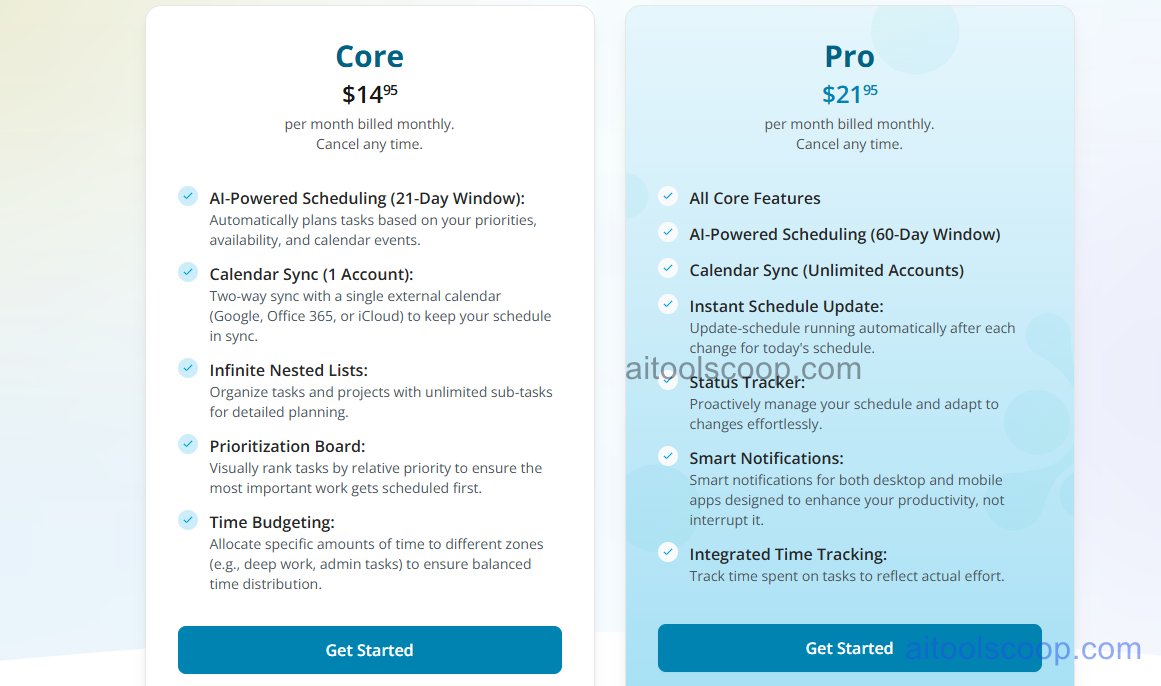
- Core — $14.95/month (from $9.95/month billed annually) — AI scheduling with a 21-day planning window, sync with one external calendar account, infinite nested task lists, the prioritisation board, and time budgeting. Covers the essentials for someone managing a single calendar and a personal task list.
- Pro — $21.95/month (from $14.95/month billed annually) — Everything in Core, plus a 60-day scheduling window, unlimited calendar account syncing, instant schedule updates after every change, the status tracker, smart desktop and mobile notifications, and integrated time tracking. Built for people managing multiple calendars or longer-horizon projects.
There is no permanent free plan; SkedPal offers a 14-day free trial before billing begins. Annual billing lowers the effective monthly rate on both plans. Pricing verified from skedpal.com; rates may change — always confirm current pricing at skedpal.com.
Who Should Use SkedPal?
SkedPal is best suited to people whose workload doesn't fit neatly into fixed appointments — freelancers juggling several clients, academics splitting time between teaching and research, or anyone following a GTD-style personal system who wants that structure reflected directly on a calendar rather than kept in a separate app. The Core plan is enough for someone managing one calendar and a personal task list; Pro earns its higher price for anyone syncing multiple calendars, running longer projects that benefit from the 60-day planning window, or wanting the status tracker's ongoing plan-versus-reality feedback. It's worth going in with realistic expectations about setup time: because the scheduling engine relies on Time Maps and task properties being configured correctly, most new users need a genuine onboarding period before the automation starts feeling reliable. SkedPal is also built around individual planning rather than team collaboration, so groups needing shared project boards or assignment workflows across multiple people will likely find a dedicated team project-management tool a better fit.
Frequently Asked Questions
What is SkedPal?
SkedPal is an AI-powered scheduling tool that turns a task list into an adaptive calendar. Instead of manually assigning every task to a fixed time, users set a duration, urgency, and preferred time window, and SkedPal's auto-scheduler places the task into an actual calendar slot — updating the plan automatically whenever priorities or availability change.
How much does SkedPal cost in 2026?
SkedPal offers two plans. Core is $14.95/month billed monthly, or from $9.95/month billed annually. Pro is $21.95/month billed monthly, or from $14.95/month billed annually. There is no permanent free plan, but a 14-day free trial is available before any charge applies.
What's the difference between SkedPal Core and Pro?
Core covers a 21-day AI scheduling window, syncing with a single calendar account, nested task lists, the prioritisation board, and time budgeting. Pro extends the scheduling window to 60 days, allows unlimited calendar account syncing, and adds instant schedule updates, the status tracker, smart notifications, and integrated time tracking — features aimed at people managing more complex or longer-range workloads.
Is SkedPal difficult to learn?
SkedPal has more configuration than a typical to-do list app, since its scheduling accuracy depends on setting up Time Maps and task properties correctly. Most new users need a real onboarding period — reading through setup guidance and adjusting settings over the first week or two — before the auto-scheduler starts producing reliably useful plans. Once configured, ongoing use mainly involves reviewing and refreshing the generated schedule rather than rebuilding it from scratch.
Does SkedPal work on mobile?
SkedPal is accessible on mobile devices, but it's designed primarily as a desktop-first planning tool. The full configuration and scheduling workflow is more complete on desktop, so mobile access is generally best used for quick task capture on the go rather than complete planning sessions.