

Lookeen (lookeen.com) is an AI-powered Windows desktop search application that enables fast, comprehensive retrieval of files, emails, and documents stored across a PC and connected network locations. Built for Windows users who need a faster and more capable alternative to Windows Search, Lookeen indexes content at a granular level — searching within document bodies rather than just file names — and delivers instant results through a clean, purpose-built search interface. The platform spans four plan tiers designed to serve individual users through to large enterprise deployments: the Basic plan includes the Windows App, AI Support, and a Discovery Panel for individual users; Business adds Group Policy Objects (GPOs) for IT administration, Tags for organisational metadata, and OCR (optical character recognition) for searching text within image files and scanned documents; Premium extends to a Shared Index for team-wide search access and includes a Personal Account Manager and customised onboarding support; and the Server plan provides a centralised enterprise deployment with Central Indexing, Windows Server support, high security features, and a Personal Account Manager for large organisations.
Lookeen's AI Support feature assists with search relevance and result understanding, surfacing the most pertinent content for each query beyond simple keyword matching. The Discovery Panel provides a visual browsing interface for exploring indexed content. The OCR capability on Business and above plans makes scanned PDFs, image-based documents, and screenshots searchable — a significant capability for organisations that work with paper-originated documentation. The Shared Index on the Premium plan creates a single searchable index accessible to multiple users simultaneously, enabling team members to search each other's indexed content without each person maintaining a separate local index.
How Lookeen Works
Users install the Lookeen Windows application and configure the indexing scope — local drive locations, network shares, email archives (Outlook integration is native), and other connected storage. Lookeen builds a comprehensive index in the background and, once complete, delivers instant search results as users type queries. The AI Support layer assists with query understanding and result ranking. The Discovery Panel provides a visual exploration mode for browsing indexed content categorically. On Business plans, IT administrators deploy and manage Lookeen across workstations using Group Policy Objects, maintaining centralised control without requiring individual user configuration. OCR processing extends the index to cover image-based content. The Server plan centralises all indexing on a Windows Server, providing the highest-performance and most scalable deployment for large organisations.
Key Features
- AI-powered desktop search — AI Support assists with query understanding and result relevance ranking for fast, accurate file and email retrieval
- Discovery Panel — visual interface for exploring and browsing indexed content beyond standard text-query search (Basic and above)
- Windows App — native Windows desktop application providing fast, purpose-built search across local and network content
- Group Policy Objects (GPOs) — IT administrator deployment and management of Lookeen across Windows workstations via GPO (Business and above)
- Tags — add organisational metadata to indexed content for category-based search and retrieval (Business and above)
- OCR — optical character recognition making scanned PDFs, image-based documents, and screenshots searchable (Business and above)
- Shared Index — single team-accessible index enabling multiple users to search across shared indexed content (Premium)
- Personal Account Manager — dedicated account manager for implementation support and ongoing assistance (Premium and Server)
- Customised Onboarding Support — tailored deployment and onboarding assistance for Premium plan organisations
- Server plan — centralised Windows Server deployment with central indexing, high security features, and enterprise scalability
Lookeen Pricing
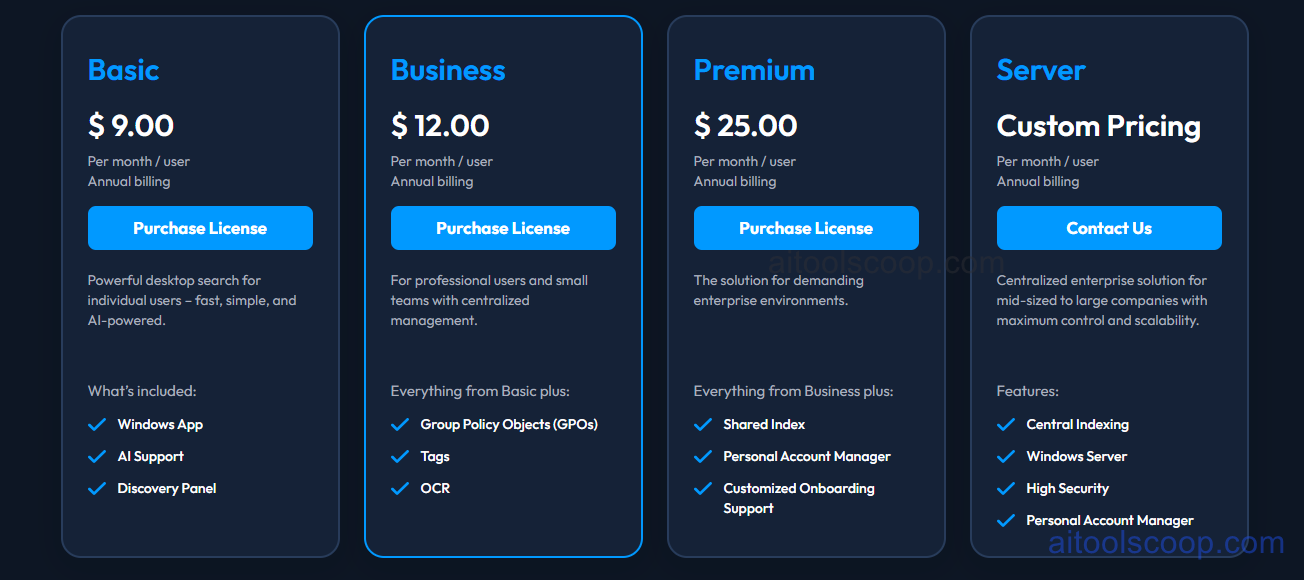
- Basic — $9/month/user (annual billing) — Windows App, AI Support, and Discovery Panel. Powerful desktop search for individual users — fast, simple, and AI-powered.
- Business — $12/month/user (annual billing) — Everything in Basic plus Group Policy Objects (GPOs) for IT admin deployment, Tags for metadata organisation, and OCR for image and scanned document search. For professional users and small teams with centralised management.
- Premium — $25/month/user (annual billing) — Everything in Business plus Shared Index for team-wide search access, Personal Account Manager, and Customised Onboarding Support. For demanding enterprise environments.
- Server — Custom pricing (annual billing) — Central Indexing, Windows Server support, High Security features, and Personal Account Manager. Centralised enterprise solution for mid-sized to large companies with maximum control and scalability.
All plans billed annually per user. No permanent free plan. Always verify current rates at lookeen.com/pricing.
Who Should Use Lookeen?
Lookeen is built for Windows-based organisations and individual professionals who need faster, more accurate document and email search than the built-in Windows Search provides. Individual knowledge workers, legal professionals, researchers, and anyone managing large local document libraries will benefit from the Basic plan's AI-assisted search and Discovery Panel. IT-managed organisations deploying across multiple workstations should look at the Business plan for GPO-based administration and OCR capability. Premium suits enterprise environments needing team-shared index access and dedicated support. The Server plan is appropriate for large organisations that need centralised indexing infrastructure with high security and dedicated account management. Organisations running Mac-first or cloud-first infrastructure will find Lookeen's Windows focus a limitation to evaluate before purchase.
Frequently Asked Questions
What is Lookeen?
Lookeen is an AI-powered Windows desktop search application that indexes files, emails, and documents across local drives and network locations, delivering instant search results with AI-assisted relevance ranking and a Discovery Panel for visual content exploration. It spans four plan tiers from Basic (individual AI search) through Business (GPOs, OCR, Tags), Premium (Shared Index, dedicated support), and Server (centralised enterprise deployment).
Does Lookeen have a free plan?
Lookeen does not offer a permanent free plan. Annual billing plans start at $9 per user per month on the Basic plan. Contact Lookeen for any available trial options before committing to a full annual subscription.
What is the Discovery Panel in Lookeen?
The Discovery Panel is a visual browsing interface included on the Basic plan and above that allows users to explore indexed content categorically — browsing files and emails by type, date, location, or other attributes — in addition to the standard text query search. It provides a complementary way to navigate indexed content when users want to explore rather than search for a specific known item.
Does Lookeen search within document content?
Yes. Lookeen indexes and searches within document bodies — not just file names — allowing users to find content based on words and phrases that appear inside files, emails, and documents. On Business and above plans, OCR extends this capability to scanned PDFs and image-based documents, making text within images and scanned paper documents searchable as well.
What is the Lookeen Shared Index?
The Shared Index on the Premium plan creates a single centralised search index that multiple team members can access simultaneously. This allows users to search across indexed content from other team members' machines or shared network locations without each person maintaining a separate local index — enabling collaborative search across a team's shared document and email environment.