Mural (mural.co) is a free visual collaboration whiteboard built for teams that run workshops, retrospectives, and brainstorming sessions with people spread across different locations. Instead of trying to replicate a single mapping technique, Mural gives teams an open canvas and a library of templates — sticky notes, voting grids, journey maps, retrospective boards — so a facilitator can set up a structured session in minutes rather than building it from scratch. That flexibility has made it a common choice inside larger organisations running distributed design sprints, agile ceremonies, and cross-functional planning sessions, alongside smaller teams that just need a shared space to think out loud together.
What distinguishes Mural from a simple digital whiteboard is the amount of structure available on top of the blank canvas: facilitation tools like timers, voting, and private/anonymous input modes are built in specifically to run a live session smoothly rather than just host static content afterward. The free visual collaboration tier already supports unlimited members and view-only visitors, which lowers the barrier for a whole organisation to try it before anyone commits budget, while paid tiers add unlimited editable murals, private rooms, and — on the higher tiers — enterprise security controls for organisations that need SSO and data residency guarantees.
How Mural Works
A team starts a session on an open canvas or from a pre-built template, then invites collaborators who can add sticky notes, shapes, images, and comments simultaneously in real time. Facilitation controls — timers, voting rounds, private mode for anonymous input, and a "follow me" mode that syncs everyone's view to the presenter — are layered over the canvas to keep live sessions on track rather than dissolving into visual clutter. Once a session ends, Mural AI can be used to summarise sticky notes into themes, cluster related ideas automatically, or generate a written recap, turning a messy live workshop into a structured set of takeaways without manual note-sorting afterward.
Key Features
- Open canvas with templates: a blank whiteboard alongside a library of pre-built templates for retrospectives, journey mapping, voting, and brainstorming
- Real-time multi-user editing: sticky notes, shapes, images, and comments can be added simultaneously by every collaborator in a session
- Mural AI: clusters related sticky notes into themes, summarises a board's content, and generates written recaps after a live session
- Facilitation tools: built-in timers, voting rounds, and a "follow me" presenter mode to keep live workshops structured and on schedule
- Private and anonymous input mode: lets participants contribute ideas without their name attached, useful for honest feedback in retrospectives
- Private rooms: restricts specific murals and boards to a defined group rather than the whole workspace, available from Team+ upward
- Integrations: connects with tools like Zoom and Webex on Team+, and extends to Azure, GitHub, and Okta on Business
- Single sign-on (SSO) and unlimited external guests: Business-tier features that let larger organisations bring outside collaborators into sessions securely
- Enterprise administrative controls (Enterprise): multi-workspace management, SCIM user provisioning, audit logs, and data residency options for large-scale deployments
Mural Pricing
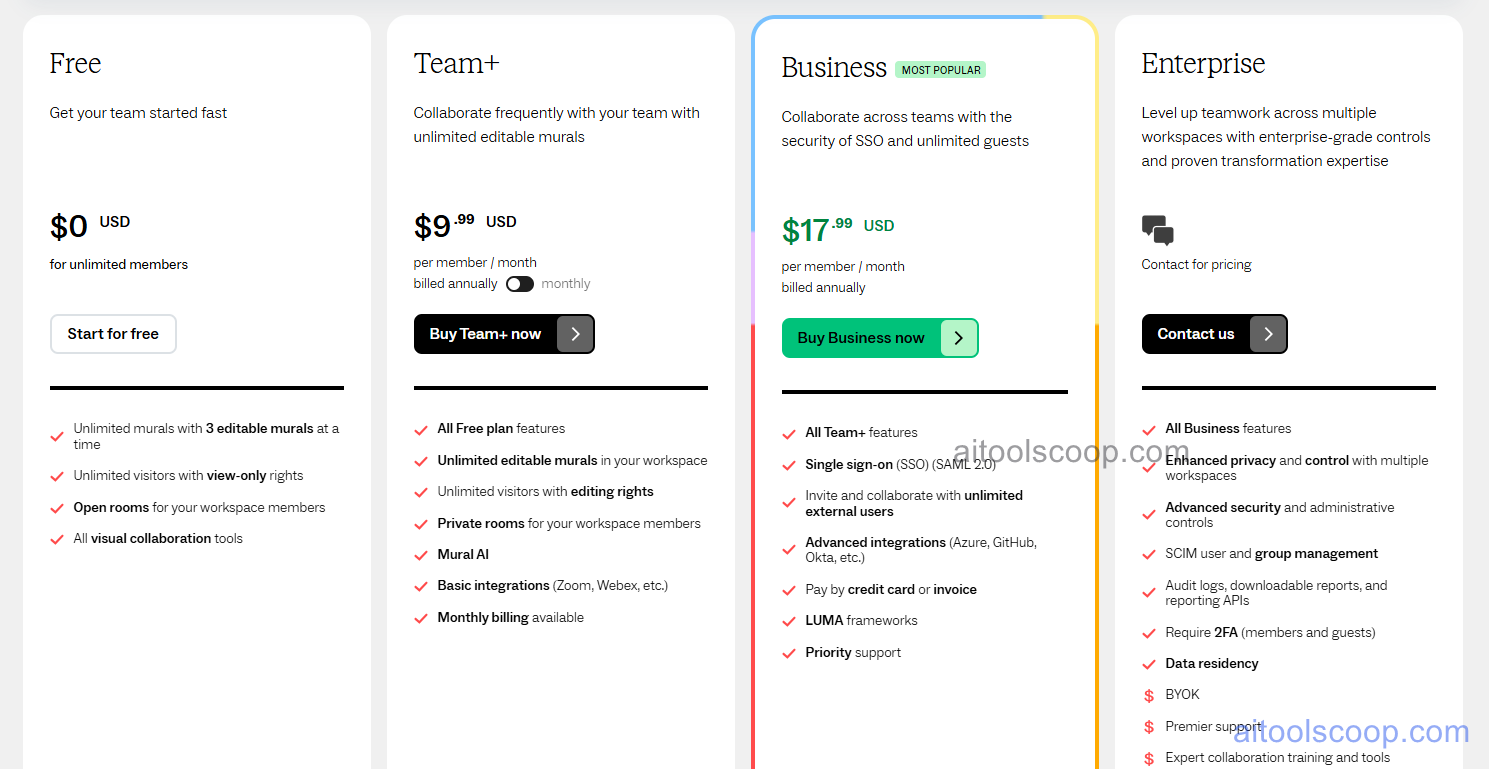
- Free — $0 — unlimited members, 3 editable murals at a time, unlimited view-only visitors, open rooms for workspace members, and all visual collaboration tools.
- Team+ — $12/member/month billed monthly (from $9.99/member/month billed annually) — everything in Free plus unlimited editable murals, unlimited editing visitors, private rooms, Mural AI, and basic integrations like Zoom and Webex.
- Business — $17.99/member/month, billed annually only — everything in Team+ plus SSO (SAML 2.0), unlimited external guests, advanced integrations (Azure, GitHub, Okta), pay by credit card or invoice, and priority support.
- Enterprise — contact for pricing — everything in Business plus multiple workspaces, advanced security and administrative controls, SCIM, audit logs, required 2FA, and data residency options.
Free plan available for unlimited members. Team+ is $12/member/month billed monthly, or from $9.99/member/month billed annually. Business is $17.99/member/month, billed annually only (no separate monthly rate shown in the pricing screenshot). Enterprise pricing is available on request. Pricing verified from mural.co; rates may change — always confirm current pricing at mural.co.
Who Should Use Mural?
Mural is built for teams that run structured live sessions — design sprints, agile retrospectives, cross-functional workshops — rather than teams that just need a static shared canvas. The free plan is enough for occasional workshop facilitators or small groups testing the format, while Team+ makes sense once a team is running these sessions regularly and needs unlimited editable murals and private rooms. Business is aimed at larger organisations that need SSO and priority support, and Enterprise is really only relevant for large, security-conscious organisations running multiple workspaces with strict compliance requirements. Teams that mainly need task tracking rather than live visual facilitation will likely be better served by a dedicated project-management tool.
Frequently Asked Questions
What is Mural?
Mural is a free visual collaboration whiteboard for running live workshops, retrospectives, and brainstorming sessions with remote or distributed teams, with built-in facilitation tools and Mural AI for summarising and clustering session content.
How much does Mural cost in 2026?
Mural has a free plan, plus Team+ at $12/member/month billed monthly (or from $9.99/member/month billed annually), and Business at $17.99/member/month, billed annually only. Enterprise pricing is available on request.
What's the difference between Mural Team+ and Business?
Team+ covers unlimited editable murals, private rooms, and Mural AI. Business adds SAML SSO, unlimited external guests, advanced integrations with tools like Azure and Okta, flexible billing options, and priority support — aimed at larger organisations needing tighter security.
Does Mural have a free plan?
Yes. The free plan supports unlimited members and unlimited view-only visitors, with up to 3 editable murals at a time, and requires no credit card to start.
Can Mural's Business plan be billed monthly?
Based on Mural's published pricing page, the Business plan is shown billed annually only, with no separate monthly-billing toggle displayed. Anyone needing monthly billing for a larger team should confirm current options directly with Mural's sales team.