

AI Calendar That Auto-Schedules Your Day
Motion (usemotion.com) is an AI-powered calendar and task management platform that automatically schedules tasks, meetings, and priorities to optimize your day. Unlike traditional to-do lists requiring manual time allocation, Motion uses AI to intelligently place tasks on your calendar based on deadlines, priorities, duration estimates, and existing commitments. The platform continuously reschedules as priorities change, meetings get added, or tasks take longer than expected. With features including automatic meeting scheduling, project management, and team coordination, Motion serves busy professionals, executives, and teams seeking to maximize productivity by automating calendar management and reducing decision fatigue.
How Motion Works
Connect Motion to your existing calendar (Google Calendar or Outlook). Add tasks with deadlines, priorities, and estimated durations. Motion's AI automatically schedules tasks on your calendar in optimal time slots based on when you're most productive, task priorities, and deadline urgency. As your day progresses and circumstances change, Motion reschedules automatically — if a meeting runs long or a task takes extra time, Motion adjusts the rest of your day. Use Motion's meeting scheduler to send availability to others without back-and-forth emails. Manage projects with task dependencies and team assignments. Access your optimized schedule from web or mobile apps. Review analytics showing time allocation across projects and actual vs. estimated task durations.
Key Features
- AI auto-scheduling — automatically places tasks on calendar based on priorities and deadlines
- Dynamic rescheduling — adjusts schedule automatically as priorities change
- Meeting scheduler — send availability links eliminating scheduling back-and-forth
- Project management — organize tasks with dependencies and team assignments
- Productivity optimization — learns your work patterns and schedules accordingly
- Calendar integration — syncs with Google Calendar and Outlook
- Time blocking — protects focus time for deep work automatically
- Mobile apps — access optimized schedule on iOS and Android
- Team coordination — shared projects and collaborative scheduling
- Analytics dashboard — insights on time allocation and task completion
Motion Pricing
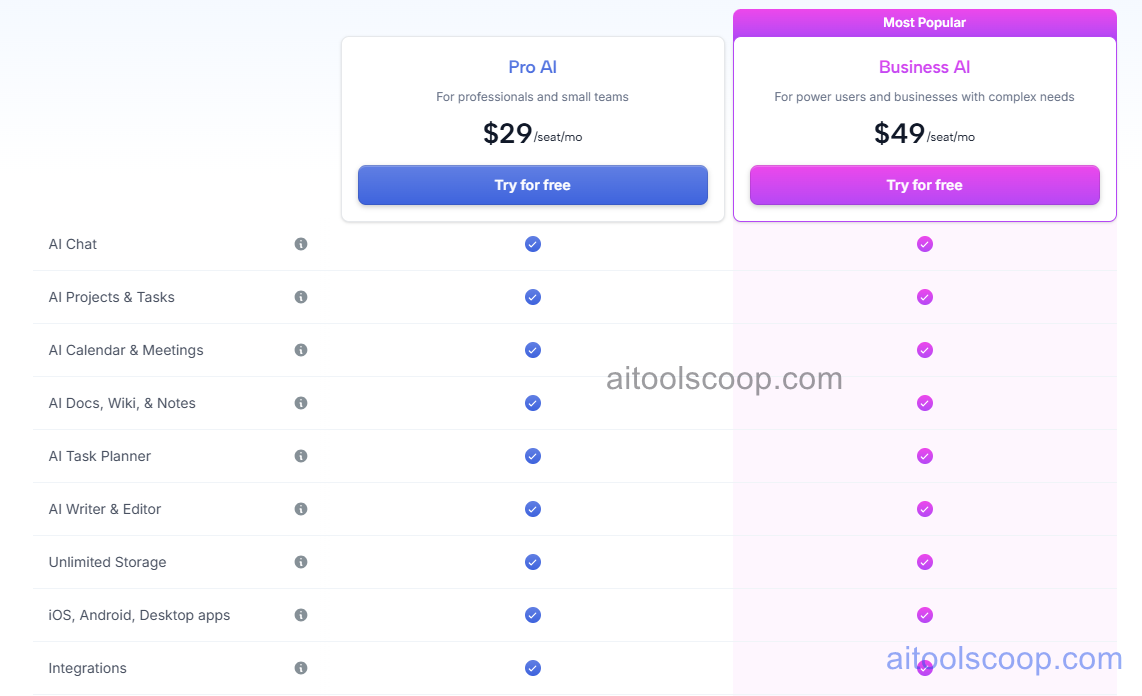
| Plan | Monthly | Annually | Key Features |
|---|---|---|---|
| Individual | $29 | $19 | AI scheduling, unlimited tasks, meeting scheduler, mobile apps, calendar sync |
| Team | $49 | $29 | Team projects, collaborative scheduling, shared calendars, workload balancing, analytics |
Always check the latest rates on the official website. For more AI tool reviews, visit aitoolscoop.com.
Who Should Use Motion?
Motion is ideal for busy executives juggling multiple priorities and meetings requiring optimized time allocation, entrepreneurs managing business tasks alongside client work, consultants coordinating projects for multiple clients simultaneously, product managers balancing feature work with meetings and planning, freelancers optimizing billable time across client projects, and anyone experiencing decision fatigue from manual calendar management. The Individual plan suits solo professionals, while the Team plan serves organizations coordinating work across team members.