
Hubstaff (hubstaff.com) is a time tracking and workforce management platform built for businesses that need to monitor, manage, and pay distributed teams — whether those teams are in the field with GPS tracking requirements, working remotely on computers, or operating across a mix of locations. Hubstaff combines time tracking with GPS location monitoring, automatic timesheet generation, productivity measurement, employee payment processing, scheduling, and project management integrations — making it one of the most operationally complete workforce management tools in its category. The platform is structured across four plans with a minimum of 2 seats on all tiers, reflecting its focus on team rather than solo use. Annual billing provides meaningful per-seat savings compared to monthly pricing across all plans.
The Starter plan provides the fundamentals of time tracking and productivity tools for small teams at a low per-seat cost. The Grow plan adds advanced reporting tools and one integration for teams that need better analytical visibility and a connection to a specific external tool. The Team plan — the most popular tier — unlocks payments (paying team members directly through Hubstaff), scheduling, and unlimited integrations with project management, accounting, and HR platforms — making it the natural choice for growing teams that need operational management alongside time data. The Enterprise plan provides custom setup, account provisioning, and dedicated support for complex enterprise deployments, billed annually.
How Hubstaff Works
Team members install the Hubstaff app on their devices — desktop (Windows, Mac, Linux), mobile (iOS, Android), or Chrome extension. Time tracking starts manually or automatically based on schedule. GPS tracking records location during tracked time for field employees. Screenshots and activity monitoring capture productivity data at configurable intervals. Timesheets are generated automatically from tracked time and submitted for approval. Managers approve timesheets, review productivity reports, check GPS routes, and process payments to team members through Hubstaff's built-in payment processing. Scheduling tools manage shift assignments and track who is working when. Integrations connect Hubstaff time data to project management tools (Jira, Asana, Trello), accounting platforms (QuickBooks, Xero), and other business software.
Key Features
- Time tracking — manual and automatic time tracking across desktop (Windows, Mac, Linux), mobile (iOS, Android), and Chrome extension
- GPS tracking — location monitoring for field employees during tracked work periods
- Automatic timesheets — timesheets generated automatically from tracked time with manager approval workflows
- Productivity monitoring — activity level measurement, screenshots, and app and URL tracking during work sessions
- Employee payments — built-in payment processing to pay team members directly based on tracked hours and rates (Team and above)
- Scheduling — shift scheduling and assignment management with attendance tracking integration (Team and above)
- Unlimited integrations — connect to unlimited project management, accounting, and HR tools (Team and above)
- Advanced reporting — granular productivity and time reports with team-level analytics (Grow and above)
- Enterprise setup — custom account provisioning, setup, and dedicated support for complex enterprise requirements (Enterprise)
- Insights Trial — Team plan includes a trial of Hubstaff Insights for advanced team analytics
Hubstaff Pricing
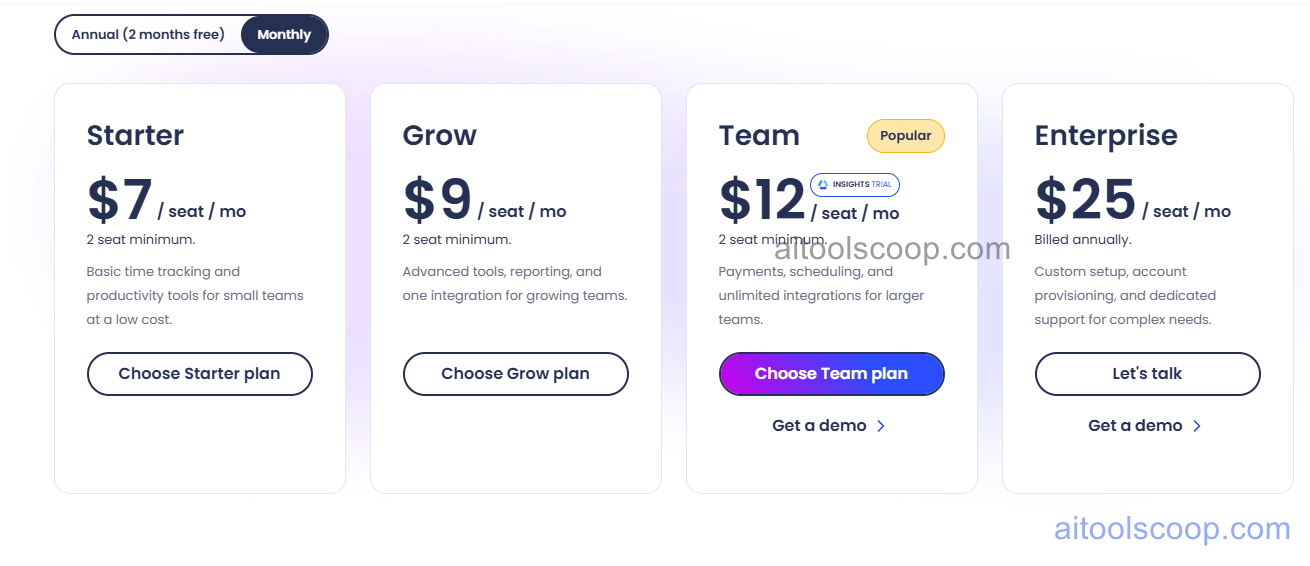
- Starter — $7/seat/month (or $4.99/seat/month billed annually) — Basic time tracking and productivity tools for small teams. 2 seat minimum.
- Grow — $9/seat/month (or $7.50/seat/month billed annually) — Advanced tools, reporting, and one integration for growing teams. 2 seat minimum.
- Team — $12/seat/month (or $10/seat/month billed annually) — Payments, scheduling, and unlimited integrations for larger teams. Includes Insights Trial. 2 seat minimum. Most popular plan.
- Enterprise — $25/seat/month (billed annually) — Custom setup, account provisioning, and dedicated support for complex enterprise needs. 2 seat minimum. Requires demo/sales contact.
No permanent free plan. All plans require a minimum of 2 seats. Annual billing saves approximately 29% on Starter, 17% on Grow, and 17% on Team. Always verify current rates at hubstaff.com/pricing.
Who Should Use Hubstaff?
Hubstaff is particularly well-suited to service businesses, construction companies, cleaning and maintenance services, IT firms, and agencies that manage field workers or distributed remote teams and need GPS tracking, time verification, and direct payment processing in one platform. The Starter plan suits very small teams needing basic time and productivity tracking at low cost. Grow adds reporting depth for teams that need analytical visibility. Team is the operational hub for businesses that want to manage scheduling, process payroll, and connect unlimited tools — the most popular choice for growing service businesses. Enterprise handles complex deployments with dedicated support. Purely office-based businesses without GPS or field employee needs may find simpler time tracking tools sufficient.
Frequently Asked Questions
What is Hubstaff?
Hubstaff is a time tracking and workforce management platform combining GPS tracking, automatic timesheets, productivity monitoring, employee payment processing, scheduling, and unlimited integrations for field and remote teams. It spans four plan tiers from Starter to Enterprise, all with a minimum of 2 seats, and provides annual billing at reduced per-seat rates compared to monthly pricing.
Does Hubstaff have a free plan?
Hubstaff does not offer a permanent free plan. All plans require a minimum of 2 seats and start at $7 per seat per month on monthly billing, or $4.99 per seat per month on annual billing for the Starter plan. A demo is available for the Team and Enterprise plans.
Does Hubstaff have GPS tracking?
Yes. Hubstaff includes GPS location tracking for team members during tracked work periods — making it particularly valuable for field service businesses, construction teams, and any organisation that needs to verify where employees are working. GPS data is recorded alongside time tracking data and accessible through the Hubstaff dashboard and reports.
Can Hubstaff process employee payments?
Yes. Built-in payment processing is available on the Team plan and above, allowing organisations to pay team members directly through Hubstaff based on tracked hours and configured pay rates. This eliminates the need to export timesheet data to a separate payroll system for many standard payment scenarios.
What integrations does Hubstaff support?
The Team and Enterprise plans include unlimited integrations with project management tools (Jira, Asana, Trello, and others), accounting platforms (QuickBooks, Xero), and HR and payroll systems. The Grow plan includes one integration. The Starter plan does not include third-party integrations beyond the core Hubstaff feature set.