
Everhour (everhour.com) is a project time tracking and billing platform built for individuals, freelancers, and teams that need to track time against projects and tasks, generate reports, and — on paid plans — create invoices and manage budgets. What distinguishes Everhour in the time tracking category is its native integration architecture: rather than requiring users to switch between tools, Everhour embeds its time tracking controls directly inside popular project management platforms — Asana, Jira, Trello, ClickUp, GitHub, and others — allowing teams to log time without leaving the tools they already use. The platform offers a permanently free plan for up to 5 seats that includes time tracking, projects and tasks, reports, and data export — covering the essential needs of small teams or freelancers at zero cost. The free plan also includes a 14-day trial of all features, giving teams a full preview of paid capabilities before deciding to upgrade.
The Team plan ($10/seat/month on monthly billing, $8.50/seat/month annually) removes the 5-seat cap entirely — providing unlimited seats — and adds the platform's most valuable capabilities for service businesses: native integrations with project management and development tools, billing, budgeting, and invoicing for client billing workflows, and SSO and advanced permissions for secure team access management. A minimum of 5 seats applies to the Team plan. The Custom plan is available for larger organisations (50 or more seats) requiring volume discounts, personalised demos, priority support, and a dedicated account manager.
How Everhour Works
For teams using supported project management tools, Everhour's browser extension embeds timer controls and time entry fields directly within the Asana, Jira, Trello, or ClickUp interface — team members click a timer button next to a task to start tracking without switching applications. Time can also be logged retrospectively through Everhour's own dashboard. Tracked hours are aggregated at the project, task, and team member level in Everhour's reporting dashboard. On the Team plan, billing rates are configured per user or per project, and invoices are generated from tracked billable hours and sent directly from Everhour. Budget tracking monitors project spending against defined limits with alerts when thresholds are approached. Data can be exported for use in external accounting or reporting systems.
Key Features
- Free plan — up to 5 seats — time tracking, projects and tasks, reports, and data export at zero cost; includes 14-day trial of all features
- Native integrations — time tracking embedded directly inside Asana, Jira, Trello, ClickUp, GitHub, and other project management tools (Team plan)
- Unlimited seats — Team plan removes the 5-seat cap for unlimited team members
- Billing and invoicing — create and send client invoices directly from tracked billable hours (Team plan)
- Budget tracking — define project budgets and monitor spending with alerts at threshold milestones (Team plan)
- SSO and advanced permissions — single sign-on and role-based access controls for team security management (Team plan)
- 14-day trial of all features — free plan includes a full-feature trial before any paid commitment
- Custom plan — volume discounts, personalised demos, priority support, and dedicated manager for 50+ seat organisations
- Reports and data export — detailed time and project reports with export capability (all plans)
- Projects and tasks — organise time tracking against defined project and task structures (all plans)
Everhour Pricing
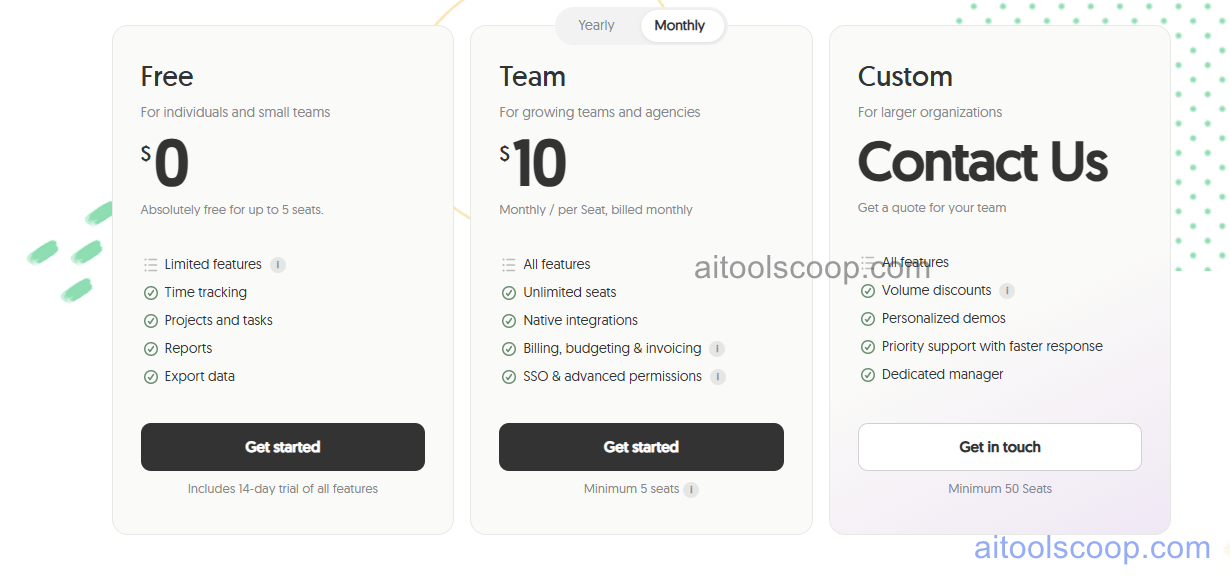
- Free — $0 — Up to 5 seats. Time tracking, projects and tasks, reports, and data export. Limited features compared to Team plan. Includes 14-day trial of all features to preview paid capabilities.
- Team — $10/seat/month (or $8.50/seat/month billed annually) — All features, unlimited seats, native integrations with project management tools, billing, budgeting and invoicing, SSO and advanced permissions. Minimum 5 seats.
- Custom — Contact for pricing — All features plus volume discounts, personalised demos, priority support with faster response, and a dedicated account manager. Minimum 50 seats.
Free plan permanently available for up to 5 seats with no time limit. Annual Team plan saves approximately 15%. Always verify current rates at everhour.com/pricing.
Who Should Use Everhour?
Everhour is best suited to small freelancer teams, agencies, and project-based service businesses that already use popular project management tools (Asana, Jira, Trello, ClickUp) and want time tracking embedded directly into those tools rather than managed separately. The free plan is a genuine starting point for individuals and teams of up to 5 that need basic time tracking and reporting at no cost. The Team plan is the right upgrade for teams that need client billing, invoicing, and project budget management alongside the native integration experience. Organisations not using any of Everhour's supported project management integrations will still find value in the standalone time tracking and billing features, though the integration architecture is the platform's strongest differentiator.
Frequently Asked Questions
What is Everhour?
Everhour is a project time tracking and billing platform with native integrations that embed timer controls directly inside project management tools like Asana, Jira, Trello, and ClickUp. A permanently free plan supports up to 5 seats with time tracking, projects, reports, and data export. The Team plan adds unlimited seats, native integrations, invoicing, budgeting, and SSO.
Is Everhour free?
Yes. Everhour offers a permanently free plan for up to 5 seats that includes time tracking, projects and tasks, reports, and data export with no time limit. The free plan also includes a 14-day trial of all Team plan features, giving small teams a full preview of paid capabilities before deciding whether to upgrade. Paid plans start at $10 per seat per month for unlimited seats and full features.
Which project management tools does Everhour integrate with?
Everhour integrates natively with Asana, Jira, Trello, ClickUp, GitHub, and other popular project management and development platforms on the Team plan. These integrations embed Everhour's time tracking controls directly within the project management tool's interface, so team members can start and stop timers and log time without leaving the tools they already use for task management.
Can Everhour create invoices?
Yes. The Team plan includes billing and invoicing capabilities that allow organisations to generate client invoices directly from tracked billable hours in Everhour. Billing rates are configurable per user or per project, and invoices can be sent directly from the platform — eliminating the need to export time data to a separate invoicing tool for standard client billing workflows.
What is the Everhour 14-day trial?
Free plan users automatically receive a 14-day trial of all Everhour Team plan features — including native integrations, billing, budgeting, invoicing, and SSO — before the free plan reverts to its standard limitations. This gives small teams a meaningful window to evaluate the full platform before deciding whether the Team plan's paid capabilities justify upgrading.