

Emaze (emaze.com) is a cloud-based presentation and visual storytelling platform that distinguishes itself from traditional slide tools through its use of cinematic 3D transitions, animated templates, and an AI-powered content generation engine that can produce a complete, visually designed presentation from a text outline in seconds. Founded in 2013, Emaze is used by sales teams, educators, marketers, and business professionals who want presentations that look significantly more polished than standard PowerPoint or Google Slides output without investing hours in design work.
Emaze's AI presentation builder analyses an input topic or outline and automatically selects a template, populates slides with relevant content suggestions, and applies a cohesive visual theme — giving users a working draft to refine rather than a blank canvas. Beyond presentations, Emaze also supports creating micro-websites, digital business cards, and e-cards within the same platform, making it a versatile visual content tool for professionals managing their digital presence alongside their presentations.
How Emaze Works
Users either select a template from Emaze's library or enter a topic into the AI builder, which generates a complete presentation automatically. The web-based editor allows slide content, layouts, colours, and fonts to be customised using a drag-and-drop interface. Emaze's 3D transition effects — zooming between slides rather than flat page-turns — give presentations a cinematic quality that distinguishes them in business pitches and educational settings. Finished presentations can be shared via a public link, embedded on a website, exported as a PDF, or published as a standalone micro-website directly from the Emaze platform.
Key Features
- AI presentation builder — generates a complete visually designed presentation from a topic or text outline automatically
- 3D cinematic transitions — zoom-based slide transitions that create a cinematic, spatial navigation experience rather than flat page-turns
- Designer template library — hundreds of professionally designed templates covering business, education, marketing, and creative use cases
- Micro-website creation — publish presentations as standalone public websites directly from the Emaze platform without additional hosting
- Digital business cards — create shareable, animated digital business cards with contact information and branding
- Real-time collaboration — invite team members to co-edit presentations simultaneously in the browser
- Analytics dashboard — track views, shares, and engagement metrics for published presentations and websites
- PDF and PowerPoint export — export finished presentations as PDF files or PowerPoint-compatible formats for offline use
- Embed and share — share via public link, embed on any website, or present live in the browser with full-screen mode
- Brand kit — apply custom colours, fonts, and logo globally across all presentation projects
Emaze Pricing
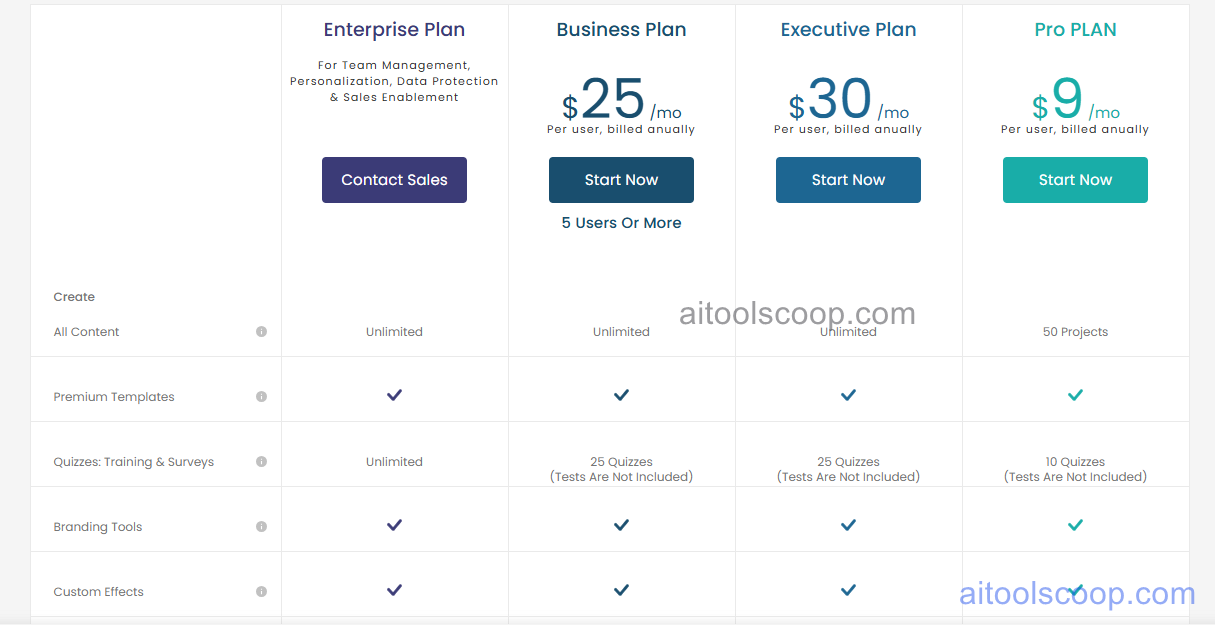
Emaze offers three paid plans, all billed annually.
- Pro — $9/month (billed annually) — full template library, AI presentation builder, unlimited presentations, analytics, PDF export, and watermark-free sharing. Suited to individuals and freelancers.
- Business — $25/month (billed annually) — everything in Pro plus team collaboration, brand kit, advanced analytics, PowerPoint export, and micro-website publishing.
- Executive — $30/month (billed annually) — everything in Business plus priority support, maximum storage, and enterprise-grade sharing controls for larger organisations.
All plans are billed annually. A free plan or trial may be available for evaluation — verify current options at emaze.com/pricing.
Who Should Use Emaze?
Emaze is well suited to sales professionals, educators, marketers, and business owners who want visually impressive presentations without a design background or significant time investment. Its AI builder and 3D templates produce results that stand out compared to standard slide tools, making it particularly effective for client pitches, keynotes, and educational content where visual impact matters. The Pro annual plan at $9/month is an affordable entry point. Emaze is less suited to users needing deep data visualisation, complex infographic layouts, or the extensive chart and table capabilities of PowerPoint or Google Slides for data-heavy presentations.
Frequently Asked Questions
What is Emaze used for?
Emaze is an online presentation tool used to create visually impressive slideshows, micro-websites, and digital business cards. It is known for its cinematic 3D zoom transitions and AI-powered presentation builder that generates a complete, designed presentation from a topic or outline. It is used by sales teams, educators, and marketers who want professional-looking presentations without manual design work.
How much does Emaze cost?
Emaze's plans are all billed annually. The Pro plan costs $9/month, the Business plan costs $25/month, and the Executive plan costs $30/month. A free plan or trial may be available for initial evaluation — check the Emaze website for current free access options before committing to an annual subscription.
How does Emaze differ from PowerPoint and Google Slides?
Emaze differentiates itself through 3D cinematic zoom transitions between slides, an AI builder that generates complete presentations from a topic, and the ability to publish presentations as standalone micro-websites. PowerPoint and Google Slides have far more extensive charting, data table, and layout customisation capabilities, and are universally accepted as standard business file formats. Emaze is stronger for visual impact and quick AI-generated drafts; PowerPoint and Google Slides are stronger for data-heavy, highly customised, or enterprise-standard presentation workflows.
Can Emaze export to PowerPoint?
Yes. Emaze supports PowerPoint export on the Business and Executive plans, allowing presentations created in Emaze to be downloaded as .pptx files for sharing with recipients who use PowerPoint. Note that 3D transitions and animated effects specific to Emaze may not translate perfectly to PowerPoint format. PDF export is available on all paid plans.
Does Emaze support team collaboration?
Yes. Emaze's Business and Executive plans include real-time team collaboration allowing multiple users to co-edit presentations simultaneously in the browser. Team workspaces, shared brand kits, and advanced sharing controls are included on Business and above. The Pro plan is a single-user plan without team collaboration features.