

Coda.io (coda.io), launched in 2019, is an all-in-one doc workspace that merges traditional documents, spreadsheet-like tables, Kanban boards, charts, and application-like buttons and automations into a single collaborative surface. Rather than switching between a word processor, a spreadsheet, and a project management tool, teams build "docs" in Coda that function as living applications — combining narrative text, structured data tables, multiple views (calendar, card, chart), and interactive elements like buttons that trigger actions, all within one document.
Coda's distinguishing commercial model is its Doc Maker billing: rather than charging per user like most workspace tools, Coda only charges for "Doc Makers" — workspace members who create or manage documents — while viewers and editors who don't perform document-creation actions remain free. This can make Coda significantly more cost-effective for organisations with many people who consume information but few who build it. Coda AI is built into the platform with workspace-pooled credits for content generation, summarisation, data analysis, and natural-language formula creation; AI blocks can be embedded directly in docs to generate dynamically updating tables, summaries, or analyses, and the AI assistant can answer questions about a doc's content or help build automations.
How Coda.io Works
Users start a Coda doc from a blank page or a template from the gallery (covering meetings, product roadmaps, project trackers, and more) and begin typing as they would in any document. Tables can be inserted that behave like relational databases, with columns supporting dropdowns, references to other tables, and formulas that operate with the scope of the whole document — far more powerful than typical spreadsheet formulas. Different views (calendar, Kanban board, chart, card gallery) can be layered onto the same underlying data, so the same information can be displayed differently for different team members. "Packs" connect Coda to external services like Slack, Gmail, Jira, GitHub, and Salesforce, pulling live data into docs. Coda AI can be invoked to draft content, summarise long tables or threads, generate formulas from natural-language descriptions, or answer questions about the doc's contents — with usage drawn from a workspace-wide AI credit pool.
Key Features
- Unified doc-table-app surface — combine narrative text, relational tables, Kanban boards, calendars, and charts within a single document
- Coda AI — generate content, summarise tables and threads, create formulas from natural language, and answer questions about doc content using workspace-pooled AI credits
- Doc Maker billing model — only document creators and managers count toward billing; viewers and editors who don't create docs are free
- Powerful document-scoped formulas — a formula language that operates across the whole document, more capable than typical spreadsheet formulas
- Packs integrations — connect to hundreds of external services including Slack, Gmail, Google Calendar, Jira, GitHub, and Salesforce to pull live data into docs
- Multiple table views — display the same underlying data as tables, Kanban boards, calendars, or card galleries depending on the use case
- Buttons and automations — add interactive buttons and automated actions (time-based or event-based) that make docs function like lightweight apps
- Cross-doc syncing — connect and sync data across multiple separate documents (Team plan and above)
- Version history — 30-day version history on Pro, unlimited indefinite version history on Team
- Templates gallery — extensive library of customisable templates for meeting notes, roadmaps, trackers, and more, suitable for quick setup
Coda.io Pricing
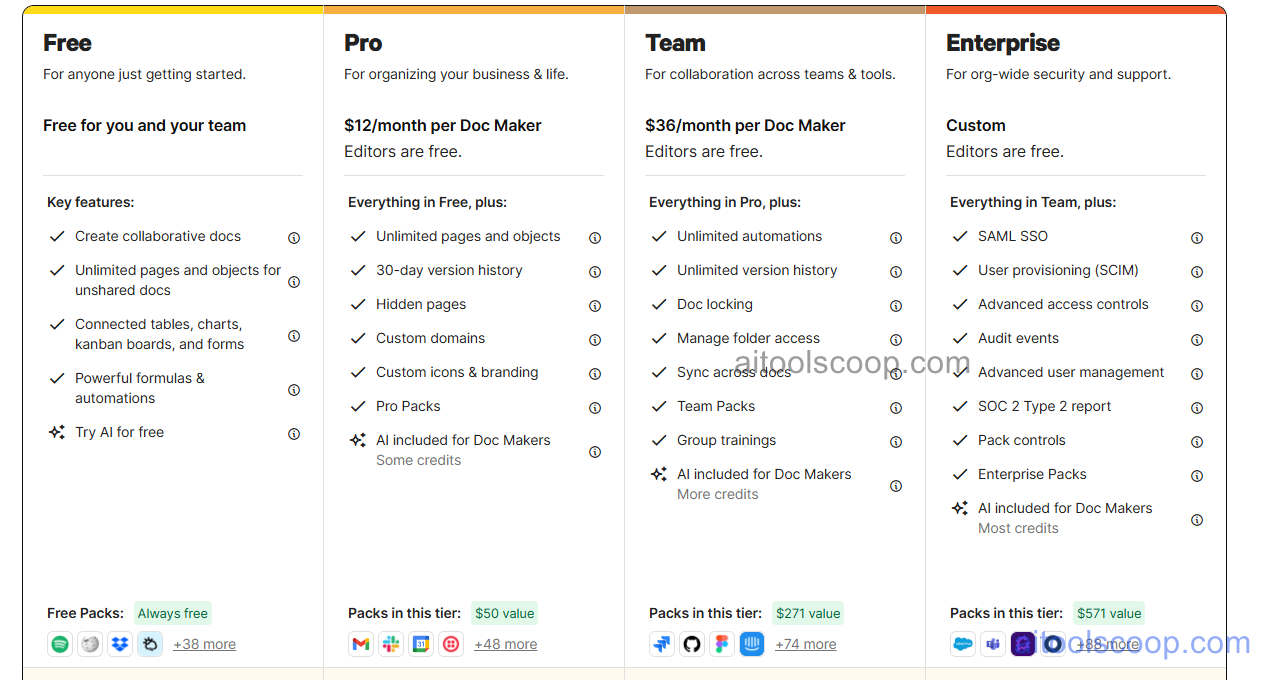
- Free — $0/month — Unlimited unshared docs, connected tables, Kanban boards, charts, forms, basic automations and formulas, free Packs (Spotify, Wikipedia, Dropbox, Weather), and access to try Coda AI. Ideal for individuals and small teams getting started.
- Pro — $12/month per Doc Maker ($10/month billed annually) — Removes unshared doc size limits, adds hidden pages, custom branding, 30-day version history, AI assistance for Doc Makers, and premium Packs (Gmail, Slack, Google Calendar, Twilio) valued separately at $50. Editors are included at no extra cost.
- Team — $36/month per Doc Maker ($30/month billed annually) — Unlimited automations with no monthly quotas, unlimited indefinite version history, cross-doc syncing, document locking, folder-level permissions, and Team Packs for advanced business integrations.
Enterprise plans with custom pricing add advanced security, compliance, and administrative controls for large organisations. Pricing is per Doc Maker (creators and managers of documents), not per total workspace member. Always verify current rates at coda.io/pricing.
Who Should Use Coda.io?
Coda.io is well suited to teams that want to replace multiple separate tools — docs, spreadsheets, project trackers, wikis — with a single connected workspace, particularly organisations with a small number of document creators and a larger number of viewers or light editors who benefit from the Doc Maker billing model. Its AI features and document-scoped formula language make it powerful for building internal tools, trackers, and dashboards without code. Teams of 10+ users needing serious automation, cross-document workflows, or long-term version history will find the jump to the Team plan justified by the 3x increase in capability over Pro. Organisations that need per-user pricing simplicity, or whose primary need is straightforward note-taking and wiki documentation without database-like functionality, may find Notion's pricing model or scope a better fit.
Frequently Asked Questions
What is Coda.io?
Coda.io is an all-in-one workspace that combines documents, spreadsheet-like tables, Kanban boards, charts, and app-like buttons and automations into a single collaborative surface. It includes built-in Coda AI for content generation, summarisation, and formula creation, and uses a unique Doc Maker billing model where only document creators are charged.
Is Coda.io free?
Yes — Coda.io offers a free plan with unlimited unshared documents, connected tables, Kanban boards, charts, forms, basic automations, and access to try Coda AI. Paid plans start at $12/month per Doc Maker (or $10/month billed annually), which unlock larger documents, AI assistance, and premium integrations.
What is Doc Maker billing in Coda?
Doc Maker billing means Coda only charges for workspace members who perform document creation or management actions — referred to as Doc Makers. Members who only view, comment, or edit existing content created by others (such as adding to tables or using existing automations) remain free as Editors. This differs from per-user pricing models like Notion's, where all members are billed.
What can Coda AI do?
Coda AI can generate content within docs, summarise long tables or discussion threads, create formulas from natural-language descriptions, and answer questions about a document's content. AI blocks can be embedded in docs to produce dynamically updating tables, summaries, or analyses. AI usage draws from a workspace-pooled credit allocation that varies by plan.
How does Coda.io compare to Notion?
Notion charges per user for all workspace members (viewers and editors included), while Coda charges only for Doc Makers — creators and managers of documents. This means teams with many read-only consumers of information may find Coda more cost-effective, while Notion's mid-tier Business plan can be cheaper at list price for teams where most members actively edit. Coda emphasises workflow automation and app-building within docs; Notion is often positioned more around knowledge management and documentation.