
Airtable (airtable.com) is a cloud-based no-code platform that combines the familiarity of a spreadsheet interface with the power of a relational database — plus automations, custom interfaces, and AI-powered workflows — all without requiring any coding knowledge. Founded in 2012 and used by over 500,000 organisations including 80% of the Fortune 100, Airtable has become the go-to platform for teams who need to formalise and automate structured data workflows quickly. In 2026, Airtable has evolved from a "fancy spreadsheet" into an AI-native work operating system, with its Omni AI layer adding intelligent automation, categorisation, and generation directly to records and workflows.
Airtable's core concept is the Base — a workspace containing linked tables, similar to a relational database. Each table can store records with multiple field types (text, numbers, attachments, checkboxes, linked records, formulas, lookups) and display the same data through multiple views: Grid, Kanban, Calendar, Gallery, Gantt, and more. Teams use Airtable to manage everything from content pipelines and CRM systems to project tracking, product roadmaps, and hiring workflows — all within a single shared data layer that everyone can see and update.
How Airtable Works
You create a Base, define your tables and fields, and start entering records. Linked record fields connect data across tables — for example, linking a Projects table to a Clients table and a Tasks table — creating a relational structure without SQL. Views filter, group, sort, and display the same records differently for different team members. Automations trigger actions based on record changes — sending an email when a status changes, creating a record in another table, or calling an external API. The Interface Designer lets you build custom dashboards, intake forms, and approval screens that non-technical stakeholders can use without accessing the raw data. AI fields powered by the Omni AI layer can automatically categorise records, generate text, summarise data, and extract insights from any field.
Key Features
- Omni AI layer — native AI fields that categorise records, generate text, summarise data, extract insights, and translate content directly inside the database
- Relational database with linked records — connect data across multiple tables with lookup and rollup fields, replacing complex spreadsheet formulas
- Multiple views — display the same data as Grid, Kanban, Calendar, Gallery, Gantt, or Form view for different workflows and roles
- Interface Designer — build custom dashboards, portals, and approval interfaces for stakeholders without exposing the raw database
- Automations — no-code workflow automation triggered by record changes, schedules, or form submissions, with actions including email, Slack, webhooks, and scripting
- Forms — shareable intake forms that write directly to the database, with conditional logic and file uploads
- AI agent workflows — build multi-step AI workflows that process and enrich records automatically without manual intervention
- Integrations — connects to Slack, Google Workspace, Jira, Salesforce, GitHub, Zapier, and 1,000+ apps via API
- Permissions and governance — role-based access, field-level permissions, SSO, and audit logs on higher plans
- Free plan — up to 5 editors, unlimited bases, and 1,000 records per base with core features at no cost
Airtable Pricing
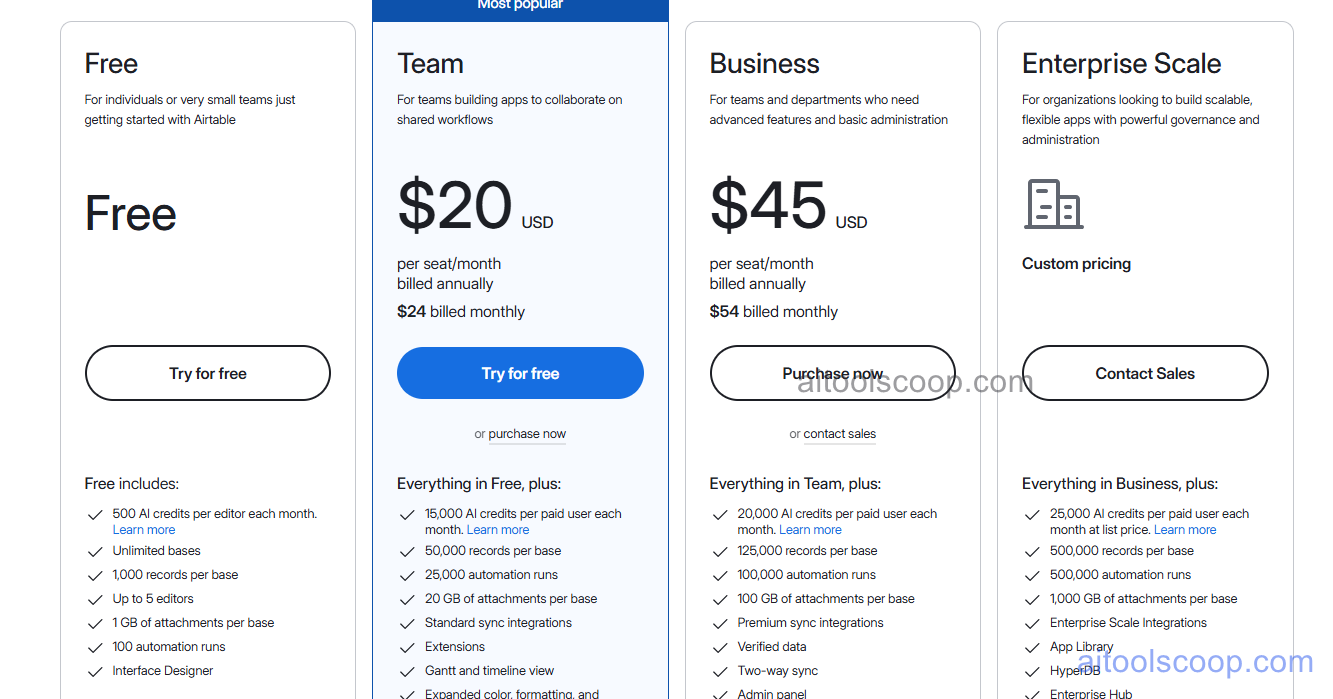
- Free — $0/month — Up to 5 editors, unlimited bases, 1,000 records per base, 1 GB attachment storage, Grid/Calendar/Kanban/Gallery views, and 100 automation runs/month.
- Team — $20/user/month — 50,000 records per base, 25,000 automation runs/month, all view types including Gantt and Timeline, expanded attachment storage, and access to AI features.
- Business — $45/user/month — 125,000 records per base, advanced admin controls, SSO integration, expanded automation runs, Interface Designer with full customisation, and enhanced AI capabilities.
- Enterprise Scale — custom pricing for large organisations requiring unlimited records, advanced governance, dedicated support, and enterprise-grade security.
Annual billing reduces per-user costs. Always verify current rates at airtable.com/pricing.
Who Should Use Airtable?
Airtable excels for teams that manage structured, repetitive workflows and want a single shared data layer that everyone can see and contribute to — content teams, marketing operations, product managers, HR, agencies, and project managers. The Interface Designer makes it possible to expose data to non-technical stakeholders in clean, role-appropriate views. Its AI fields are particularly valuable for content operations: automatically classifying records, summarising long-form text, or generating draft copy at scale. Airtable is less suited to teams with very large datasets (record limits apply per base on all plans), pure back-end or API-building needs, or organisations on tight budgets where per-user pricing at $20–$45/user/month can escalate quickly.
Frequently Asked Questions
What is Airtable?
Airtable is a no-code cloud platform that combines a spreadsheet-style interface with a relational database, plus automations, custom interfaces, forms, and AI-powered fields. Teams use it to manage projects, CRM, content pipelines, hiring, and operations workflows — all in a single collaborative data layer — without writing any code.
Is Airtable free?
Yes — Airtable has a free plan that supports up to 5 editors, unlimited bases, 1,000 records per base, and core features including Grid, Calendar, Kanban, and Gallery views, plus 100 automation runs per month. Paid plans with higher record limits, AI features, and advanced governance start at $20/user/month.
How much does Airtable cost?
Airtable's paid plans are Team at $20/user/month and Business at $45/user/month. Annual billing reduces these costs. Enterprise Scale pricing is available on request for large organisations. A free plan is available for small teams.
What AI features does Airtable have?
Airtable's Omni AI layer adds native AI fields to any table. These fields can automatically categorise records, generate text, summarise long-form content, extract key data points, and translate content — all running inside the database as records are added or updated. Airtable also supports AI-powered multi-step automation workflows and AI agent pipelines for processing records at scale.
What is the difference between Airtable and a spreadsheet?
Unlike a spreadsheet, Airtable supports linked records across multiple tables (relational database structure), multiple simultaneous views of the same data (Grid, Kanban, Calendar, Gantt, Gallery), no-code automations triggered by data changes, custom interface and form building for non-technical users, AI-powered fields, and role-based permission controls. It stores structured data with relationships, not just flat rows and columns.