

Home/ AI Tools /AI Video Tools /InVideo AI
InVideo AI Freemium
🤖 AI Video Tools
#30 in AI Video Tools

InVideo AI

InVideo AI is a text-to-video platform that generates complete videos from prompts using AI. Includes script writing, voiceover, stock media, and editing. Free plan available. Plus from $25/month.

4.0 / 5 (16 reviews) Freemium From $25/mo
Quick Info
💰 Pricing$25/mo
⭐ Rating4.0 / 5 (16 reviews)
🆓 Free Plan✅ Yes
📂 CategoryAI Video Tools
🌐 WebsiteVisit ↗
🕐 Last UpdatedMay 21, 2026
🔀 Alternatives43 tools
▲ 19 Upvotes on ProductHunt
★ 3.2 11 PH reviews
via ProductHunt ↗
Verified DataUpdated May 21, 2026
Independently ReviewedNo paid placements
Detailed AnalysisHands-on testing
Key Features
  • Prompt-to-video generation with AI script, visuals, and voiceover
  • Exclusive access to Sora 2 and VEO 3.1 generative video models
  • Magic Box conversational editing — refine by typing commands
  • 16 million stock media library with iStock premium access
  • Voice cloning from 30-second samples for consistent branding
  • 10,000+ templates for social media, ads, and explainers
4.0
Overall Rating — based on 16 reviews
Ease of Use
4.2
Features
4.0
Value
3.7
Performance
4.1
Support
3.9
Pros & Cons
👍 Pros
  • Fastest path from idea to video — draft ready in 3-5 minutes
  • Access to Sora 2 and VEO 3.1 at $25/month vs $200-250 standalone
  • Conversational editing eliminates timeline complexity for beginners
  • Massive stock library reduces need for separate subscriptions
  • Mobile apps (iOS/Android) with full feature parity to web version
👎 Cons
  • Credit system confusing — AI charges more to fix its own errors
  • Prompt accuracy inconsistent, often requires multiple regenerations
  • AI-generated scripts generic and safe rather than sharp or creative
  • Platform performance issues during peak usage times reported
📖

About InVideo AI

Create Faceless YouTube Videos From a Prompt

InVideo AI (invideo.io) is an AI-powered video creation platform that turns text prompts into fully produced videos complete with scripts, voiceovers, stock footage, and captions. With exclusive access to OpenAI's Sora 2 and Google's VEO 3.1 generative video models starting at $25/month, InVideo offers professional-grade AI video generation at a fraction of standalone costs ($200-250/month for these models separately).

How InVideo AI Works

You start by typing a detailed prompt describing your video idea — audience, tone, purpose, and key points. InVideo's AI generates a complete script, selects relevant stock media from its 16 million asset library, adds voiceover narration, inserts captions, and assembles everything into a draft video. You can then refine using the Magic Box conversational editing tool by typing commands like "make it more upbeat" or "add a call-to-action at the end" — no timeline editing required.

Key Features

  • Prompt-to-video generation — describe your idea, AI creates script, visuals, voiceover, and captions automatically
  • Sora 2 & VEO 3.1 integration — access to OpenAI and Google's cutting-edge generative video models included in paid plans
  • Magic Box conversational editing — refine videos by typing commands, no timeline or technical skills needed
  • 16 million stock assets — iStock integration with 95-320 premium credits/month depending on plan
  • Voice cloning — upload 30-second audio sample to create digital voice clone for brand consistency
  • 10,000+ templates — pre-built layouts for YouTube, Instagram, TikTok, ads, explainers, and more

InVideo AI Pricing
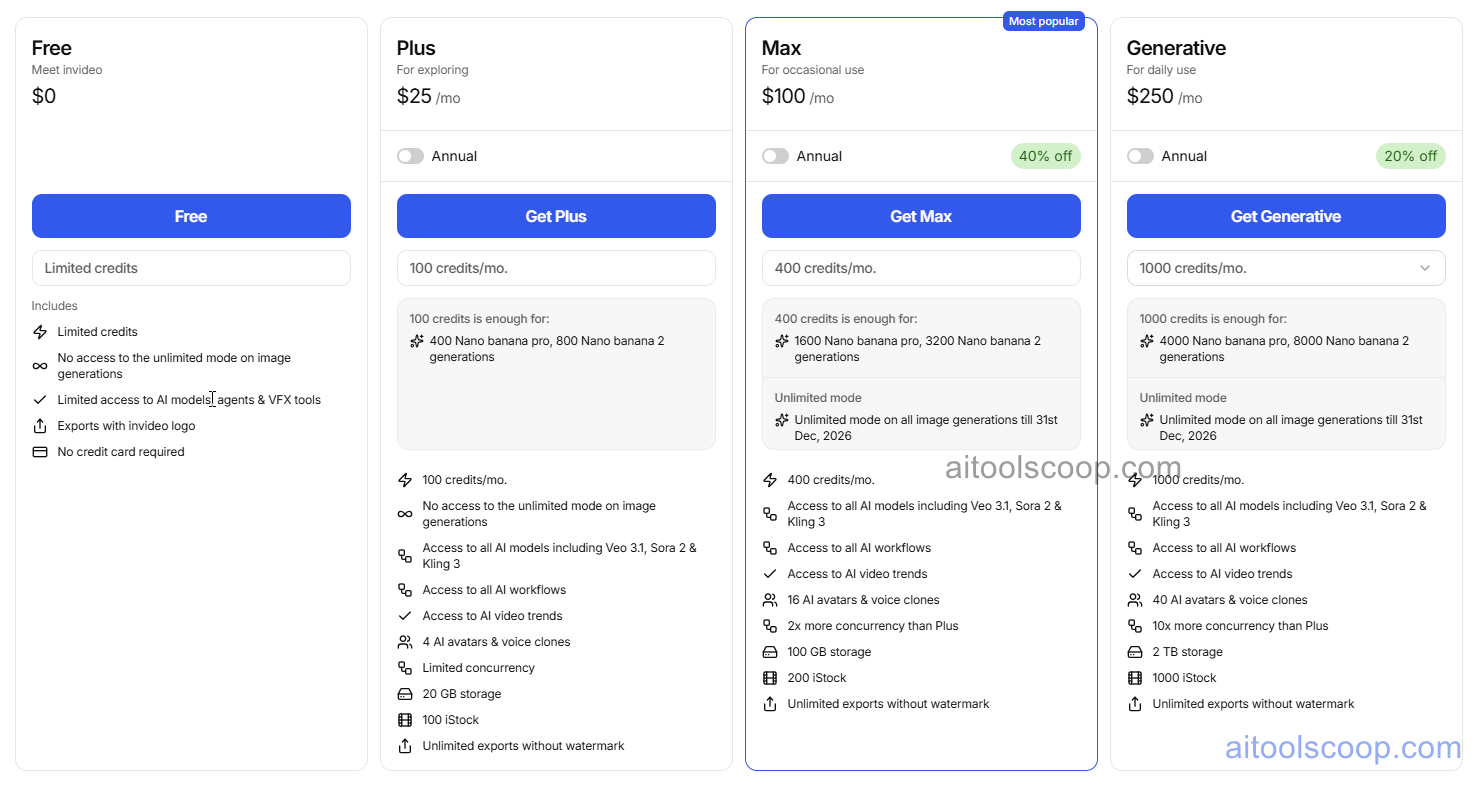
InVideo AI Pricing, Monthly AI Video Generation Minutes, Premium Media Access and Storage Tiers
InVideo AI: Subscription Plans for AI-Powered Video Creation and Stock Media
  • Free — $0 — 10 minutes AI generation/week, watermarked exports, 4 videos/week, standard media access.
  • Plus — $25/month (annual) — 50 minutes/month, 1080p export, 95 iStock credits, voice cloning, no watermark.
  • Max — $60/month (20% off annual) — Higher AI minutes, 320 iStock credits, priority processing, advanced features.Pricing is subject to change. Always check the latest rates on the official website. For more AI tool reviews, visit aitoolscoop.com.

Who Should Use InVideo AI?

InVideo AI is perfect for social media managers creating high-volume short-form content, marketers needing quick ad variations, educators producing explainer videos, and small businesses without video production budgets. It excels at speed and accessibility over precision — the baseline quality from a well-written prompt now rivals what a junior editor produces. However, brands requiring strict visual control or complex storytelling may find iteration time-consuming despite the fast initial generation.


💰

Pricing Plans

PlanPriceIncludes
Pro$25/moFull access + priority support
Check Current Pricing →
Affiliate Disclosure: This page contains affiliate links. If you click and make a purchase, we may earn a small commission at no extra cost to you. We only recommend tools we genuinely believe in.

🎯 Explore More

Discover other curated resources from our platform

🛠️ AI Tools View All →
Supaboard
★ 3.9
Capacities
★ 4.3
Resemble
★ 4.2
⚔️ VS Comparisons View All →
⚔️
DeepSeek vs Gemini: Which AI Is…
DeepSeek R1 vs Google Gemini 2.0 Pro
ChatGPT vs Gemini: 2026 Comparison —…
ChatGPT vs Gemini
ChatGPT vs Grok: 2026 Comparison —…
ChatGPT vs Grok
💡 Free Prompts View All →
💡
Claude for Consulting Account Managers: Write…
🔥 0.8K uses
💡
25 ChatGPT Prompts for Accountants: Build…
🔥 10.3K uses
💡
Beginner-Level Claude Prompts for Food Bloggers…
🔥 0.6K uses
💡 Free Prompts