Superblocks (superblocks.com) is a low-code development platform founded in 2020 and headquartered in San Francisco. It is designed specifically for engineering teams at growth-stage and enterprise companies that need to build, maintain, and govern a portfolio of internal tools, scheduled jobs, and internal APIs at scale. Unlike more accessible no-code builders, Superblocks embraces a developer-first philosophy — it provides a visual builder for speed, but couples it with Git integration, code-native customisation, robust access controls, and an infrastructure designed for production use rather than quick prototypes.
Superblocks distinguishes itself through three product areas that work together: Applications (visual UI builder for internal tools), Scheduled Jobs (recurring data processing tasks and automation), and Workflows (API-level automation triggered by events or webhooks). This combination means engineering teams can manage their entire internal automation layer — frontend tools, backend jobs, and internal API endpoints — within a single governed platform rather than across multiple disparate tools. AI features assist with code generation, query writing, and UI scaffolding throughout all three areas.
How Superblocks Works
Engineers connect data sources — databases, REST APIs, GraphQL, cloud services — using Superblocks' integration library. Applications are built in the visual editor, where UI components are placed on a canvas and bound to data using JavaScript or Python expressions. Business logic is written directly in code blocks embedded in the application, giving developers full programmatic control within the visual environment. Scheduled Jobs are configured with a cron-style scheduler and a code editor for the job logic. Workflows define API endpoints and their processing logic, exposing them to internal consumers. All three product types are stored in a Git repository for version control and can be deployed through CI/CD pipelines.
Key Features
- AI code generation — AI assists with writing SQL queries, JavaScript transformations, Python scripts, and UI component scaffolding throughout the platform
- Applications builder — drag-and-drop visual UI builder for internal tools with JavaScript and Python code blocks for custom logic
- Scheduled Jobs — cron-based recurring automation for data processing, reporting, and scheduled API calls without separate infrastructure
- Workflows (internal APIs) — define and expose internal API endpoints with processing logic for event-driven automation
- Git-native version control — all applications, jobs, and workflows stored in Git with full branching, review, and CI/CD pipeline support
- Granular access controls — fine-grained permissions for users, groups, and service accounts across all platform resources
- On-prem agent — deploy a Superblocks agent inside the organisation's infrastructure so data never leaves the network
- 50+ data source integrations — PostgreSQL, MySQL, MongoDB, REST APIs, Snowflake, BigQuery, Redshift, S3, Salesforce, and more
- Audit logs — complete audit trail of all user actions, configuration changes, and automation executions
- SOC 2 Type II compliance — enterprise security certification covering the Superblocks Cloud infrastructure
Superblocks Pricing
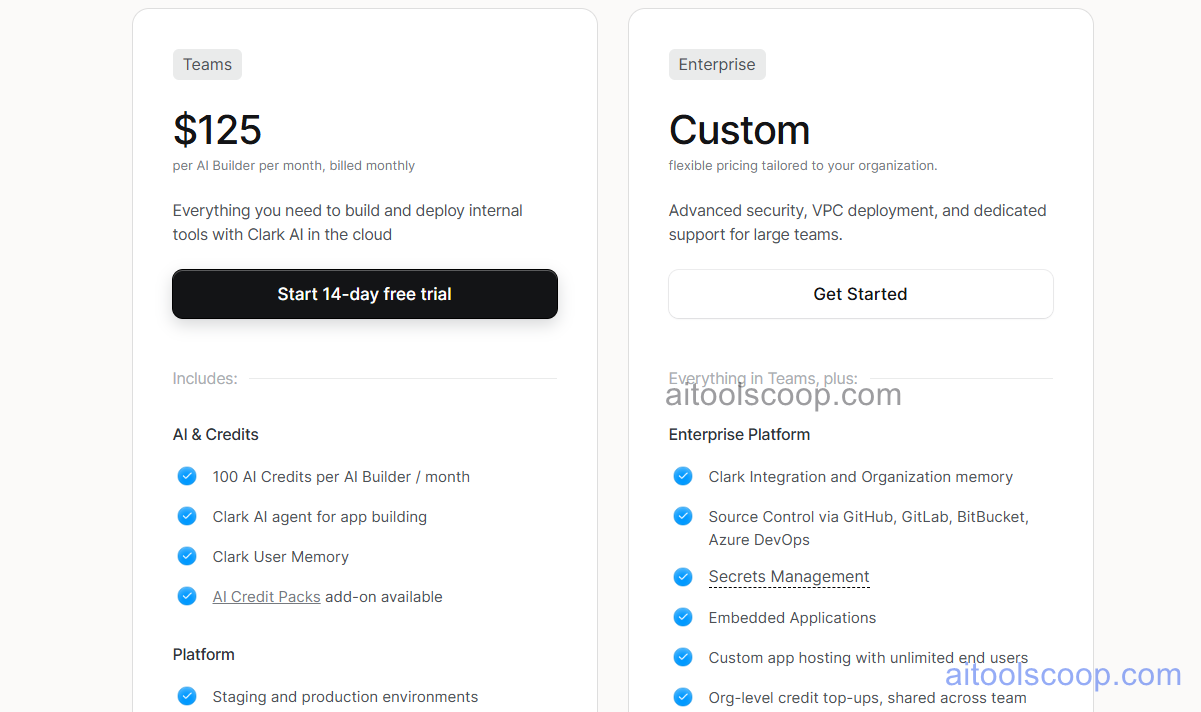
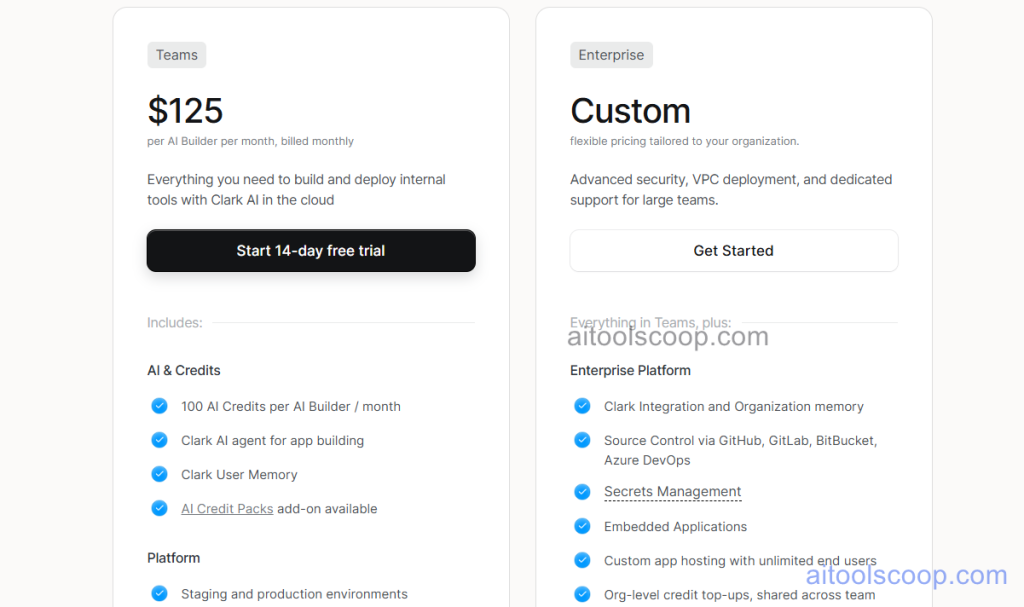
Superblocks offers a single all-inclusive plan with a discount for annual billing. A free trial is available.
- Monthly — $125/month — full platform access including Applications, Scheduled Jobs, Workflows, all integrations, AI features, Git version control, on-prem agent, audit logs, and SOC 2 compliance. Pricing covers the team subscription; contact Superblocks for per-user pricing details.
- Annual — $100/month (billed yearly) — same full platform access with a 20% saving for annual commitment.
A free trial is available. Custom enterprise pricing available for larger organisations. Always verify current rates at superblocks.com/pricing.
Who Should Use Superblocks?
Superblocks is designed for engineering teams at growth-stage and enterprise companies that need a production-grade internal development platform — not just a prototyping tool. Its Git-native approach, on-prem agent for data security, Scheduled Jobs, and Workflows make it one of the most comprehensive single platforms for managing the full internal tooling and automation layer. It is particularly well suited to teams with strict security and compliance requirements, and to those who want internal tools to follow the same engineering standards as production software. Superblocks is not suited to non-developers, small startups, or teams looking for a free or low-cost starting point — the open-source alternatives like ToolJet or Appsmith are more appropriate for those use cases.
Frequently Asked Questions
What is Superblocks used for?
Superblocks is used by engineering teams to build and manage internal tools, recurring automated jobs, and internal API workflows in a single governed platform. It covers three use cases: Applications (visual internal tool builder), Scheduled Jobs (cron-based recurring automation), and Workflows (event-driven internal APIs). The combination replaces the need for separate internal tool builders, cron job infrastructure, and custom API development for internal automation.
How much does Superblocks cost?
Superblocks costs $125/month on a monthly plan or $100/month billed annually — a 20% saving for annual commitment. This covers the full platform including Applications, Scheduled Jobs, Workflows, all integrations, AI features, Git version control, on-prem agent, audit logs, and SOC 2 compliance. Custom enterprise pricing is available for larger organisations with higher user counts or specific requirements. A free trial is available.
What is the Superblocks on-prem agent?
The Superblocks on-prem agent is a lightweight component deployed inside the organisation's own network infrastructure. It acts as a secure intermediary between Superblocks Cloud and the organisation's internal databases and APIs — all data queries are executed by the agent inside the network, so sensitive data never passes through Superblocks' servers. The Superblocks UI and platform remain cloud-hosted, while the data layer stays within the organisation's security perimeter. This architecture is important for organisations with strict data residency or compliance requirements.
Does Superblocks support Scheduled Jobs?
Yes. Superblocks includes a Scheduled Jobs feature for running recurring automation tasks on a cron schedule — data processing pipelines, report generation, database cleanup, scheduled API calls, and similar recurring backend jobs. Jobs are written in JavaScript or Python in Superblocks' editor and executed on the configured schedule automatically. This eliminates the need to manage separate cron infrastructure (AWS Lambda scheduled functions, GitHub Actions cron jobs) for internal automation tasks.
How does Superblocks compare to Retool?
Superblocks and Retool are both enterprise-grade low-code internal tool platforms aimed at developer teams. Superblocks differentiates through its Git-native architecture (applications live in Git by default), Scheduled Jobs and Workflows as first-class platform features alongside the UI builder, and its on-prem agent for data security without full self-hosting. Retool has a larger community, more components, and a longer market presence. Teams prioritising Git-native engineering standards and integrated automation choose Superblocks; teams prioritising the largest component ecosystem and community choose Retool.