Draftbit (draftbit.com) is a visual no-code and low-code platform for building native mobile apps that run on iOS and Android. What makes Draftbit stand out from most no-code builders is its commitment to real code output: every app built on Draftbit generates clean, exportable React Native and Expo source code. This means you are never locked into the platform — you can export your entire project, open it in VS Code or any IDE, modify it freely, and deploy it independently, forever. Draftbit targets entrepreneurs, startups, and technically-minded teams who want the speed of visual development combined with the freedom of code ownership.
Draftbit's builder runs entirely in the browser. You design screens by clicking to add components, arrange layouts using flexbox principles, connect to APIs and external data sources, and preview your app on a real device simulator in real time. The platform also offers AI-assisted development features to help generate components and screens from prompts, and maintains a directory of vetted Draftbit Experts — human developers available for hire to assist with complex custom builds.
How Draftbit Works
You open the Draftbit editor in your browser, create a new project, and begin laying out screens using a component library of pre-built UI elements — buttons, lists, navigation bars, forms, image pickers, and more. Components are arranged visually with click-to-add simplicity, and properties like colours, fonts, padding, and actions are configured in the right-hand panel. Data is connected through API integrations — Draftbit supports REST APIs, Airtable, Supabase, and other external services. Once built, apps can be previewed on a mobile device via the Draftbit app, and published to the iOS App Store and Google Play. At any point, you can export the full React Native source code to your own repository.
Key Features
- React Native code export — export your full project as clean, maintainable React Native/Expo source code at any time with no platform lock-in
- Visual drag-and-drop builder — browser-based screen editor with click-to-add components and real-time mobile preview
- AI-assisted development — AI tools to generate components and screens from prompts, speeding up initial build stages
- API and data integrations — connect to REST APIs, Airtable, Supabase, and external backends without writing integration code
- Native iOS and Android output — apps run as true native mobile apps, not web views wrapped in a container
- Custom components — extend the visual builder with custom React Native components for advanced functionality
- Real-time device preview — preview app changes live on a physical device or simulator as you build
- GitHub export — sync your project to a GitHub repository for version control and team collaboration
- Draftbit Experts — access a directory of vetted professional developers for hire to assist with complex custom builds
- Free tier — start building without a subscription; publish and share apps with limited features at no cost
Draftbit Pricing
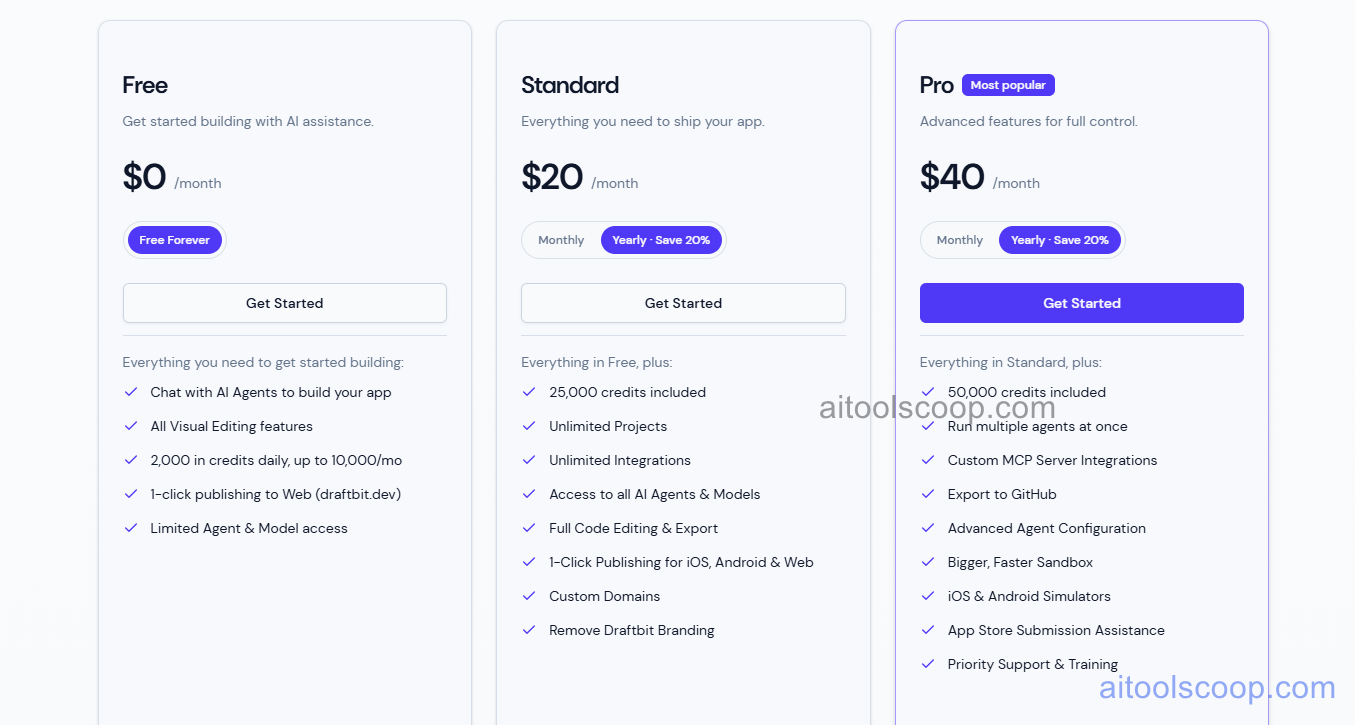
- Free — $0/month — Access the visual builder, create projects, and explore the platform. Limited publishing and export features. Suitable for learning and early prototyping.
- Pro — $20/month — Full access to the builder, API integrations, code export, and app publishing to iOS and Android. Designed for solo builders and indie developers.
- Team — $40/month — All Pro features plus multi-seat collaboration, shared projects, GitHub sync, and team management. Suited for small teams and agencies building multiple apps.
Expert services (professional developer assistance) are available separately, starting from around $2,500 for one-time projects. Always verify current rates at draftbit.com/pricing.
Who Should Use Draftbit?
Draftbit is best for founders, product managers, and technically-minded builders who want to ship a native mobile app quickly without managing a full React Native development environment — but who also want the option to take the code and continue independently. Its real code export makes it a genuine bridge between no-code speed and professional development. It is less suitable for non-technical users who have no familiarity with API concepts, as connecting data sources requires an understanding of request/response structures. Teams building web-only applications or those committed to Flutter or Swift/Kotlin native frameworks will find other platforms better suited.
Frequently Asked Questions
What is Draftbit?
Draftbit is a browser-based no-code and low-code platform for building native iOS and Android mobile apps visually. Its defining feature is that it generates real, exportable React Native and Expo source code — so builders are never locked into the platform and can continue development independently at any time.
Is Draftbit free?
Yes — Draftbit offers a free plan that allows access to the visual builder and basic project creation with no subscription required. Publishing and full code export features require a paid plan starting at $20/month.
Does Draftbit export real code?
Yes. Draftbit exports complete, clean React Native and Expo source code that is fully editable and maintainable in any standard development environment. Unlike platforms that generate obfuscated or proprietary output, Draftbit's code is professional-grade and can be extended by any React Native developer without rewriting from scratch.
What platforms does Draftbit build for?
Draftbit builds native mobile apps for iOS and Android using the React Native and Expo framework. Apps can be published to the Apple App Store and Google Play. The platform does not currently target web-only or Flutter-based applications.
Does Draftbit have AI features?
Yes. Draftbit includes AI-assisted development tools that help generate components and screens from natural language prompts, accelerating the initial stages of building. The platform also provides access to a vetted directory of human Draftbit Experts for hire when more advanced custom development is required.