Appsmith (appsmith.com) is an open-source low-code framework for building internal applications, admin dashboards, and data tools. Founded in 2019 in Bengaluru, India, Appsmith has become one of the most widely adopted open-source internal tool builders with over 30,000 organisations using it globally. Its open-source model means the platform is free to self-host without user limits, while a cloud-hosted version provides a managed option with additional enterprise features.
Appsmith is developer-centric — it exposes the full power of JavaScript throughout the platform, allowing developers to write custom logic anywhere: in widget properties, query transformations, event handlers, and workflow actions. This JavaScript-first approach gives Appsmith a flexibility advantage over more constrained low-code tools, making it particularly popular with engineering teams that want the speed of a visual builder without sacrificing the ability to implement complex custom logic when needed.
How Appsmith Works
Developers connect data sources — databases, REST APIs, GraphQL, SaaS tools — using Appsmith's connector library. The visual canvas editor allows drag-and-drop placement and configuration of widgets (tables, forms, charts, buttons, maps, file pickers). Widget properties and display values are bound to query results using JavaScript expressions in curly braces. Custom business logic is written in JavaScript functions that can be called from any widget event. Workflows (multi-step processes triggered by user actions) are configured in the workflow editor. Applications are deployed to Appsmith Cloud or a self-hosted instance and accessed via browser by end users.
Key Features
- Open-source and self-hostable — fully open-source on GitHub with 34,000+ stars; self-host free with no user limits on Docker or Kubernetes
- JavaScript everywhere — write custom JS logic in widget properties, query transformations, event handlers, and workflow steps throughout the platform
- 40+ data source connectors — PostgreSQL, MySQL, MongoDB, REST APIs, GraphQL, Google Sheets, Salesforce, S3, DynamoDB, Snowflake, and more
- Drag-and-drop canvas builder — place and configure 45+ UI widgets on a freeform canvas without writing frontend code
- Workflow automation — visual multi-step workflow builder for approval flows, data processing pipelines, and automated actions
- AI integration support — connect to OpenAI, Anthropic, and other AI APIs as data sources to build AI-powered internal tools
- Git-based version control — connect applications to a Git repository for version history, branching, and deployment workflows
- Role-based access control — manage user groups and permissions at the application and workspace level
- Custom widgets — import custom React components as widgets to extend the standard library
- Audit logs — track all user actions and configuration changes in the workspace for compliance and security
Appsmith Pricing
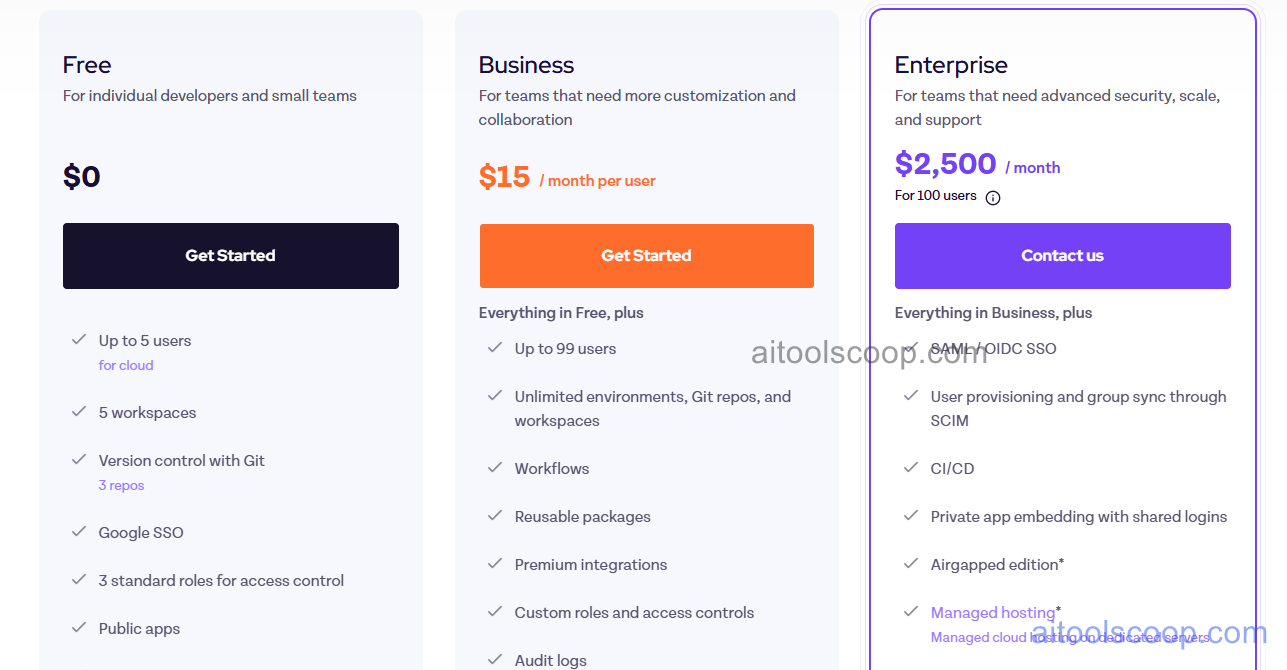
Appsmith Cloud offers a free plan alongside paid tiers. Self-hosting is always free with no user limits.
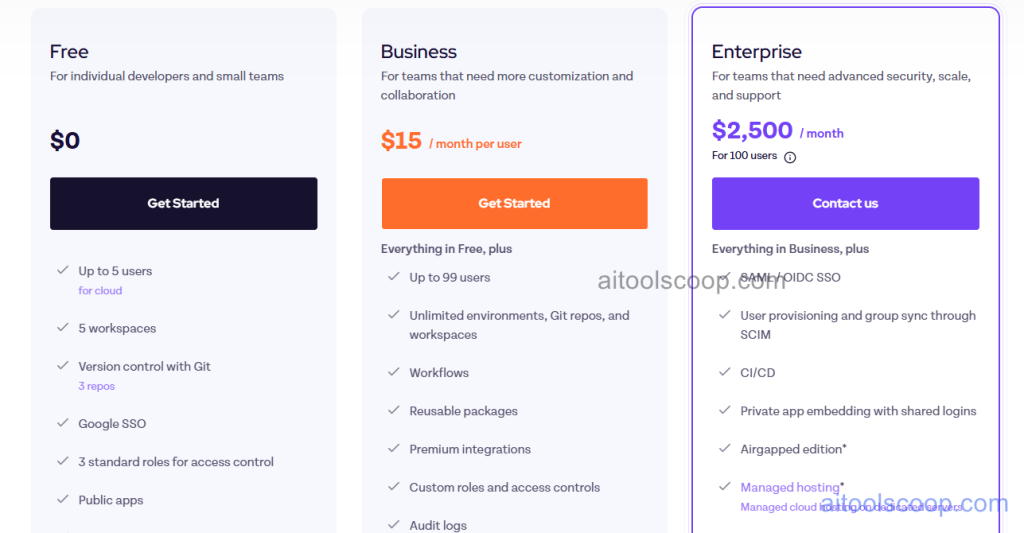
- Free — unlimited apps, all connectors, visual builder, and core features for up to 5 workspace members on Appsmith Cloud. Self-hosting is always free for any number of users.
- Business — $15/month per user — everything in Free plus SSO, audit logs, custom branding, granular permissions, Git-based version control, and priority support. Per-user pricing scales with team size.
- Enterprise — $2,500/month for 100 users — everything in Business plus dedicated support, SLA, advanced security and compliance features, and custom integrations for large organisations.
Self-hosting is always free with no user limits. Cloud free plan requires no credit card. Always verify current rates at appsmith.com/pricing.
Who Should Use Appsmith?
Appsmith is best suited to developer teams and engineering organisations that want maximum JavaScript flexibility in a visual low-code environment — and that value the open-source model for self-hosting, community support, and code transparency. Its Git integration makes it particularly practical for teams with existing code review and deployment workflows who want internal tools to follow the same engineering standards as production code. The free cloud plan and unlimited self-hosted option make it accessible for teams at any budget level. Appsmith is less suited to non-technical users who cannot write JavaScript, or to teams needing native mobile app output alongside their web tools.
Frequently Asked Questions
Is Appsmith free to use?
Yes. Appsmith is free in two ways. The self-hosted version is completely free with no user limits — teams can run Appsmith on their own infrastructure and build unlimited applications at no cost. The cloud-hosted version offers a permanently free plan for up to 5 workspace members with all core features. No credit card is required for either the self-hosted deployment or the cloud free plan.
What is Appsmith used for?
Appsmith is used by engineering teams to build internal tools — admin panels, data dashboards, approval workflows, customer management tools, inventory systems, and operational applications. It connects to databases, REST APIs, and SaaS tools, and allows developers to compose data-driven UIs visually while retaining the full power of JavaScript for custom logic. It is widely used as an open-source alternative to proprietary tools like Retool.
Does Appsmith support Git version control?
Yes. Appsmith supports connecting applications to a Git repository (GitHub, GitLab, Bitbucket) for version control, branching, and deployment workflows. This allows engineering teams to apply the same code review and release processes to internal tools that they use for production software — committing application changes, creating feature branches, reviewing pull requests, and deploying through CI/CD pipelines. Git integration is available on the Business plan and above.
How JavaScript-heavy is Appsmith?
Appsmith allows JavaScript in virtually every part of the platform — widget properties, query results transformations, event handlers, conditional display logic, and workflow actions all accept JavaScript expressions. This makes Appsmith significantly more flexible than tools that restrict custom logic to specific "custom code" blocks. However, it also means getting the most out of Appsmith requires JavaScript knowledge — teams without developer resources will find the platform harder to use than more constrained visual builders.
How does Appsmith compare to ToolJet?
Both Appsmith and ToolJet are open-source low-code internal tool builders free to self-host. Appsmith's key advantages are its JavaScript-everywhere flexibility, Git integration, and larger community. ToolJet's key advantages are its AI chat component for embedding conversational AI in tools and multiplayer collaboration. Both have 40+ data connectors and similar visual builders. Teams prioritising developer flexibility and Git workflows tend to choose Appsmith; teams wanting AI-native tool features or stronger real-time collaboration tend to choose ToolJet.