
Raycast (raycast.com) is a command bar for macOS (and Windows in beta) that replaces Spotlight with a dramatically faster and more extensible launcher. At its core, it lets you open apps, search files, manage windows, and execute custom commands without touching the mouse. The Pro plan adds AI directly into that workflow — you can write, summarize, translate, fix code, and ask questions without switching to a separate chat window.
How Raycast Works
A single keyboard shortcut summons the Raycast bar from anywhere on your screen. From there you can launch apps, search files, trigger snippets, or invoke AI. The Pro plan integrates models including GPT-4o, Claude 3.5, and Llama 3, accessible from Quick AI (one-shot answers), AI Chat (persistent conversation), and AI Commands (reusable automations you build once and trigger on selected text). Cloud Sync keeps settings, history, and extensions in sync across all your Macs.
Key Features
- AI Chat and Quick AI — ask anything, get answers instantly without leaving your current app
- AI Commands — create reusable automations like "fix grammar," "summarize this," or custom dev workflows
- 1,500+ community extensions — connect GitHub, Jira, Linear, Notion, Spotify, and hundreds more
- Cloud Sync — settings, clipboard history, extensions, and snippets synced across devices
- Window management — resize and arrange windows via keyboard without a separate app
- Clipboard history — searchable history of everything you have copied
Raycast Pricing
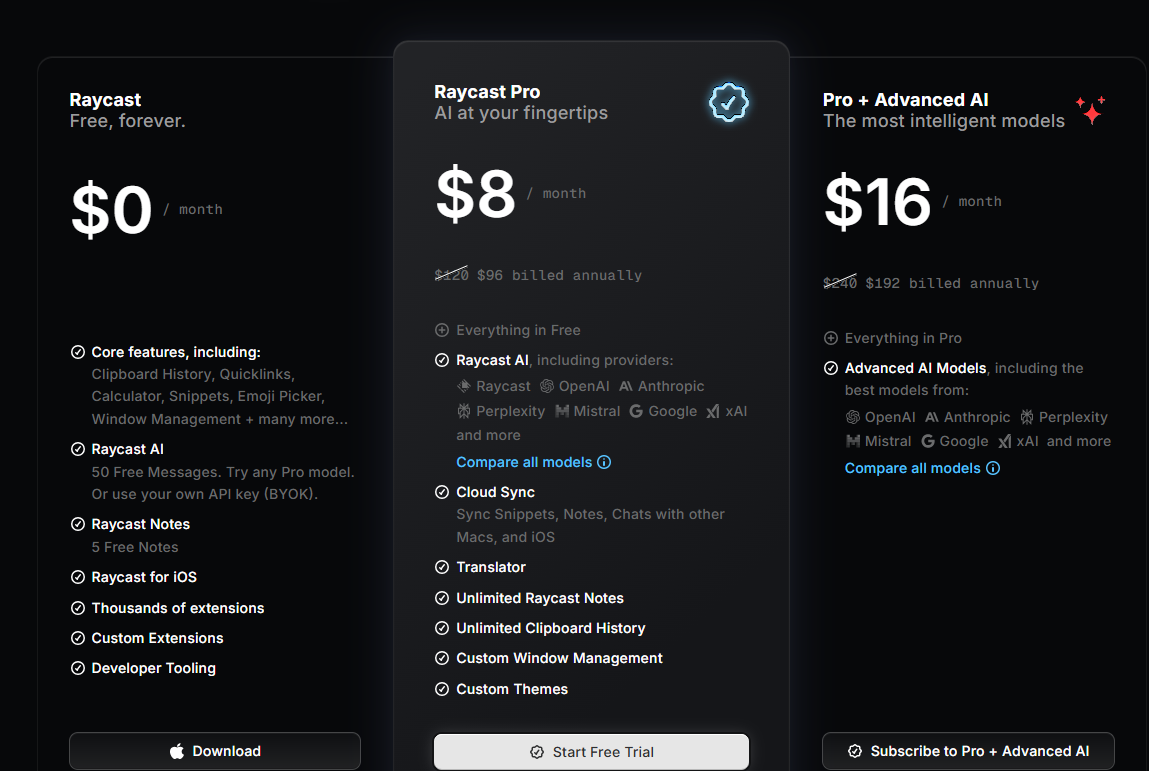
- Free — $0 — All core features forever: launcher, clipboard history, window management, snippets, and all 1,500+ community extensions. A limited number of AI messages included to try the feature.
- Pro — $8/month (billed annually) — Adds unlimited Raycast AI (GPT-4o, Claude, Llama 3), Cloud Sync, custom themes, unlimited clipboard history, and a 14-day free trial.
- Team — $16/user/month — Everything in Pro plus shared snippets, shared quicklinks, shared extensions, and team commands across the workspace.
- Enterprise — custom pricing — Advanced security, SSO, compliance controls, and dedicated support.
Who Should Use Raycast?
Raycast is made for developers, designers, and power users on Mac who spend most of their day at a keyboard and want to eliminate context-switching overhead. The free plan alone replaces Spotlight and several standalone apps. Upgrading to Pro makes sense the moment you want AI that is always available mid-task — without opening a browser tab. Student discounts (50% off Pro) are available via application on their website.