

Haiku Deck (haikudeck.com) is an AI-powered presentation platform founded in 2011 and originally launched on iPad before expanding to web. It built its reputation on a design philosophy that emphasises simplicity and visual impact over text-heavy slides — each slide typically features a single high-quality full-bleed photograph, a minimal text overlay, and clean typography. Haiku Deck automates the most time-consuming part of this approach: it uses AI to match slide content with relevant, high-quality Creative Commons licensed images from a library of millions of photos, so users never need to search for stock photography separately.
Haiku Deck's AI presentation builder, Zuru, takes a topic or outline as input and generates a complete presentation automatically — selecting images, composing text, and applying a consistent visual theme. This makes it particularly popular with educators, startup founders pitching investors, and speakers who want to produce impactful visual stories quickly without a design background. The platform integrates with PowerPoint and Google Slides for import and export, and presentations can be shared publicly or embedded on websites.
How Haiku Deck Works
Users enter a presentation topic into Zuru (the AI builder) or create slides manually. For AI-generated presentations, Zuru generates slide titles and talking points, selects matching full-bleed images from the photo library, and applies a cohesive visual theme. Users review and refine each slide — swapping images, editing text, and adjusting layouts. The editor enforces a minimal text limit per slide by design, encouraging bullet-point thinking rather than paragraph-heavy slides. Finished presentations are shared via public link, embedded on a web page, exported as a PowerPoint file, or downloaded as a PDF.
Key Features
- Zuru AI builder — generates a complete presentation from a topic or outline with matched images, text, and visual theme automatically
- Automatic image matching — AI selects relevant, high-quality Creative Commons images from a library of millions for each slide topic
- Full-bleed photography layouts — minimal, high-impact slide designs featuring full-screen background images with text overlay
- Minimal text design philosophy — enforces concise, focused slide content that improves visual clarity and audience engagement
- PowerPoint and Google Slides import/export — import existing presentations or export finished Haiku Decks as .pptx files
- Theme library — curated visual themes with typography and colour palette combinations for consistent presentation aesthetics
- Public sharing and embedding — share via link, embed on any website, or present live in the browser in full-screen mode
- Analytics — track views and engagement for publicly shared presentations on paid plans
- iPad and web access — available via browser and iPad app for presenting and editing on multiple devices
- Speaker notes — add presenter notes to each slide for reference during live delivery
Haiku Deck Pricing
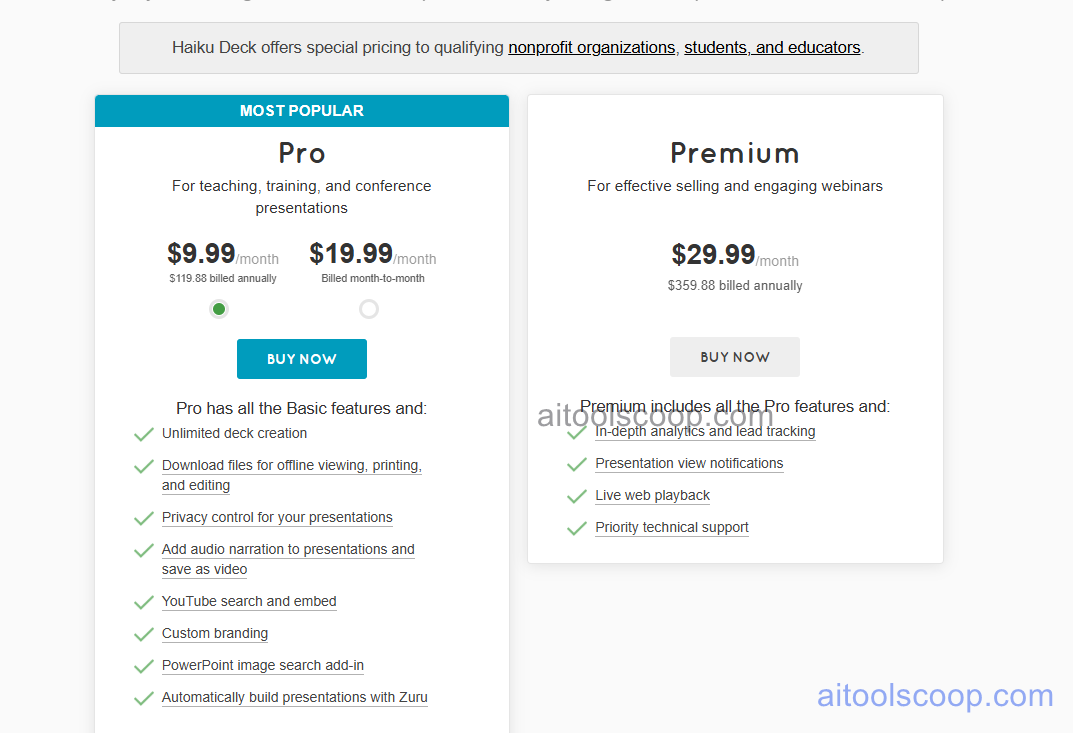
Haiku Deck offers two paid plans. Annual billing provides significant savings on the Pro plan.
- Pro — $19.99/month (annual: $9.99/month) — full Zuru AI builder, unlimited presentations, all themes, full image library, PowerPoint export, analytics, watermark-free sharing, and priority support.
- Premium — $29.99/month — everything in Pro plus advanced collaboration, additional brand customisation, team features, and maximum storage. No annual billing option noted at this tier.
A limited free plan may be available for evaluation. Always verify current rates at haikudeck.com/upgrade.
Who Should Use Haiku Deck?
Haiku Deck is best suited to educators, startup founders, speakers, and professionals who prioritise visual simplicity and image-led storytelling in their presentations. Its automated image matching and minimal design enforcement make it particularly effective for people who struggle with design decisions or tend to over-fill slides with text. The annual Pro plan at $9.99/month is highly affordable for the quality of AI-generated presentations it produces. Haiku Deck is less suited to teams needing complex data visualisation, multi-column layouts, tables, or the full formatting flexibility of PowerPoint or Google Slides for detailed business reporting.
Frequently Asked Questions
What is Haiku Deck used for?
Haiku Deck is an AI-powered presentation maker used to create clean, visually impactful slideshows with full-bleed photography and minimal text. Its Zuru AI builder generates complete presentations from a topic or outline automatically, selecting matching Creative Commons images and applying a cohesive visual theme. It is popular with educators, startup founders, and speakers who want professional visual presentations without manual design work.
How much does Haiku Deck cost?
Haiku Deck's Pro plan costs $19.99/month or $9.99/month billed annually — annual billing saves approximately 50%. The Premium plan costs $29.99/month. A limited free plan may be available for evaluation. The annual Pro plan at $9.99/month is one of the most affordable AI presentation builders that includes full image library access and PowerPoint export.
What is Zuru and how does it work?
Zuru is Haiku Deck's AI presentation builder. Users enter a presentation topic, and Zuru automatically generates a complete presentation — composing slide titles and talking points, selecting relevant full-bleed images from a library of millions of Creative Commons photos, and applying a consistent visual theme. The resulting presentation is a ready-to-refine draft rather than a blank canvas, significantly reducing the time from idea to finished presentation for users without design skills.
Can I export Haiku Deck presentations to PowerPoint?
Yes. Haiku Deck supports PowerPoint (.pptx) export on paid plans, allowing presentations to be downloaded and opened in Microsoft PowerPoint for further editing or sharing. The export preserves the visual layout and imagery, though some design elements specific to Haiku Deck's rendering engine may not translate perfectly to PowerPoint's format. PDF export is also available for static sharing.
Does Haiku Deck provide its own images or do I need to source them?
Haiku Deck provides automatic image matching from its built-in library of millions of Creative Commons licensed photographs. When creating a slide, Haiku Deck's AI selects a relevant, high-quality image based on the slide's text content — so users do not need to search for or license stock photography separately. Users can also browse and swap images manually if the AI selection is not ideal. All images sourced from Haiku Deck's library are cleared for use in presentations.