
GitMind (gitmind.com) is a free AI mind mapping tool aimed at people who want to get from a messy pile of notes to a clean visual outline without first learning a complicated interface. Rather than treating AI as a bolt-on feature, GitMind builds its assistant directly into the map-creation process: a document, a webpage, an audio recording, or even a YouTube video can be dropped in and converted into a structured mind map or summary within seconds. That makes it a natural fit for students consolidating lecture notes, content creators outlining scripts, and small teams who need a shared visual space without the overhead of a full project-management tool.
What separates GitMind's free AI mind mapping approach from more traditional outliners is the breadth of source material it can absorb. Most mapping tools start from a blank canvas; GitMind is built to start from whatever raw material already exists — a PDF, a meeting recording, a block of pasted text — and reorganise it automatically. The free plan is generous enough for occasional users to get real value, while the Pro and Ultra tiers layer in enough AI credits and export flexibility to support daily use by research-heavy or content-heavy workflows.
How GitMind Works
Users start either from a blank canvas or by feeding source material — a document, article link, audio file, or YouTube URL — into GitMind's AI assistant, which parses the content and generates an initial mind map or flowchart automatically. From there, nodes can be rearranged, restyled, and expanded manually, or the built-in chat can be asked to summarise a section, generate an infographic from the map, or convert loose notes into a structured outline. Finished maps can be exported as images, shared as links, or dropped straight into a lightweight slide presentation for quick walkthroughs.
Key Features
- AI content-to-map conversion: turns text, webpages, uploaded files, audio, and YouTube videos into a structured mind map or summary automatically, rather than requiring manual node entry
- Chat with AI: a built-in conversational assistant that can answer questions about a map's content, suggest additions, or restructure sections on request
- Infographic generation: converts an existing mind map into a stand-alone visual infographic for sharing outside the map format
- Flowchart generation: builds process flowcharts from a text description, useful for documenting workflows without manually placing every shape and connector
- Image summarisation: extracts and summarises the content of an uploaded image directly into map form
- Multi-format export: maps can be exported as standard image files for use outside the platform, with node limits scaling by plan tier
- Cloud storage and sync: maps are stored in the cloud and accessible across devices, with storage capacity scaling from 100MB on the free plan up to 30GB on Ultra
- Planet workspaces (Ultra): a dedicated collaborative space supporting multiple members per workspace, aimed at small teams working from a shared map library
- AI credit system: Pro and Ultra plans allocate a monthly pool of AI credits that cover summarisation, chat, and generation actions, scaling from 2,000 to 4,000 credits per month
GitMind Pricing
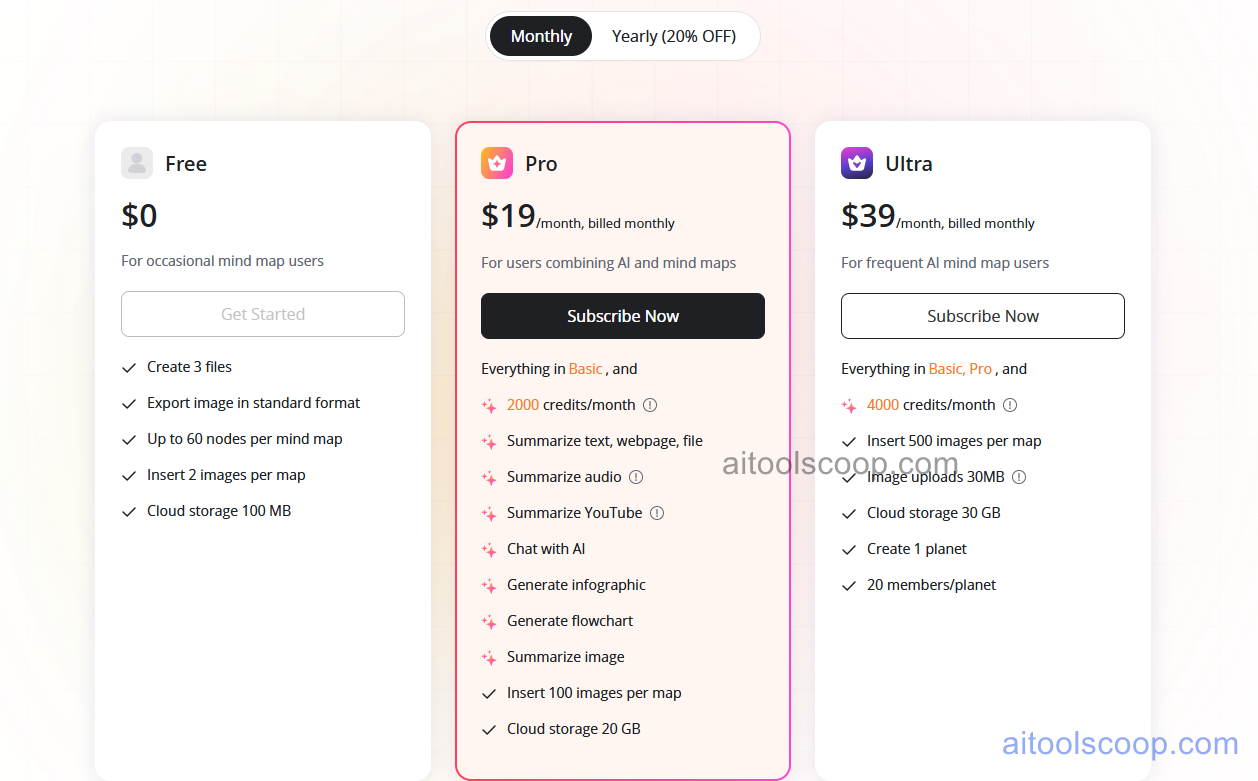
- Free — $0 — up to 3 files, 60 nodes per map, 2 images per map, view-only sharing, and 100MB of cloud storage. Enough for occasional mapping without any AI credits.
- Pro — $19/month (roughly $15.20/month billed annually) — everything in Free plus 2,000 AI credits/month for summarising text, files, audio, and YouTube video, AI chat, infographic and flowchart generation, 100 images per map, and 20GB of cloud storage.
- Ultra — $39/month (roughly $31.20/month billed annually) — everything in Pro plus 4,000 AI credits/month, 500 images per map, 30MB image uploads, 30GB of cloud storage, and one shared Planet workspace supporting up to 20 members.
Free plan available. Pro is $19/month and Ultra is $39/month billed monthly, with roughly 20% off when billed annually — the exact annual figure was not visible in the pricing screenshot and should be confirmed on-site before publishing. Pricing verified from gitmind.com; rates may change — always confirm current pricing at gitmind.com.
Who Should Use GitMind?
GitMind fits best for students, researchers, and content creators who regularly need to turn existing material — lecture recordings, PDFs, long articles — into a visual outline rather than starting from a blank page. The free plan is genuinely usable for anyone mapping occasionally, while Pro makes sense once AI summarisation and chat become part of a regular workflow rather than an occasional convenience. Ultra is really only worth the jump for small teams that want a shared Planet workspace, or heavy users who would otherwise burn through Pro's monthly AI credit pool. Larger organisations needing enterprise security controls or deep third-party integrations will likely find GitMind's feature set thinner than dedicated enterprise mapping or whiteboarding tools.
Frequently Asked Questions
What is GitMind?
GitMind is a free AI mind mapping tool that converts documents, webpages, audio, and video into structured mind maps, alongside AI chat, infographic generation, and flowchart creation from plain-text descriptions.
How much does GitMind cost in 2026?
GitMind has a free plan alongside two paid tiers: Pro at $19/month and Ultra at $39/month, both billed monthly. Annual billing is advertised at roughly 20% off, though the exact per-month annual rate should be confirmed directly on gitmind.com.
What's the difference between GitMind Pro and Ultra?
Pro includes 2,000 monthly AI credits, 100 images per map, and 20GB of storage. Ultra doubles the AI credit pool to 4,000, raises image and storage limits, and adds a shared Planet workspace for small-team collaboration with up to 20 members.
Does GitMind have a free plan?
Yes. The free plan allows up to 3 files and 60 nodes per map, with 100MB of cloud storage and view-only sharing, without requiring a credit card.
Is GitMind good for teams?
Basic sharing works on every plan, but dedicated team collaboration — the Planet workspace with multiple members — is only available on the Ultra tier. Smaller teams needing lighter shared access may find this limiting compared to tools that offer collaboration lower down their pricing ladder.