Flowace (flowace.ai) is an AI-driven time tracking and workforce analytics platform built to give managers and executives a clear, automated picture of how their teams actually spend their working hours. Rather than relying on employees to fill in manual timesheets, Flowace runs quietly in the background, capturing app and website usage, attendance, and active work time, then converts that raw activity data into productivity reports, billing-ready hours, and utilisation dashboards. The platform positions itself as a tool for measuring output and surfacing genuine work patterns rather than a surveillance product, and it is used across remote, hybrid, and in-office team structures.
Flowace's core pitch is that most organisations lose visibility into where time actually goes the moment work becomes distributed across home offices, coworking spaces, and traditional desks. By automating attendance capture, project and task time allocation, and app/website categorisation, the platform aims to give leadership a real-time read on workload balance, billable-hour accuracy, and early warning signs of burnout or disengagement — all without requiring staff to manually log their day. Pricing scales per user per month, starting at the Basic tier for small teams and solopreneurs handling core time tracking, up through higher tiers that add deeper reporting, white-glove onboarding, and priority support, with a custom-quoted Enterprise tier for large organisations that need dedicated provisioning and account management.
How Flowace Works
After signing up, teams install the Flowace desktop or web tracker, which begins logging activity automatically once a device is in use — there is no manual start/stop timer required for most workflows. The software records active and idle time, attributes hours to specific projects, tasks, and clients, and classifies applications and websites as productive, unproductive, or neutral based on configurable rules set by an admin. Attendance is captured the moment a session begins, supporting distributed teams without requiring employees to clock in through a separate system. Collected data feeds into dashboards that break down utilisation by individual, team, or the whole organisation, and can be mapped against billing rates so that managers can see project margins before an invoice goes out. Flowace also includes scheduling and shift-alert functionality, flagging missed shifts or late logins, and offers a "silent mode" that lets the tracker run in the background without interrupting a user's workflow.
Key Features
- Automated hands-free time tracking — activity capture starts as soon as a device is in use, removing the need for employees to manually start or stop timers or fill in end-of-day timesheets
- App and website productivity categorisation — administrators can label applications and URLs as productive, unproductive, or neutral at the individual, team, or company level, feeding directly into productivity scoring
- Automated attendance and shift tracking — clock-in is detected automatically when a session begins, with configurable schedules, rotation management, and alerts when a team member misses a shift or logs in late
- Project, task, and client time mapping — tracked hours are automatically attributed to the relevant project or client, supporting utilisation analysis without manual entry
- Billing rate and margin visibility — tracked time can be mapped to billing rates so managers can see real project margins ahead of invoicing, and convert tracked hours directly into client invoices
- Configurable productivity ratings — productivity benchmarks can be tuned separately for the whole company, individual teams, or specific employees rather than applying one fixed standard across the organisation
- Custom work categories — teams can define their own categories for classifying time and activity in a way that matches their actual workflows rather than generic presets
- Idle time and burnout signal detection — the platform flags idle periods, non-focus time, and repetitive inefficiency patterns that can indicate workflow bottlenecks or early signs of employee burnout
- Third-party integrations — Flowace connects with a range of workplace tools so tracked time can flow into existing project management and HR systems without duplicate data entry
- Offline tracking support — timesheet activity continues to be recorded even without an active internet connection, syncing once connectivity is restored
Flowace Pricing
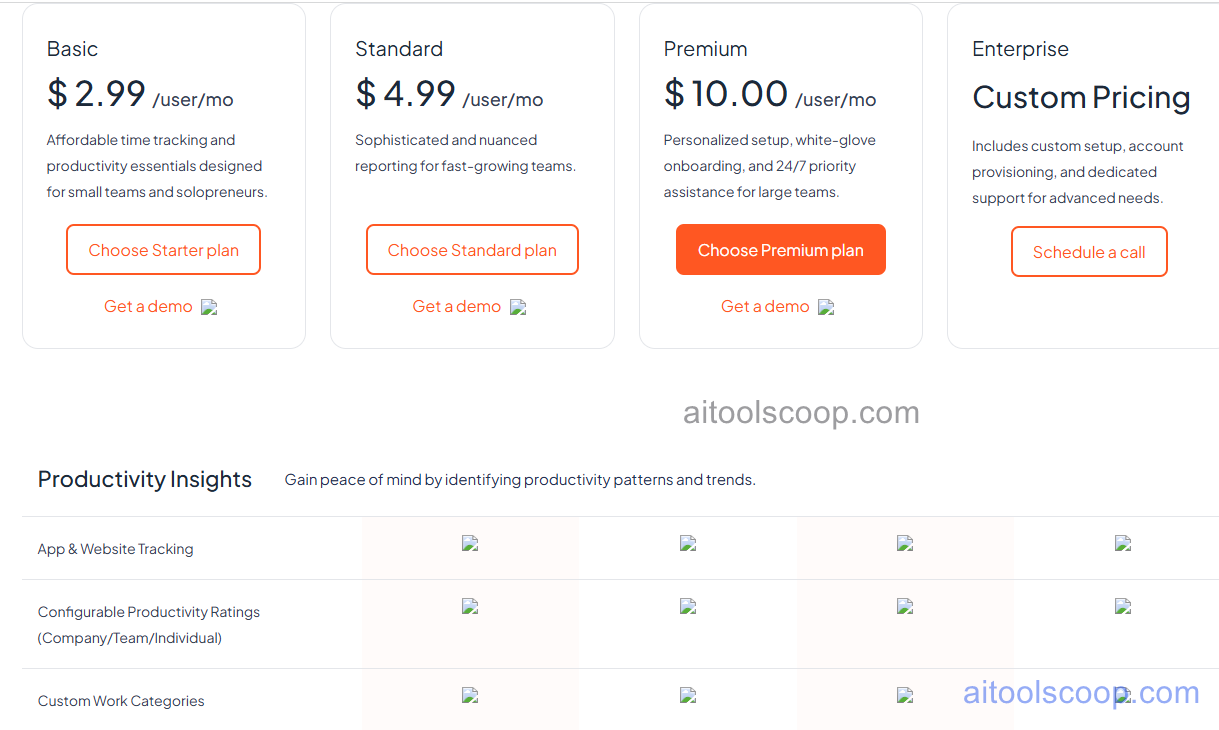
Flowace uses per-user, subscription-based pricing that scales with team size and the depth of reporting and support included. Paid plans start from $2.99 per user, per month on monthly billing, covering core time tracking and productivity essentials aimed at small teams and solopreneurs. Mid-tier and higher plans add more sophisticated reporting, white-glove onboarding, and priority assistance for growing teams, with the top self-serve tier suited to larger teams that need 24/7 priority support. Organisations with advanced requirements — custom setup, account provisioning, or dedicated support — are quoted a custom Enterprise price rather than a fixed rate. Billing annually brings the effective monthly rate down to roughly $1.99 per user at the entry level, a saving of close to a third compared with paying month to month. Flowace does not currently list a permanent free tier, but a free trial period is typically available for teams that want to evaluate the tracker before subscribing.
Plan names and included features vary and are set by Flowace directly — always confirm current tiers and pricing at flowace.ai before subscribing, as rates are subject to change.
Who Should Use Flowace?
Flowace is best suited to managers and executives overseeing remote, hybrid, or distributed teams who need objective visibility into how work hours are actually spent, without asking staff to maintain manual timesheets. Small teams and solopreneurs get a low-cost entry point at the Basic tier for straightforward attendance and time tracking. Agencies and client-services businesses that need to tie tracked hours to billing rates and project margins will get the most value from the mid and upper tiers, where invoicing and more granular reporting become available. Larger organisations that need custom onboarding, dedicated account support, and provisioning for many users are better served by the Enterprise tier with a negotiated quote. Flowace is less suited to individuals or teams looking purely for a simple personal Pomodoro-style timer, or to organisations whose staff are strongly opposed in principle to any form of automated activity monitoring — even though Flowace frames its approach around measuring output patterns rather than surveillance, any always-on activity tracker requires team buy-in to be effective.
Frequently Asked Questions
What is Flowace?
Flowace is an AI-powered time tracking and workforce analytics platform that automatically records work activity, attendance, and app or website usage for remote, hybrid, and in-office teams. It converts that data into productivity reports, billing-ready hours, and utilisation insights without requiring employees to fill in manual timesheets.
How much does Flowace cost in 2026?
Flowace pricing is per user, per month, and starts from around $2.99/user/month on monthly billing at the entry tier. Paying annually brings the effective starting rate down to roughly $1.99/user/month. Higher tiers with deeper reporting and priority support cost more, and large organisations can request custom Enterprise pricing. Exact tier names and inclusions should be confirmed directly at flowace.ai, as they are set by the vendor and may change.
Does Flowace have a free plan?
Flowace does not advertise a permanent free tier; instead it typically offers a free trial period so teams can test the tracker before committing to a paid subscription. Ongoing use of the productivity and attendance tracking features requires a paid plan starting from roughly $2.99/user/month.
Is Flowace an employee monitoring tool or a productivity tool?
Flowace combines both functions. It automatically tracks attendance, app and website usage, and active work time in the way monitoring software does, but the platform's stated focus is on surfacing productivity patterns, workload balance, and bottlenecks for teams and managers rather than granular personal surveillance. Whether it is experienced primarily as a monitoring tool or a productivity tool in practice depends on how an organisation configures and communicates its use.
Can Flowace track time for remote and hybrid teams?
Yes. Flowace is designed to work the same way regardless of whether a team member is fully remote, hybrid, or working from an office, giving managers consistent visibility into attendance and productivity across all work locations. Offline activity is also recorded and synced once an internet connection is restored.