

Home/ AI Tools /AI Coding Tools /Continue
Continue screenshot Paid
Continue thumbnail
🤖 AI Coding Tools
#6 in AI Coding Tools

Continue

Continue is an open-source AI coding assistant for VS Code and JetBrains that lets you use any AI model — including local models — for chat, code completion, and autonomous agent tasks. Free plan available. Teams from $20/month.

4.4 / 5 (24 reviews) Paid From $3/mo
Quick Info
💰 Pricing$3/mo
⭐ Rating4.4 / 5 (24 reviews)
🆓 Free Plan❌ No
📂 CategoryAI Coding Tools
🌐 WebsiteVisit ↗
🔄 Last UpdatedMay 21, 2026
🔀 Alternatives16 tools
Verified DataUpdated May 21, 2026
Independently ReviewedNo paid placements
Detailed AnalysisHands-on testing
Key Features
  • Bring your own model — connect GPT-4o, Claude, Gemini, Mistral, or local Ollama models
  • Three workflow modes — Chat, Plan, and Agent for different levels of AI involvement
  • Full local deployment — run air-gapped with local models, zero code sent externally
  • Open source — full codebase on GitHub, customizable to any workflow
  • Agent Mode — autonomous multi-file edits, CI/CD integration, and Jira ticket handling
  • Custom private AI agents tailored to your team stack on Teams plan
  • VS Code and JetBrains support with real-time completions and chat
  • Enterprise SSO (SAML/OIDC) and on-premises data plane separation
4.4
Overall Rating — based on 24 reviews
Ease of Use
4.6
Features
4.4
Value
4.1
Performance
4.5
Support
4.3
Pros & Cons
👍 Pros
  • Completely open source — full transparency and customizability with no vendor lock-in
  • Use any AI model including free local models via Ollama for zero ongoing cost
  • Full local deployment makes it viable for air-gapped and regulated environments
  • Solo plan at $3/month is the most affordable paid AI coding assistant available
  • Agent Mode handles autonomous multi-file changes and CI/CD pipeline tasks
👎 Cons
  • Steeper setup compared to one-click tools like GitHub Copilot
  • UI less polished than Cursor or Copilot — functional but not refined
  • Documentation gaps require digging through GitHub issues for advanced features
  • Model quality depends entirely on the API or local model you configure
📖

About Continue

Open-Source AI Coding Assistant for Any IDE

Continue (continue.dev) is the leading open-source AI code assistant, installed as an extension in VS Code and JetBrains IDEs. Unlike locked-in tools like GitHub Copilot, Continue gives developers complete freedom to choose their AI model — GPT-4o, Claude, Gemini, Mistral, or any local model via Ollama — and deploy entirely on-premises with no code leaving the machine. It supports three workflow modes: Chat for Q&A, Plan for safe code exploration, and Agent for autonomous multi-file changes.

How Continue Works

Continue installs as an IDE extension and connects to your chosen AI model via API key or local inference. Chat Mode provides a conversational interface grounded in your actual codebase context. Plan Mode creates a read-only sandbox where AI suggests changes without touching anything — useful for reviewing proposed modifications before applying them. Agent Mode autonomously executes multi-file refactoring, addresses CI/CD issues, and handles large-scale changes across the entire project.

Key Features

  • Bring your own model — connect any LLM including GPT-4o, Claude, Gemini, Mistral, or local Ollama models
  • Three workflow modes — Chat, Plan, and Agent for different levels of AI involvement
  • Full local deployment — run entirely air-gapped with local models, no code sent to external servers
  • Open source — full codebase on GitHub, customizable to any team workflow or toolchain
  • Agent Mode — autonomous multi-file edits, CI/CD integration, Sentry alert resolution, and Jira ticket handling
  • Custom AI agents — build and share private coding agents tailored to your team's stack on Teams plan
  • IDE integration — VS Code and JetBrains with real-time inline completions and chat
  • Enterprise SSO & on-prem data plane — SAML/OIDC SSO and local data plane separation for enterprise compliance

Continue Pricing
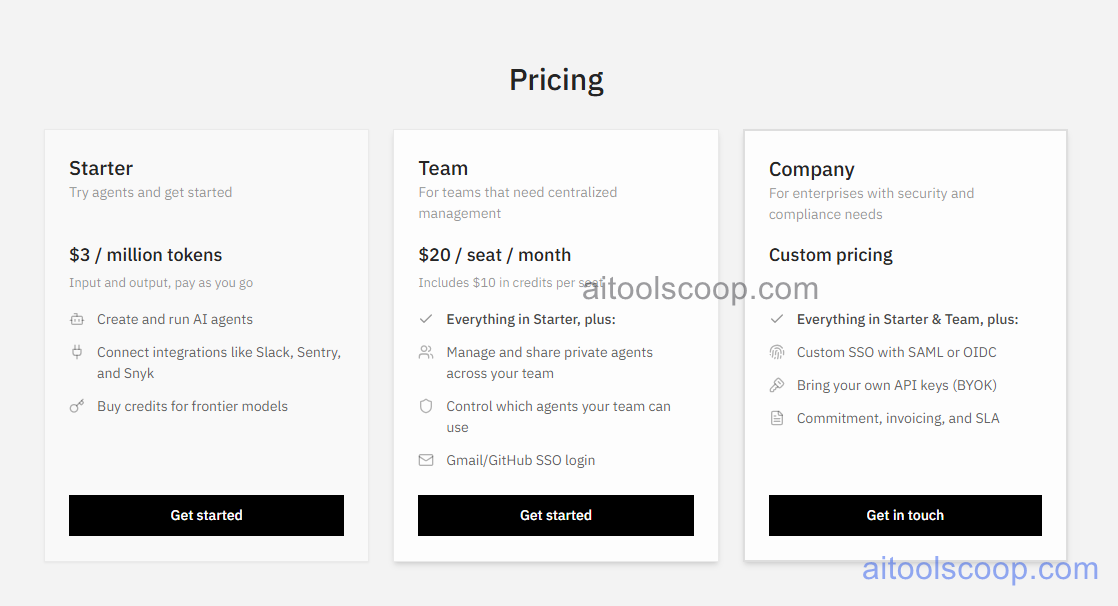
Continue pricing plans
Continue pricing — screenshot from continue.dev/pricing
  • Solo — $3/month — full access to all core features including Chat, Plan, and Agent modes. You supply your own API keys or use free local models. Models Add-On available for flat-fee frontier model access.
  • Teams — $20/developer/month — shared team configurations, custom private AI agents, centralized secret management, team analytics, and priority support.
  • Enterprise — Custom pricing — SSO (SAML/OIDC), on-premises data plane, advanced governance, allow/block lists for agents, and dedicated support.

Always check the latest rates on the official website. For more AI tool reviews, visit aitoolscoop.com.

Who Should Use Continue?

Continue is ideal for privacy-conscious developers and teams who cannot send proprietary code to external servers, developers who want full control over their AI model choice and costs, and engineering teams seeking a cost-effective alternative to GitHub Copilot Business. It is particularly strong for teams in regulated industries — healthcare, finance, defense — where air-gapped or on-premises AI deployment is a requirement.


💰

Pricing Plans

Plan Monthly Annual (billed yearly)
Starter $3/mo $3/mo
Creator $20/mo $20/mo

Solo $3/mo · Teams $20/dev/mo · Enterprise Custom

Check Current Pricing →
Affiliate Disclosure: This page contains affiliate links. If you click and make a purchase, we may earn a small commission at no extra cost to you. We only recommend tools we genuinely believe in.

🎯 Explore More

Discover other curated resources from our platform

🛠️ AI Tools View All →
Wolfram Alpha — Free Computational Intelligence…
★ 4.6
Relume
★ 4.5
CrowdStrike
★ 4.7
⚔️ VS Comparisons View All →
⚔️
ChatGPT vs Gemini for Writing in…
ChatGPT GPT-4o vs Gemini 1.5 Pro
⚔️
ChatGPT vs DeepSeek: Which AI Is…
ChatGPT GPT-4o vs DeepSeek R1
ChatGPT vs Kimi: 2026 Comparison —…
ChatGPT vs Kimi
💡 Free Prompts View All →
💡
ChatGPT for Tourism Board Marketers: Write…
🔥 2.3K uses
💡
Beginner Guide: Claude Prompts for CFOs…
🔥 8.1K uses
💡
Gemini for Ops Managers: Fix Vague…
🔥 980 uses
💡 Free Prompts
SUBMIT TOOL FREE