
Murf AI (murf.ai) is a cloud-based AI voice generator and text-to-speech (TTS) platform that allows content creators, marketers, educators, and product teams to produce high-quality voiceovers from typed text without recording equipment or voice talent. Founded in 2020 and headquartered in San Francisco, Murf provides a library of more than 200 AI voices across 20+ languages and accents — covering a wide range of styles from professional narrators and corporate presenters to casual conversational voices and character styles.
Murf's studio interface goes beyond basic text-to-speech: it offers a full voiceover production environment where users can import a video or presentation, sync the AI voice timeline to the visual content, adjust pacing and emphasis on individual words, add background music, and export a finished video with the AI voiceover composited. This makes it particularly well suited to e-learning creators, explainer video producers, and marketing teams who need narrated video content at scale without hiring voice actors for every iteration.
How Murf AI Works
Users type or paste a script into Murf's studio, select a voice from the library (filtered by language, accent, gender, age, and use case), and generate the AI voiceover. The timeline editor allows the narration to be split into segments with adjustable pauses, emphasis, and pronunciation corrections for specific words. Users can upload a video or image sequence and sync the voiceover to the visual content within the studio. Background music tracks are available from Murf's library. The finished output is exported as an MP3 or WAV audio file, or as an MP4 video with the voiceover and visuals combined.
Key Features
- 200+ AI voices — diverse voice library covering 20+ languages, multiple accents, age ranges, and styles for varied use cases
- Voice customisation — adjust speed, pitch, emphasis, pauses, and pronunciation at the word and sentence level
- Video sync studio — import video or image sequences and sync AI voiceover narration to the visual timeline
- Background music library — royalty-free music tracks for adding atmosphere and professional polish to voiceover productions
- Voice cloning — create a custom AI voice clone from a recorded sample for consistent brand voice across all content
- Collaboration — team workspace with shared projects, role-based access, and multi-user editing on paid plans
- API access — REST API for integrating Murf text-to-speech generation into custom applications and content pipelines
- Script import — import scripts from DOCX or plain text files directly into the Murf studio
- MP3, WAV, and MP4 export — export finished voiceovers as audio files or composited video with narration and visuals
- Pronunciation editor — custom phonetic pronunciation settings for brand names, technical terms, and abbreviations
Murf AI Pricing
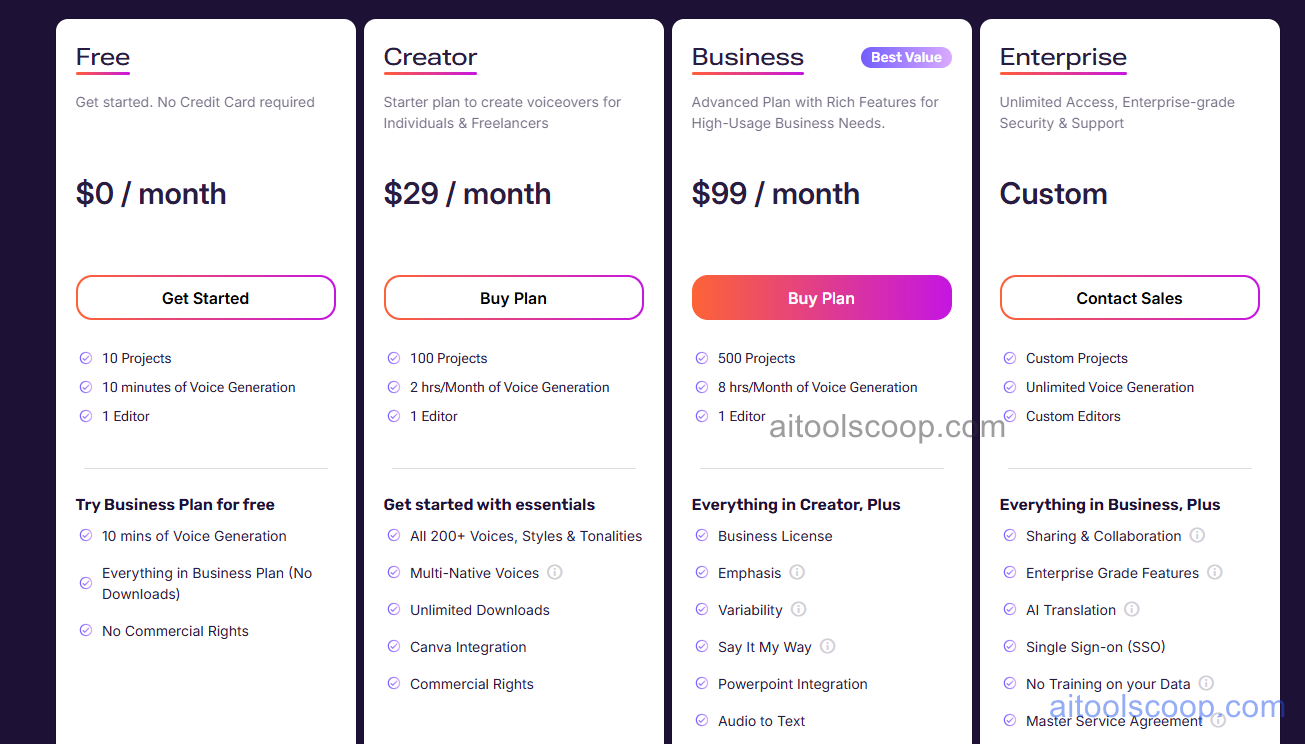
Murf AI offers a free plan alongside three paid tiers with significant annual billing savings.
- Free — limited monthly voice generation minutes, access to a subset of voices, and basic studio features. No credit card required. Suitable for evaluation and light personal use.
- Creator — $29/month (annual: $19/month) — full voice library, unlimited voiceover generation, video sync studio, background music, MP3/WAV/MP4 export, and commercial usage rights for individual creators.
- Business — $99/month (annual: $66/month) — everything in Creator plus voice cloning, team collaboration, API access, priority support, and advanced commercial rights for teams and agencies.
- Enterprise — Custom pricing — custom voice creation, dedicated support, SLA, SSO, and volume licensing for large organisations.
The free plan is permanently available with no credit card required. Always verify current rates at murf.ai/pricing.
Who Should Use Murf AI?
Murf AI is best suited to e-learning content developers, YouTube creators, explainer video producers, corporate training teams, and marketing agencies who need professional voiceover narration at scale without the cost and scheduling constraints of human voice actors. The video sync studio makes it particularly practical for teams producing narrated slide-based or explainer video content regularly. Voice cloning on the Business plan is valuable for brands wanting a consistent custom AI voice across all content. The free plan covers basic evaluation and one-off use. Murf is less suited to projects requiring highly expressive or emotional voice performance that AI cannot yet match — for those, human voice acting remains superior.
Frequently Asked Questions
Is Murf AI free to use?
Yes. Murf AI offers a permanently free plan that includes limited monthly voice generation minutes and access to a subset of the voice library. No credit card is required to sign up. The free plan is suitable for evaluating the voice quality and studio interface before committing to a paid subscription. For commercial use, unlimited generation, and the full voice library, a paid plan is required.
How many voices does Murf AI have?
Murf AI offers more than 200 AI voices covering 20+ languages and a wide range of accents, ages, genders, and speaking styles. The library includes voices suited for corporate narration, e-learning, explainer videos, advertisements, audiobooks, and casual conversational content. Users can filter the voice library by language, accent, gender, age, and use case to find the most appropriate voice for their project.
Can Murf AI sync voiceover to video?
Yes. Murf's studio includes a video sync feature that allows users to import a video file or image sequence and align the AI voiceover narration to the visual content on a timeline. The voiceover segments can be adjusted for timing and pacing to match specific visual moments. Background music can be added on the same timeline. The finished output is exported as an MP4 video with the voiceover and visuals composited — eliminating the need for a separate video editor for narrated presentations and explainer videos.
Does Murf AI support voice cloning?
Yes. Murf AI's Business plan includes voice cloning, which allows users to create a custom AI voice model from a recorded audio sample. The cloned voice can then be used to generate unlimited voiceover content in that voice without re-recording. This is particularly useful for brands and creators who want a consistent, recognisable voice across all their content — without the voice actor being available for every recording session.
Can I use Murf AI voiceovers commercially?
Yes. Murf AI grants commercial usage rights on paid plans — Creator and above. This covers using the generated voiceovers in YouTube videos, advertisements, corporate training content, e-learning courses, podcasts, and other commercial projects. The free plan is limited to non-commercial personal use. Always review the current Murf AI terms of service for the specific commercial rights granted at each plan level.