
Happy Scribe (happyscribe.com) is a cloud-based transcription and subtitle platform founded in 2017 in Barcelona, Spain. It converts audio and video recordings into accurate text transcripts and subtitle files using AI automatic speech recognition (ASR), and also offers access to a network of professional human transcriptionists for projects where accuracy is critical. Happy Scribe supports over 120 languages and accents, making it one of the most linguistically comprehensive transcription tools available for content creators, journalists, researchers, and media production teams.
Happy Scribe's platform covers the full subtitle and transcription workflow in one place: automatic transcription, an interactive browser-based editor for reviewing and correcting the AI output, translation into 72+ languages, and export in all standard subtitle and transcript formats. It integrates directly with video editing software and content platforms, and its API allows development teams to build transcription into their own applications and workflows. The combination of AI speed and optional human accuracy makes it suitable for everything from podcast show notes to broadcast-quality subtitles.
How Happy Scribe Works
Users upload an audio or video file (or paste a YouTube, Vimeo, or podcast URL), select a source language, and choose between automatic AI transcription (fast, lower cost) or human transcription (slower, higher accuracy guaranteed). The AI generates a transcript within minutes; the browser-based editor displays the transcript alongside the audio waveform with playback controls, allowing users to click any word to jump to that point in the recording and correct errors inline. Finished transcripts are exported as TXT, DOCX, PDF, SRT, VTT, or other formats. Translation converts the transcript or subtitle file into a chosen target language automatically.
Key Features
- AI automatic transcription — converts audio and video to text in 120+ languages with speaker identification and timestamps
- Human transcription service — professional transcriptionists available for projects requiring guaranteed accuracy beyond AI capability
- Interactive transcript editor — browser-based editor with audio waveform playback, click-to-seek word navigation, and inline correction
- Automatic subtitle generation — generates SRT and VTT subtitle files from any audio or video file with timing synchronisation
- Translation — translate transcripts and subtitle files into 72+ languages directly within the platform
- 120+ language support — automatic speech recognition covering over 120 languages and regional accents
- Multi-format export — export as TXT, DOCX, PDF, SRT, VTT, EBU-STL, and other standard transcript and subtitle formats
- Speaker identification — automatically labels different speakers in multi-person recordings for organised transcripts
- API access — REST API for integrating transcription and subtitle generation into custom applications and workflows
- Integrations — connects with Zapier, Adobe Premiere Pro, and content management platforms for automated workflow integration
Happy Scribe Pricing
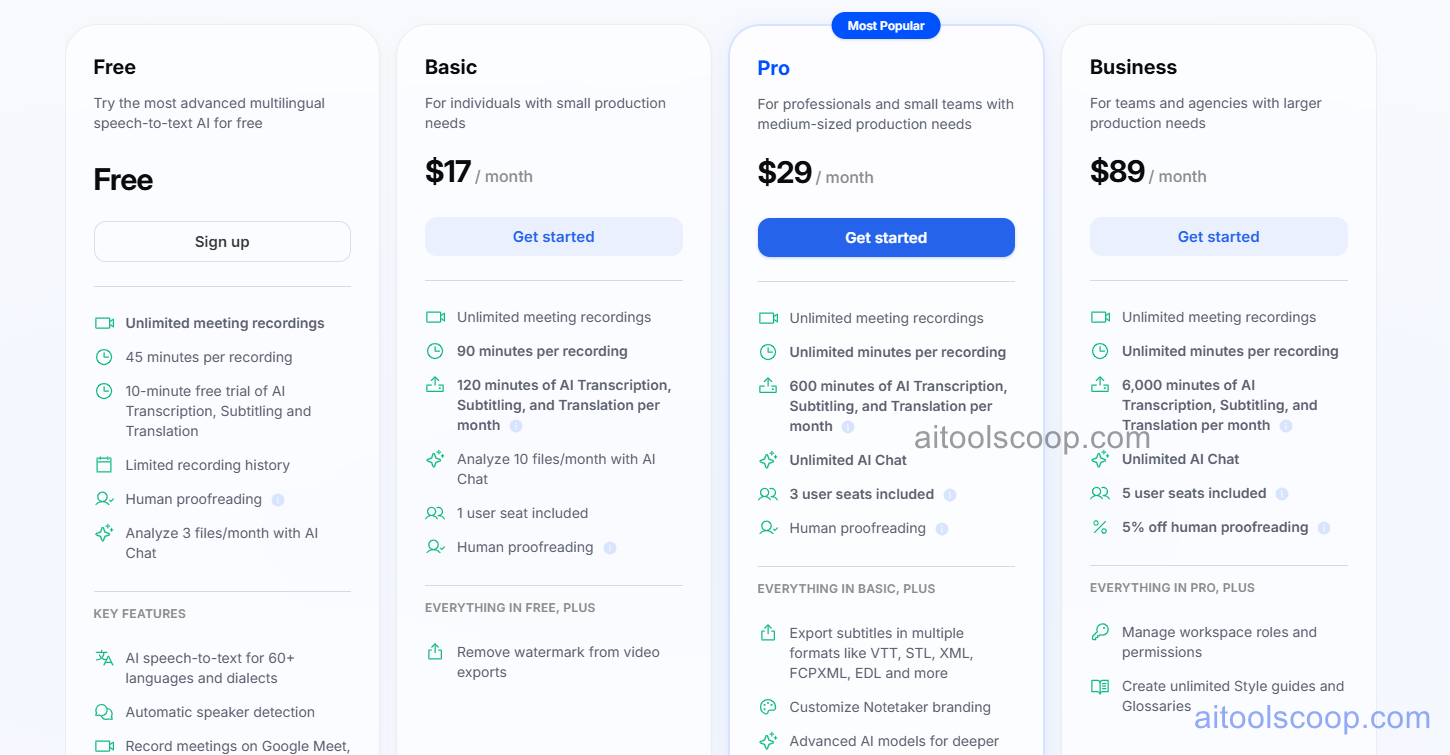
Happy Scribe offers a free plan alongside three paid tiers with significant annual billing savings.
- Free — limited free transcription minutes per month, AI automatic transcription, subtitle generation, and basic export. No credit card required. Suitable for occasional transcription needs.
- Basic — $17/month (annual: $8.50/month) — expanded transcription minutes, full export formats including SRT and VTT, translation, and priority support.
- Pro — $29/month (annual: $19/month) — higher transcription volume, speaker identification, human transcription access, API access, and team collaboration features.
- Business — $89/month (annual: $59/month) — maximum transcription volume, full API access, advanced team management, custom integrations, and dedicated support for high-volume media and production teams.
The free plan is permanently available with no credit card required. Human transcription is billed separately per minute. Always verify current rates at happyscribe.com/pricing.
Who Should Use Happy Scribe?
Happy Scribe is well suited to podcasters, journalists, video content creators, researchers, media production teams, and academics who regularly need to convert spoken audio or video content into accurate text. Its 120+ language support makes it one of the best options for multilingual transcription and subtitle workflows. The free plan is functional for occasional users with light transcription needs. The annual Basic plan at $8.50/month offers excellent value for content creators who need regular transcription and subtitle export. The human transcription option makes it suitable even for broadcast-quality accuracy requirements. Happy Scribe is less suited to teams needing real-time live transcription or enterprise-grade compliance features.
Frequently Asked Questions
Is Happy Scribe free to use?
Yes. Happy Scribe offers a permanently free plan that includes a limited number of transcription minutes per month, AI automatic transcription, subtitle generation, and basic export functionality. No credit card is required to sign up. The free plan is suitable for occasional transcription needs such as short podcast episodes, interviews, or video clips. For higher volume or regular transcription workflows, a paid plan provides more minutes and advanced features.
How accurate is Happy Scribe's AI transcription?
Happy Scribe's AI transcription accuracy varies depending on audio quality, accent, background noise, and the language being transcribed. For clear, standard-accent recordings in major languages like English, accuracy is typically high and requires minimal correction. For challenging audio, non-standard accents, or less common languages, accuracy may be lower and more editor review will be needed. For broadcast-quality or legally critical accuracy requirements, Happy Scribe's human transcription service guarantees a higher accuracy standard at an additional per-minute cost.
How much does Happy Scribe cost?
Happy Scribe's Basic plan costs $17/month ($8.50/month annually), the Pro plan costs $29/month ($19/month annually), and the Business plan costs $89/month ($59/month annually). Annual billing saves approximately 33–50% across plans. A permanently free plan with limited minutes is available with no credit card required. Human transcription is billed separately at per-minute rates on top of the subscription.
What subtitle file formats does Happy Scribe export?
Happy Scribe exports subtitle files in SRT, VTT, EBU-STL, TTML, and other standard subtitle formats used by video platforms, broadcast systems, and video editing software. Transcript text can be exported as TXT, DOCX, PDF, and other document formats. The format export range covers the requirements of YouTube, Vimeo, Netflix, Adobe Premiere Pro, Final Cut Pro, and most major video platforms and broadcast delivery specifications.
Does Happy Scribe support translation?
Yes. Happy Scribe includes an automatic translation feature that converts a completed transcript or subtitle file into a chosen target language — covering 72+ languages. Users select the source language of the original transcription and the desired target language, and Happy Scribe generates the translated version automatically. The translated subtitle file can then be exported in SRT, VTT, or other formats for adding multilingual subtitles to video content without a separate translation tool.