
Best AI Meeting Notes Tool for Remote Teams
Notta (notta.ai) is an AI-powered meeting assistant and transcription platform that automatically captures, transcribes, and summarizes meetings, interviews, and voice recordings in real time. Compatible with Zoom, Google Meet, Microsoft Teams, and other major conferencing platforms, Notta joins meetings as an AI bot and delivers a complete transcript, an AI-generated summary, and a structured list of action items immediately after each session ends. With support for over 50 languages and integrations with popular productivity tools, Notta eliminates manual note-taking and enables teams to stay focused on conversations while ensuring nothing is missed or forgotten.
How Notta Works
Connect Notta to your calendar or conferencing platform and it automatically joins scheduled meetings as a virtual participant. Notta transcribes conversations in real time with speaker identification, so every participant's contributions are attributed accurately. When the meeting ends, Notta's AI generates a concise summary of the discussion, identifies decisions made, and extracts a prioritized action item list. Review and edit the transcript and notes in the Notta web or mobile app. Share meeting summaries with absent team members via email or through integrations with Notion, Slack, HubSpot, and other tools. Audio and video files can also be uploaded manually for transcription outside of live meetings.
Key Features
- AI meeting bot — automatically joins and transcribes Zoom, Google Meet, and Teams meetings
- Real-time transcription — live speech-to-text with speaker identification throughout sessions
- AI-generated summaries — automatic post-meeting summaries capturing key discussion points
- Action item extraction — AI identifies and lists tasks and next steps from meeting content
- 50+ language support — transcription and meeting notes across a wide range of languages
- Calendar integration — sync with Google Calendar and Outlook for automatic meeting joins
- Productivity tool integrations — connect to Notion, Slack, HubSpot, Salesforce, and more
- File upload transcription — manually upload audio and video files for AI transcription
- Mobile and web apps — access meeting notes and transcripts from any device
- Team workspace — shared library for storing, searching, and collaborating on meeting notes
Notta Pricing
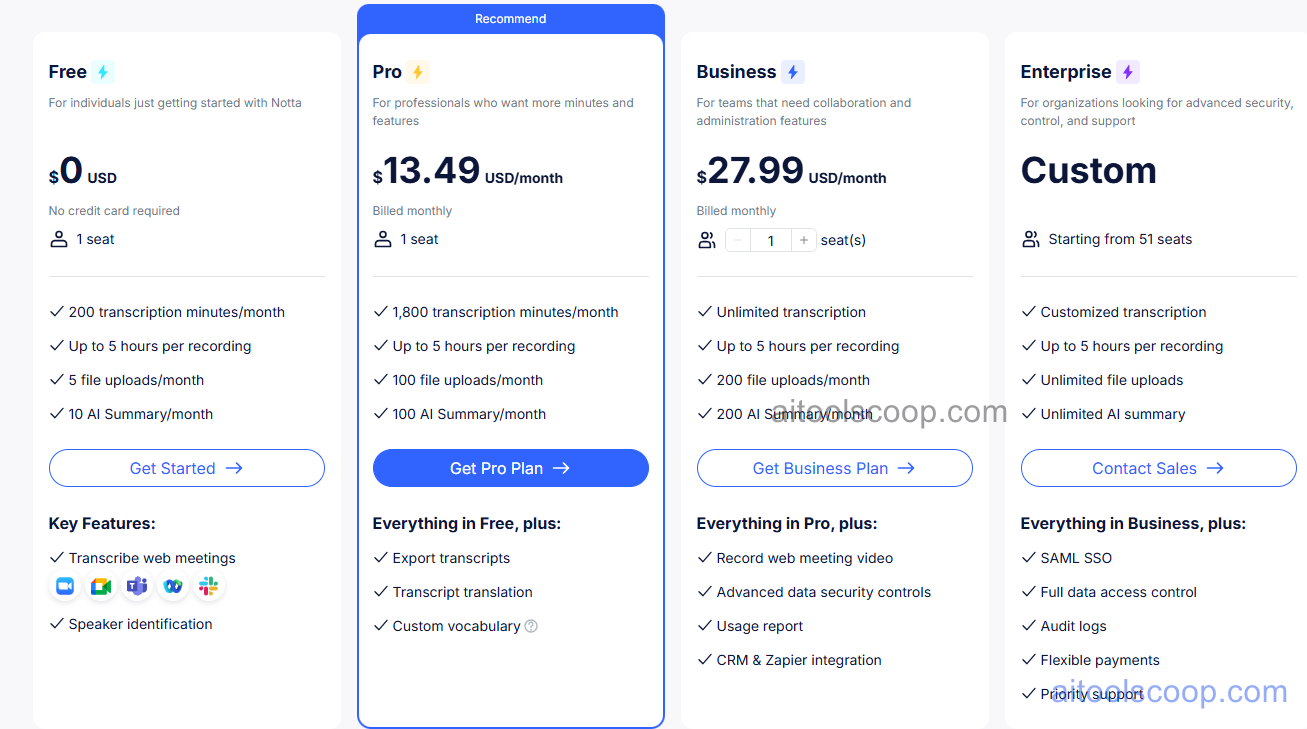
- Free — limited transcription minutes per month, AI meeting bot for short meetings, basic summaries, standard export, single user.
- Pro — $13.49/month or $8.17/month billed annually ($98.04/year) — expanded monthly transcription minutes, unlimited AI summaries, action item extraction, all integrations, advanced export formats, priority support.
- Business — $27.99/month or $16.67/month billed annually ($200.04/year) — all Pro features, team workspace, shared meeting library, admin controls, user management, advanced analytics, CRM integrations.
- Enterprise — Custom pricing — all Business features, unlimited volume, SSO, custom integrations, dedicated support, SLA guarantees, enterprise security compliance.
Always check the latest rates on the official website. For more AI tool reviews, visit aitoolscoop.com.
Who Should Use Notta?
Notta is ideal for remote and hybrid teams tired of manual note-taking during online meetings, sales professionals capturing client calls and CRM follow-up actions, HR teams recording interviews for candidate evaluation, project managers tracking decision logs and task assignments from standups, and researchers conducting and documenting qualitative interviews. The Free plan works for occasional meeting transcription, the Pro plan suits individual professionals in high-meeting roles, the Business plan fits collaborative teams needing shared note libraries, and Enterprise covers organizations with compliance and volume requirements.