

Automated AI Audio Mastering for Podcasters
Auphonic (auphonic.com) is an automated audio post-production platform that applies intelligent processing to raw recordings — leveling loudness, reducing background noise, removing hum and clicks, and encoding to broadcast standards — without requiring manual audio engineering knowledge. Widely adopted in the podcasting community, Auphonic handles the repetitive technical cleanup tasks between recording and publishing, allowing creators to focus on content rather than audio production. The platform integrates directly with podcast hosting platforms, WordPress, Dropbox, and SoundCloud, enabling fully automated publish pipelines. With chapter mark support, transcript generation, and multi-track mixing, Auphonic serves independent podcasters, radio stations, and audiobook producers requiring consistent, broadcast-ready audio at scale.
How Auphonic Works
Upload your audio or video file to Auphonic via the web interface, API, or connected cloud storage. Create a Production preset specifying your desired processing chain — adaptive leveling (LUFS target), noise reduction strength, filtering type, and output format. Select output encoding formats (MP3, AAC, FLAC, WAV, Opus) and destinations (local download, FTP, Dropbox, SoundCloud, podcast hosts). Auphonic processes the file in the cloud, applying its Leveler algorithm for perceptual loudness normalization, DeNoise for background noise reduction, Filtering for hum and click removal, and DeEsser for sibilance control. For podcasts, add chapter marks with titles, images, and URLs. Enable SpeechRecognition to generate automatic transcripts. For multi-track recordings (interview shows), use the multi-track feature to level and mix separate speaker tracks before export. Download or auto-publish the finished file to all connected destinations.
Key Features
- Adaptive leveling — normalizes loudness to broadcast standards (EBU R128, ATSC A/85)
- AI noise reduction — removes background noise, hum, hiss, and room reverberation
- DeEsser — reduces harsh sibilance and plosive sounds automatically
- Multi-track mixing — balances separate speaker tracks from interview recordings
- Chapter marks — add timestamped chapters with images and URLs for podcast episodes
- Automatic transcription — speech recognition for episode transcripts
- Direct publishing — integrates with podcast hosts, Dropbox, SoundCloud, and FTP
- Production presets — save custom processing chains for consistent episode treatment
- API access — integrate Auphonic into automated audio workflows
- Video support — process audio within video files and export with improved audio
Auphonic Pricing
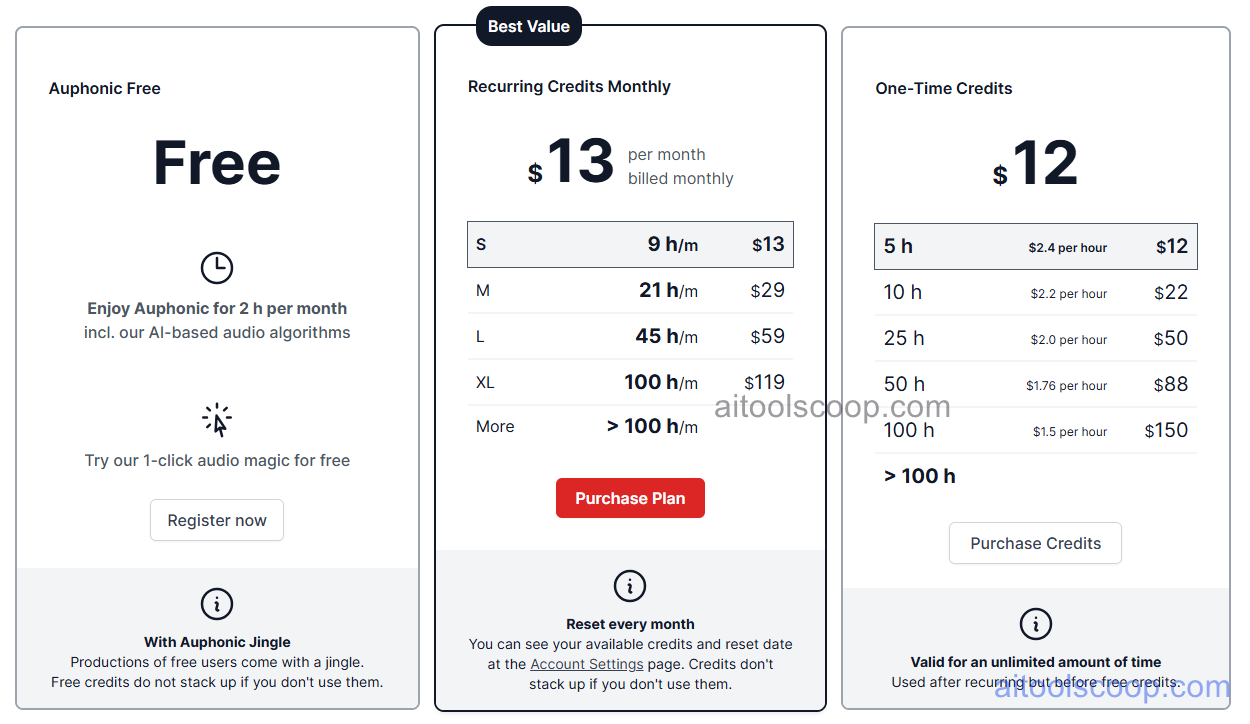
| Plan | Monthly | Annually | Key Features |
|---|---|---|---|
| Free | $0 | $0 | 2 hours free processing/month, all AI features, all output formats, API access |
| Paid | from $12/month | from $11/month | Additional processing hours, all features, production presets, multi-track, chapter marks, publishing integrations |
Auphonic uses a credit-based model — paid plans provide additional processing hours beyond the free 2 hours/month. Always check the latest rates on the official website. For more AI tool reviews, visit aitoolscoop.com.
Who Should Use Auphonic?
Auphonic is ideal for independent podcasters seeking consistent broadcast-quality audio without audio engineering training, radio producers automating post-production for regular broadcasts, audiobook narrators cleaning up home studio recordings, video creators improving audio tracks before publishing, journalists and interview-format creators managing multi-track recordings from remote guests, and developers building automated audio processing pipelines via API. The free 2 hours/month covers weekly podcasters publishing 30-minute episodes, while the paid tier suits higher-volume producers or those needing additional processing capacity.