

Sciwheel (sciwheel.com) is a cloud-based reference management and academic writing tool built specifically for the scientific and research community. Originally developed as F1000Workspace and later rebranded as Sciwheel, the platform integrates directly with PubMed, Google Scholar, and major journal sites to let researchers save, annotate, and cite papers without leaving their workflow. Sciwheel's AI capabilities assist with literature review, summarisation of research papers, and generating citation-formatted references within Google Docs and Microsoft Word via browser extensions.
What distinguishes Sciwheel from general reference managers like Zotero or Mendeley is its deep focus on collaborative science — shared project libraries, team annotation, and real-time commenting make it particularly suited to research groups, lab teams, and co-authored manuscripts. The platform supports over 6,000 citation styles and integrates natively with Google Docs and Microsoft Word for in-document reference insertion and bibliography generation.
How Sciwheel Works
Researchers install the Sciwheel browser extension (Chrome or Firefox) and begin saving papers from PubMed, Google Scholar, journal websites, or any webpage with a single click. Saved papers are stored in project-based libraries where users can annotate PDFs with highlights and comments, add personal notes, and tag references for organisation. When writing in Google Docs or Word, the Sciwheel add-on lets researchers search their library and insert formatted citations inline. Sciwheel's AI features can summarise individual papers, extract key findings, and assist in drafting literature review sections. Team members invited to a shared project can see each other's annotations and comments in real time.
Key Features
- AI paper summarisation — AI-generated summaries of research papers to quickly assess relevance without reading full text
- One-click reference capture — browser extension saves papers from PubMed, Google Scholar, journal sites, and any webpage with full metadata
- PDF annotation — highlight, annotate, and add notes to full-text PDFs directly within Sciwheel
- Google Docs and Word integration — insert citations and generate bibliographies in 6,000+ styles directly within documents
- Collaborative project libraries — share paper collections with lab teams, co-authors, and supervisors with real-time annotation visibility
- PubMed and Google Scholar sync — search PubMed directly within Sciwheel and import results in bulk
- Citation style support — 6,000+ citation styles including APA, MLA, Vancouver, and all major journal-specific formats
- Research notes — create linked notes and literature review drafts connected to cited papers
- DOI and metadata auto-fill — automatic metadata retrieval for papers added by DOI, PMID, or URL
- Mobile access — read and annotate saved papers on mobile via the Sciwheel web app
Sciwheel Pricing
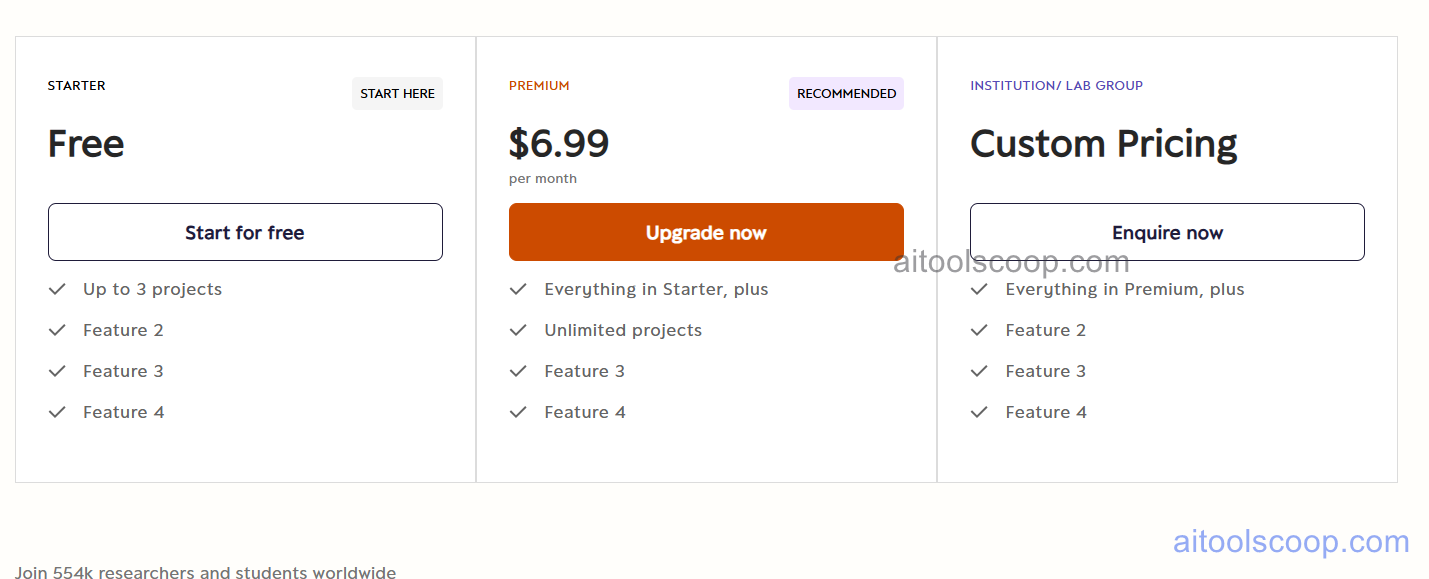
Sciwheel offers three plans to suit individual researchers, active academics, and institutional teams.
- Free — unlimited reference storage, browser extension, PDF annotation, Google Docs and Word add-on, PubMed search, and basic collaboration. Suitable for students and researchers with light citation needs.
- Personal — $6.99/month — everything in Free plus unlimited PDF storage, advanced AI paper summarisation, priority support, and enhanced collaboration features for individual power users.
- Custom (Institutional/Enterprise) — tailored pricing for universities, research institutions, and corporate labs. Includes team administration, SSO, usage analytics, and dedicated onboarding support.
A free plan is available with no credit card required. Always verify current rates at sciwheel.com/home/pricing.
Who Should Use Sciwheel?
Sciwheel is best suited to academic researchers, graduate students, postdocs, and scientific lab teams who regularly read, annotate, and cite primary literature. It is particularly strong for teams co-authoring manuscripts or conducting systematic literature reviews, thanks to its shared annotation and collaborative project features. The free plan is capable enough for most student and early-career researcher needs. The Personal plan unlocks AI summarisation and unlimited PDF storage, making it worthwhile for active researchers managing large paper libraries. Institutions looking to provide a citation tool for faculty and students should enquire about custom institutional pricing. Sciwheel is less suited to non-academic writers, marketers, or general note-taking use cases — Notion or Zotero may be better fits for those workflows.
Frequently Asked Questions
Is Sciwheel free?
Yes. Sciwheel offers a permanently free plan that includes unlimited reference storage, PDF annotation, the browser extension for one-click paper capture, and Google Docs and Word integration for citation insertion. The free plan is suitable for students and researchers with moderate reference management needs. No credit card is required to sign up.
How much does Sciwheel cost?
Sciwheel's Personal plan costs $6.99 per month and adds unlimited PDF storage, advanced AI paper summarisation, and priority support on top of the free plan features. Institutional and enterprise pricing is available on a custom quote basis for universities and research organisations. The free plan covers most basic reference management needs at no cost.
What is the difference between Sciwheel and Zotero?
Both are reference managers, but Sciwheel is designed specifically for scientific literature and integrates directly with PubMed and journal platforms. Sciwheel's collaborative annotation, team project libraries, and AI paper summarisation features are stronger for research group workflows. Zotero is open-source, free, and more general-purpose — it handles a wider range of source types and disciplines. Zotero stores files locally by default, while Sciwheel is fully cloud-based. Researchers in life sciences and biomedicine often prefer Sciwheel; humanities and social science researchers often lean toward Zotero.
Does Sciwheel work with Microsoft Word?
Yes. Sciwheel provides a Microsoft Word add-in that allows researchers to search their Sciwheel library, insert formatted citations inline, and automatically generate a bibliography at the end of the document — all from within Word. It supports 6,000+ citation styles. The add-in works on both Windows and Mac versions of Word and is available on the free plan.
Can I use Sciwheel for team collaboration?
Yes. Sciwheel supports shared project libraries where multiple researchers can save, annotate, and comment on the same papers in real time. Team members can see each other's highlights and notes on PDFs, making it particularly useful for journal clubs, systematic reviews, and co-authored manuscripts. Basic collaboration is available on the free plan; more advanced team features and administration tools are available via the institutional plan.