

Mendeley (mendeley.com) is a reference management and academic networking platform owned by Elsevier, one of the world's largest academic publishers. Originally launched in 2008 and acquired by Elsevier in 2013, Mendeley combines a desktop and web-based reference manager with a researcher social network used by millions of academics worldwide. It allows researchers to collect, organise, annotate, and cite academic literature while connecting with other researchers who share similar interests.
Mendeley's AI-powered recommendation engine analyses a user's library and reading behaviour to surface relevant papers they may have missed — a useful feature for staying current in fast-moving fields. The platform also integrates with Mendeley Data, Elsevier's research data repository, and provides a Web Importer browser extension for one-click paper capture from journal websites, PubMed, Google Scholar, and thousands of academic databases. Citation plugins for Microsoft Word and LibreOffice allow in-document reference insertion and automatic bibliography generation.
How Mendeley Works
Researchers download the Mendeley Reference Manager desktop app (Windows, Mac, or Linux) or use the web app, then install the Web Importer browser extension to start collecting papers. References can be added by dragging PDF files into the library, importing via DOI or PubMed ID, or saving directly from browser sessions. PDFs are stored locally and synced to Mendeley's cloud (storage limits apply by plan). The Word and LibreOffice plugins allow researchers to search their library and insert formatted citations in 10,000+ citation styles. Mendeley's social features let users follow other researchers, join research groups, and share paper collections with collaborators.
Key Features
- AI paper recommendations — machine learning engine analyses your library to recommend relevant papers you may not have found through search
- Web Importer — one-click browser extension captures references and PDFs from journal sites, PubMed, Google Scholar, and academic databases
- PDF annotation — highlight, underline, and add sticky notes to PDFs with annotations synced across desktop and web
- Word and LibreOffice plugins — insert formatted citations and generate bibliographies in 10,000+ citation styles without leaving the document
- Shared libraries and groups — create private or public groups to share paper collections and annotations with collaborators
- Cross-platform sync — desktop apps for Windows, Mac, and Linux plus web and mobile access with library sync
- Mendeley Data integration — link research datasets hosted on Mendeley Data directly to publications in your library
- Researcher profile and network — public researcher profile with publication list, follower network, and paper discovery through the academic social layer
- BibTeX and RIS export — export references for use with LaTeX, Overleaf, and other academic writing environments
- Mobile apps — iOS and Android apps for reading and annotating papers on the go
Mendeley Pricing
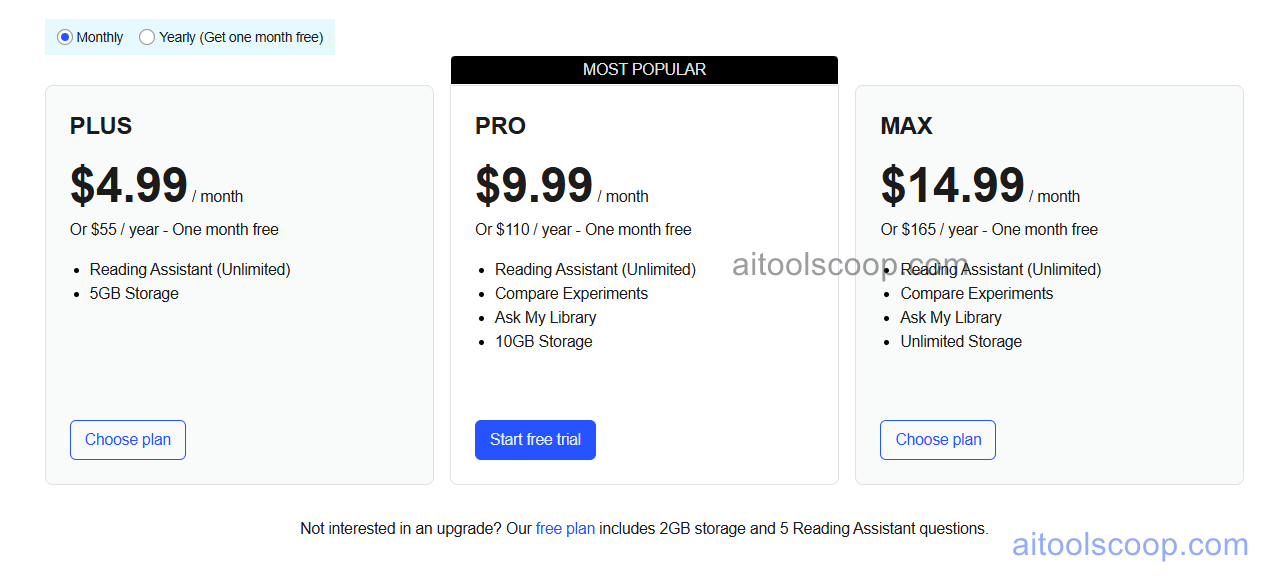
Mendeley offers a free base plan with paid upgrades for additional cloud storage. All plans include the full reference management feature set; paid plans differ primarily in PDF cloud storage capacity.
- Free — 2 GB cloud storage, full reference manager, Web Importer, Word and LibreOffice plugins, PDF annotation, shared groups, and AI recommendations. Suitable for most individual researchers.
- Plus — $4.99/month (annual: $55/year, ~$4.58/month) — 5 GB cloud storage.
- Pro — $9.99/month (annual: $110/year, ~$9.17/month) — 10 GB cloud storage.
- Max — $14.99/month (annual: $165/year, ~$13.75/month) — unlimited cloud storage.
The free plan is permanently available with no credit card required. Always verify current rates at mendeley.com/upgrade.
Who Should Use Mendeley?
Mendeley is an excellent choice for researchers, academics, and students who want a full-featured reference manager at no cost. Its free plan is genuinely comprehensive — the citation plugin, PDF annotation, group sharing, and AI recommendations are all included without paying. The social and networking layer makes it particularly useful for researchers who want to discover papers through their professional network and follow colleagues' work. Paid plans are only necessary for researchers with very large PDF libraries who need more than 2 GB of cloud storage. Mendeley is less suited to researchers who need tight Google Docs integration (it does not have a Google Docs add-on), or those who prefer a cleaner, less feature-cluttered interface.
Frequently Asked Questions
Is Mendeley free to use?
Yes. Mendeley's free plan is permanently available with no credit card required. It includes the full reference manager, Web Importer browser extension, Word and LibreOffice citation plugins, PDF annotation, shared groups, AI paper recommendations, and 2 GB of cloud PDF storage. For most individual researchers and students, the free plan covers all essential needs. Paid plans add additional cloud storage only.
How much does Mendeley cost?
Mendeley's paid plans are storage upgrades. The Plus plan costs $4.99/month (or $55/year) for 5 GB, the Pro plan costs $9.99/month ($110/year) for 10 GB, and the Max plan costs $14.99/month ($165/year) for unlimited storage. All paid features beyond storage are available on the free plan.
Does Mendeley work with Microsoft Word?
Yes. Mendeley provides a citation plugin for Microsoft Word (Windows and Mac) and LibreOffice. The plugin adds a Mendeley toolbar inside Word, allowing researchers to search their library, insert formatted citations inline, and generate a bibliography automatically at the end of the document. It supports 10,000+ citation styles including APA, MLA, Chicago, Vancouver, and journal-specific formats.
What is the difference between Mendeley and Zotero?
Both are popular free reference managers but take different approaches. Mendeley is cloud-synced, owned by Elsevier, and has a social networking layer for researcher discovery. Zotero is open-source, community-maintained, and stores files locally by default with optional cloud sync (limited free storage). Mendeley's AI recommendations and researcher profiles are unique features; Zotero's open-source ecosystem and stronger Google Docs integration are key advantages. Mendeley is generally preferred for life sciences; Zotero has broader adoption across humanities and social sciences.
Does Mendeley have a Google Docs integration?
No. Mendeley does not offer a Google Docs add-on. Its citation plugins are available for Microsoft Word and LibreOffice only. Researchers who write primarily in Google Docs and need a reference manager with a native add-on should consider Paperpile or Sciwheel, both of which offer Google Docs integration.