

Polymer Search (polymersearch.com) is an AI-powered business intelligence platform built for teams who want the analytical depth of a BI tool without the setup overhead of enterprise software like Tableau or Looker. Polymer's standout feature is its AI engine, which automatically analyses an uploaded spreadsheet or connected data source and generates a complete interactive dashboard — charts, filters, and summary insights — without the user needing to configure a single chart manually. From there, users can explore their data conversationally, asking questions in plain language and receiving instant visualisations and explanations in response.
Beyond dashboard generation, Polymer offers an API-based embedding model that lets developers and agencies integrate Polymer's reporting and analytics directly into their own products, giving end customers self-serve access to white-labelled, real-time dashboards. The platform connects to a range of popular data sources and tools, and supports presentation-ready, shareable views designed for stakeholders who need answers rather than raw data. Polymer is positioned in the market as a lighter, faster alternative to traditional enterprise BI — well suited to marketers, founders, agencies, and operators who are comfortable with spreadsheets but don't want to learn SQL or configure dashboards from scratch.
How Polymer Search Works
Users connect a spreadsheet (such as Google Sheets) or one of Polymer's supported data integrations. Polymer's AI automatically scans the dataset, identifies relevant dimensions and metrics, and builds an interactive dashboard with charts, tables, and filters tailored to the structure of the data — without manual configuration. From there, users can ask follow-up questions in natural language through Polymer's AI search interface, and the platform generates new visualisations or pulls out specific insights on demand. Completed dashboards can be shared with stakeholders, presented in a clean presentation mode, or embedded into external applications via Polymer's API for agencies and developers building client-facing reporting.
Key Features
- AI auto-dashboard generation — automatically builds a complete interactive dashboard from an uploaded spreadsheet or connected data source with no manual chart configuration
- Conversational AI search — ask questions about your data in plain language and receive instant charts, summaries, and explanations
- AI-assisted data storytelling — surfaces patterns, correlations, and notable trends in the data automatically for non-technical users
- Pre-built report templates — ready-made report structures for common business use cases, reducing setup time for recurring reporting
- Google Sheets and data source sync — connect and continuously sync spreadsheets and supported integrations for live, up-to-date dashboards
- White-labelled embedding via API — embed Polymer dashboards and reports directly into your own product or client portals under your own branding
- Presentation mode — clean, distraction-free dashboard views designed for sharing with stakeholders and clients
- Customisable access controls — manage who can view, edit, or share specific dashboards and reports
- Self-serve data visualisation — drag-and-drop adjustments to AI-generated dashboards for users who want to fine-tune the output
- Multi-source data centralisation — bring data from multiple sources into a single dashboard view for a unified picture
Polymer Search Pricing
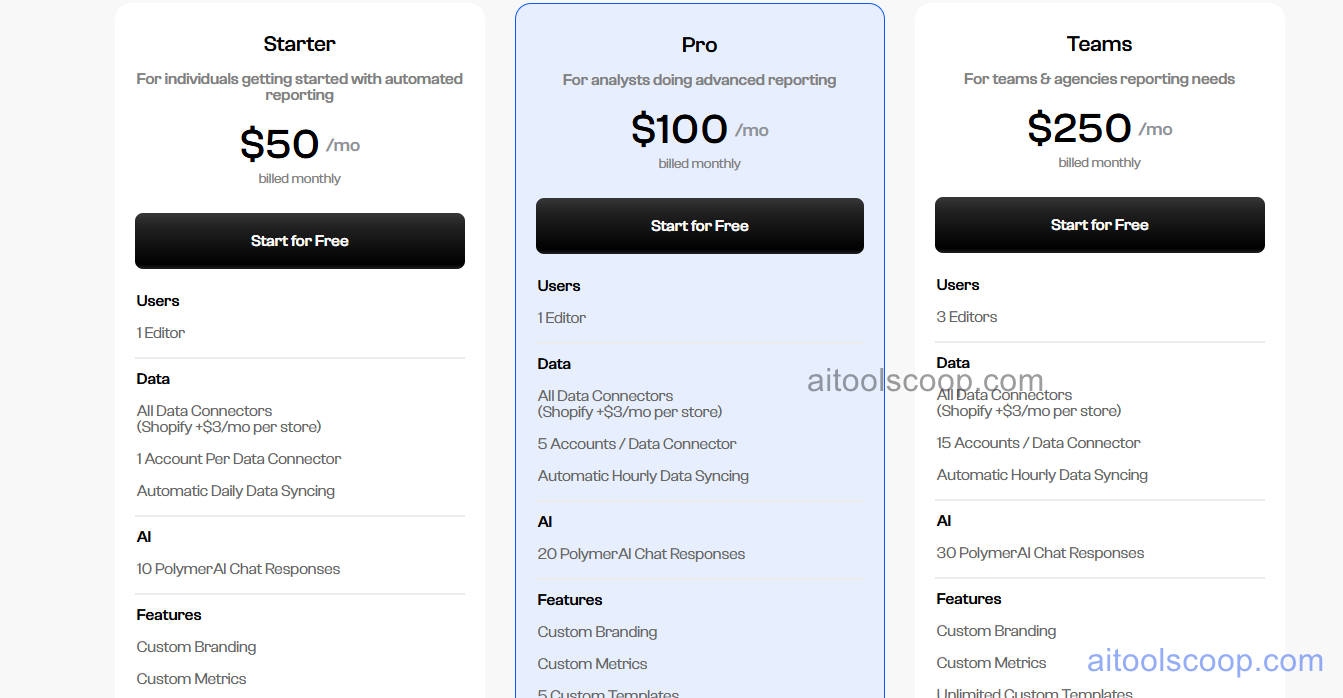
- Starter — from $25/month (billed annually; $50/month billed monthly) — AI auto-dashboard generation, conversational AI search, core integrations, and presentation-ready sharing. Suited to individuals and small teams getting started with AI-driven dashboards.
- Pro — from $50/month (billed annually; $100/month billed monthly) — Expanded data source connections, additional dashboards and reports, and broader sharing and collaboration capabilities for growing teams.
- Business — from $125/month (billed annually; $250/month billed monthly) — White-labelled API embedding, advanced access controls, higher usage limits, and features aimed at agencies and businesses building client-facing reporting.
A free trial is available to explore the platform before subscribing. Always verify current rates at polymersearch.com/pricing.
Who Should Use Polymer Search?
Polymer Search is best suited to marketers, founders, operators, and small data teams who are comfortable working with spreadsheets and want fast, AI-generated dashboards without learning SQL or configuring a traditional BI tool. Agencies and developers benefit particularly from the white-labelled API embedding option, which allows reporting and analytics to be built directly into client-facing products. Teams that need enterprise-scale data modelling, complex SQL transformations, or governed semantic layers across very large datasets may find Polymer's strengths better complemented by a dedicated data warehouse and BI tool. Polymer's sweet spot is turning existing spreadsheets into usable, shareable dashboards quickly — not replacing a full enterprise analytics stack.
Frequently Asked Questions
What is Polymer Search?
Polymer Search is an AI-powered analytics platform that automatically converts spreadsheets and connected data sources into interactive dashboards. Its AI analyses uploaded data, builds relevant charts and visualisations without manual configuration, and lets users ask follow-up questions in plain language to explore their data conversationally.
Does Polymer Search require SQL or technical skills?
No. Polymer Search is designed for non-technical users. The AI automatically generates dashboards from uploaded spreadsheets or connected data sources, and users interact with their data through a conversational search interface using plain-language questions rather than SQL queries or manual chart configuration.
Can Polymer Search dashboards be embedded into other products?
Yes. Polymer Search offers API-based embedding that allows businesses, agencies, and developers to integrate white-labelled dashboards and reports directly into their own products or client portals, giving end users self-serve access to real-time analytics under the business's own branding. This capability is part of Polymer's higher-tier plans.
What data sources does Polymer Search connect to?
Polymer Search connects to spreadsheets such as Google Sheets and a range of popular business data sources and integrations. Once connected, Polymer can sync the data and keep dashboards up to date automatically, and supports bringing multiple data sources into a single unified dashboard view.
How does Polymer Search compare to Tableau or Power BI?
Polymer Search is positioned as a lighter, AI-first alternative to enterprise BI tools like Tableau and Power BI. While Tableau and Power BI offer deeper SQL-based data modelling and enterprise governance at higher per-seat costs, Polymer focuses on instant AI-generated dashboards from spreadsheets with a conversational interface, making it faster to set up for smaller teams that don't need a full enterprise analytics stack.