

Hex (hex.tech) is a collaborative data analytics platform and agentic AI workspace that unifies SQL, Python, and no-code tools in a single environment, allowing data teams to move seamlessly from exploratory analysis to shareable interactive data apps without switching tools. Used by data-forward teams at companies like Figma, Neo, and Mercor, Hex is rated 4.5/5 on G2 and is consistently cited by reviewers as a tool that lets small data teams punch above their weight — eliminating the need for multiple point solutions and providing stakeholders with governed, trustworthy answers to business questions. Its 2026 focus on agentic AI — through the Notebook Agent, Context Studio, and conversational self-serve — has positioned Hex as one of the most AI-native analytics platforms available to data teams today.
Unlike traditional BI tools that separate data exploration from presentation, Hex treats every analysis as a collaborative, living notebook that can be published as a polished interactive app with a single click. Data teams write SQL or Python cells in the notebook, mix in no-code chart and filter components, and publish the result as an app that business stakeholders can interact with — adjusting parameters, filtering data, and asking follow-up questions through Hex's conversational interface — without ever seeing the underlying code. The Notebook Agent, introduced in 2025 and significantly upgraded in 2026 through "Act II," works alongside analysts inside the notebook to write code, debug, run statistical summaries, and generate visualisations, dramatically reducing the time spent on boilerplate analysis work.
How Hex Works
Analysts connect Hex to their data warehouse (Snowflake, BigQuery, Redshift, Databricks, and 50+ others) via workspace-level data connections, then open a notebook to begin analysis. Each notebook is a sequence of cells — SQL queries, Python code, Markdown text, and no-code chart and input components — that can be arranged in any order and run interactively. The Notebook Agent can be invoked at any point to suggest the next analysis step, write code, fix errors, generate visualisations, or run exploratory summaries across the connected data. Once an analysis is complete, the notebook is published as an App — a clean, interactive interface for stakeholders. Business users can ask questions of the app through Hex's conversational Threads feature, which generates a new notebook behind the scenes, analysable by the data team for transparency. Context Studio allows data teams to define key business terms and metrics centrally, ensuring AI-generated answers stay consistent with company definitions.
Key Features
- Agentic notebooks — the Notebook Agent works alongside analysts to write SQL and Python, debug errors, generate visualisations, and run exploratory analysis autonomously
- Conversational self-serve (Threads) — business users ask data questions in plain language; Hex generates a notebook response that data teams can inspect for full transparency
- Context Studio — centralised semantic layer for defining key business terms, metrics, and data governance rules that ground AI answers in company-specific definitions
- SQL + Python + no-code in one notebook — seamlessly mix query languages, code cells, and no-code chart and input components without switching tools
- One-click data apps — publish any notebook as an interactive stakeholder-facing app with parameter controls, filters, and visualisations
- Scheduled runs and alerts — automate notebook execution on a schedule and trigger alerts when metrics change (Team and above)
- Shared workspaces and components — shared SQL queries, Python functions, and chart templates that teams can reuse across notebooks (Team and above)
- GitHub sync — version control integration syncing notebooks with GitHub repositories for code review and change management workflows (Team and above)
- Embedded analytics — embed Hex data apps in external products and portals
- Free Community plan — full notebook access with SQL, Python, and AI features for individual exploration at no cost
Hex Pricing
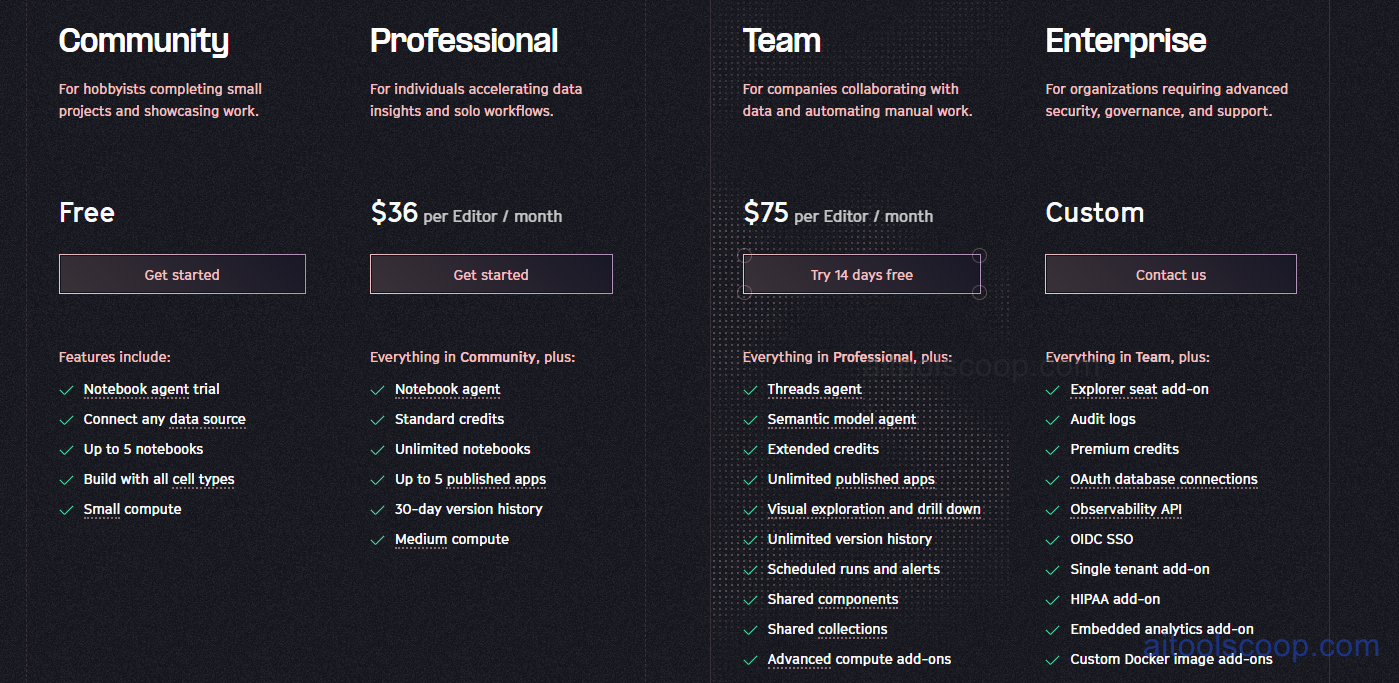
- Community — $0/month — Core notebook functionality with SQL, Python, and AI features for individual exploration. Up to 3 project authors, 7-day version history, project-level data connections, and limited published apps. No credit card required. Ideal for individual analysts and proof-of-concept work.
- Professional — $36/editor/month — Unlimited notebooks, published apps, 30-day version history, workspace-level data connections, scheduled runs, and Medium compute profiles included. Suitable for individual analysts and small teams working in production workflows.
- Team — $75/editor/month — Everything in Professional plus shared workspaces, shared components, GitHub sync, group permissions, extended AI agent access, unlimited scheduled runs with screenshots, alerts, Slack integration, and access to larger compute profiles on pay-as-you-go. Built for collaborative data teams.
Medium compute is included on all paid plans. Larger compute configurations (16GB+ RAM, GPU options) are available as pay-as-you-go additions on Team and Enterprise tiers. A 14-day free trial of the Team plan is available without a credit card.
Enterprise plans available for organisations needing private cloud deployment, SSO, advanced security, and priority support. Always verify current rates at hex.tech/pricing.
Who Should Use Hex?
Hex is an excellent fit for data-forward teams that want a single platform for exploratory analysis, stakeholder-facing apps, and AI-assisted data work without maintaining separate notebook, BI, and data app tools. Its pricing at $36–$75/editor per month significantly undercuts enterprise BI tools like Tableau, making it accessible for growth-stage companies and lean data teams. The free Community plan makes it easy to evaluate. Teams that need embedded analytics at enterprise scale, strict on-premises deployment, or pixel-perfect dashboard design may find Hex's app builder less flexible than dedicated BI tools. Hex is also most powerful for teams already comfortable with SQL and Python; pure no-code teams may prefer a more visual-first BI tool.
Frequently Asked Questions
What is Hex?
Hex is a collaborative data analytics platform that combines SQL, Python, and no-code tools in a unified notebook environment, allowing data teams to explore data and publish interactive apps for stakeholders. In 2026, Hex has added significant agentic AI capabilities including the Notebook Agent (which writes code and runs analyses autonomously), Context Studio (for governed AI answers grounded in business definitions), and conversational self-serve through Threads. It is rated 4.5/5 on G2.
Is Hex free?
Yes — Hex offers a free Community plan that includes core notebook functionality with SQL, Python, and AI features for up to 3 project authors. No credit card is required. The Community plan is suitable for individual exploration and proof-of-concept work. Paid plans start at $36/editor/month and unlock unlimited notebooks, scheduled runs, and team collaboration features.
What is the Hex Notebook Agent?
The Hex Notebook Agent is an AI agent that works directly inside Hex notebooks to assist analysts with data tasks. It can write SQL and Python code, debug errors, generate visualisations, run statistical summaries, suggest the next analysis steps, and iterate on complex analyses autonomously. First introduced in 2025 and significantly upgraded in 2026, the Notebook Agent is designed to reduce time spent on boilerplate analysis work so data scientists can focus on advanced modelling and interpretation.
What is Hex Context Studio?
Context Studio is Hex's semantic layer and data governance feature that allows data teams to define key business terms, metrics, and calculations centrally within the platform. When business users ask questions through Threads or the conversational interface, Hex's AI grounds its answers in these company-specific definitions — ensuring consistent, trusted results rather than ad-hoc interpretations. It supports syncing with external semantic layers as well.
How does Hex compare to Tableau?
Hex and Tableau serve overlapping but different needs. Hex is a notebook-first platform strong on exploratory analysis, Python and SQL integration, and AI-assisted data work — well-suited for technical data teams and growth-stage companies at a significantly lower price point than Tableau. Tableau excels at enterprise-scale governed dashboards, deep visualisation capabilities, and integration with the Salesforce ecosystem, but requires annual per-seat licensing that scales steeply. Teams that frequently write code and build data apps tend to prefer Hex; teams that need polished enterprise BI with broad stakeholder access tend to favour Tableau.