

KNIME (knime.com) is a free, open-source data science platform that lets users build analytical workflows visually by connecting nodes in a drag-and-drop editor — without writing code. Originally developed at the University of Konstanz in 2004 and now backed by KNIME GmbH, the platform has grown into one of the most comprehensive end-to-end data science tools available, covering data ingestion, transformation, visualisation, machine learning, deep learning, and model deployment within a single visual environment. The KNIME Analytics Platform desktop application — available on Windows, macOS, and Linux — is free and open source under the GPL v3 licence, with no feature restrictions, no user limits, and no time cap. More than 5,000 nodes are available across the core platform and community extensions, with over 300 connectors to databases, cloud services, ML libraries, and big data environments.
For teams that need collaboration, scheduled execution, and enterprise deployment, KNIME Business Hub (previously KNIME Server) adds workflow automation, REST API deployment, centralised administration, and a shared team workspace on top of the open-source core. Workflows built in the free desktop application deploy directly to KNIME Business Hub without modification, making the upgrade path frictionless for growing teams. The KNIME Community Hub — a public sharing platform — hosts over 14,000 workflow solutions covering a wide range of data science use cases, providing a practical learning resource and a fast starting point for common problems.
How KNIME Works
Users open the KNIME Analytics Platform desktop application and build workflows by dragging nodes from the node repository onto a canvas, then connecting them to define data flow. Each node performs one operation — reading a CSV, filtering rows, training a random forest, generating a chart — and the visual canvas shows the entire pipeline clearly, making it easy to understand, audit, and share. Python and R nodes integrate native code directly into the workflow for users who need full scripting flexibility. Completed workflows can be shared via the KNIME Community Hub, deployed as interactive data apps via KNIME Business Hub, or exposed as REST APIs for integration with external systems.
Key Features
- Free open-source desktop platform — full-featured KNIME Analytics Platform under GPL v3 with no restrictions, no user cap, and no expiry on Windows, macOS, and Linux
- 5,000+ nodes — covering data access, transformation, visualisation, machine learning, deep learning, text mining, time series, network analysis, and reporting
- 300+ connectors — databases (Oracle, Snowflake, PostgreSQL, MySQL), cloud services (AWS, Azure, GCP), ML frameworks (H2O, Python, R, TensorFlow), big data (Spark, Hive, HDFS), and SaaS tools (Salesforce, REST APIs)
- No-code / low-code workflow builder — visual drag-and-drop editor; code optional via Python and R integration nodes for power users
- KNIME Business Hub — enterprise addition for workflow scheduling, REST API deployment, team collaboration, centralised governance, and interactive data app hosting
- KNIME Community Hub — public library of 14,000+ shared workflow solutions for reuse and learning
- Model deployment — workflows deployed as REST APIs or interactive data apps without additional engineering work
- End-to-end ML pipeline — data prep, feature engineering, model training, evaluation, and deployment in one visual environment without tool-switching
- Reproducibility and auditability — every step of the analysis is visible and recorded in the workflow, supporting regulated industries and team onboarding
- Version control — track changes to workflows for collaborative development and rollback capability on Business Hub
KNIME Pricing
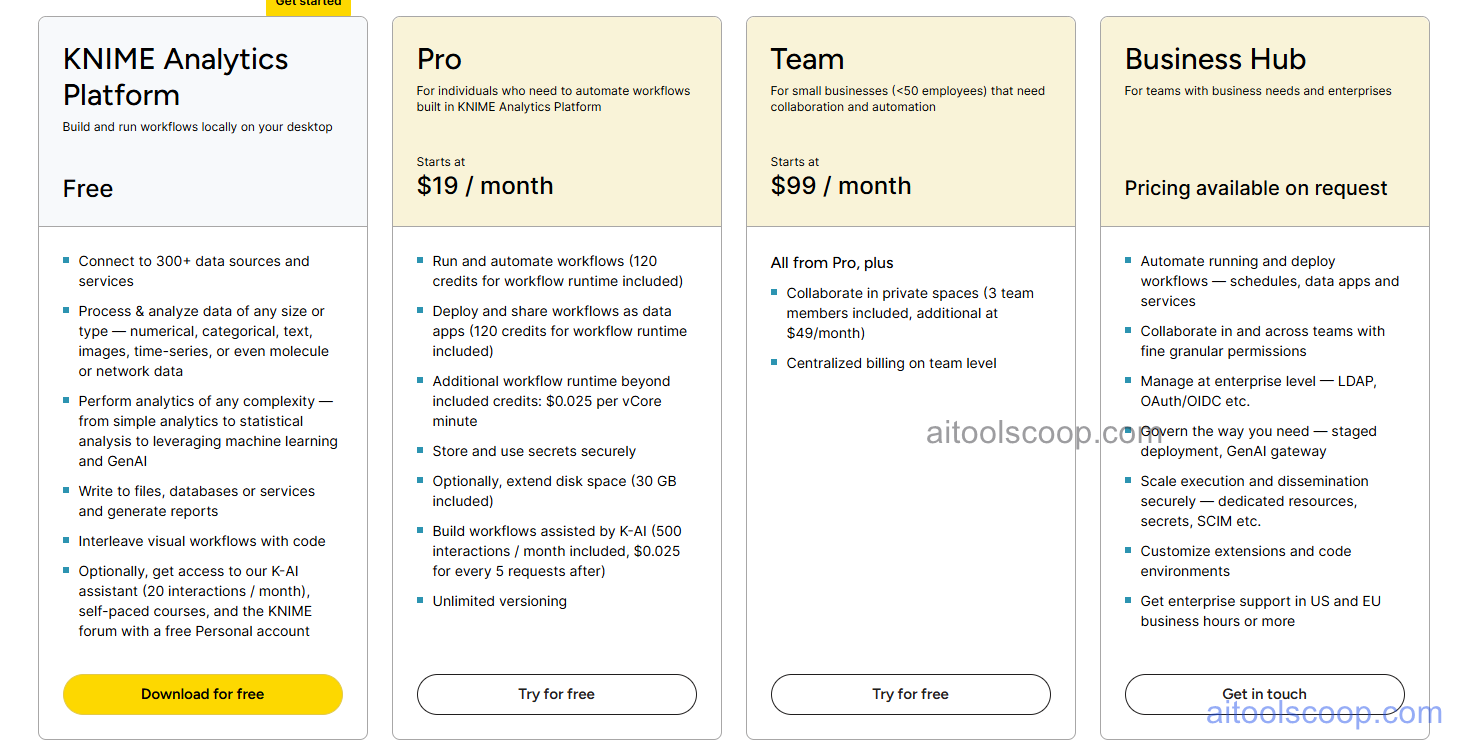
- KNIME Analytics Platform — $0 forever — full open-source desktop application with all 5,000+ nodes, ML algorithms, and connectors. No feature restrictions, no user limits, no time limit. Self-installed on your own machine.
- Business Hub Starter — $19/month — Adds managed cloud workspace, workflow scheduling, team sharing, and basic data app hosting on top of the open-source core. For individuals and small teams needing collaboration and automation.
- Business Hub Professional — $99/month — Full Business Hub capabilities including REST API deployment, advanced governance, role-based access control, prioritised support, and expanded compute for larger teams and production deployments.
Enterprise and self-hosted Business Hub licences available for large organisations with custom requirements. Always verify current rates at knime.com/pricing.
Who Should Use KNIME?
KNIME is an excellent fit for data scientists, analysts, and data engineers who want a powerful, flexible analytics platform without software licensing costs — and for organisations in regulated industries where workflow reproducibility and auditability matter. It is widely used in pharmaceutical, financial services, and academic research contexts. Its low-code interface makes it accessible to domain experts and non-programmers, while Python and R integration ensures it never limits experienced developers. Teams that need a fully managed, cloud-native analytics platform with built-in visualisation and BI dashboards may find dedicated tools like Metabase or Grafana Cloud a better complement alongside KNIME.
Frequently Asked Questions
What is KNIME?
KNIME is a free, open-source data science and analytics platform that allows users to build data workflows, train machine learning models, and deploy analytical pipelines using a visual drag-and-drop node editor — without writing code. It is available for Windows, macOS, and Linux and is widely used in industry, research, and academia.
Is KNIME really free?
Yes. KNIME Analytics Platform is completely free and open source under the GPL v3 licence. There are no feature restrictions, no user limits, and no expiry date. All 5,000+ nodes and 300+ connectors are available at no cost. The paid tiers (Business Hub) add enterprise collaboration and deployment features but are not required to use the full analytics platform.
Does KNIME require coding?
No. KNIME is designed as a no-code/low-code platform — the majority of data science tasks can be completed by connecting nodes visually without writing any code. For users who want scripting flexibility, Python and R nodes allow native code to be embedded directly in workflows alongside the visual components.
What is KNIME Business Hub?
KNIME Business Hub is the enterprise extension to the free open-source platform. It adds workflow scheduling, team collaboration, REST API deployment of workflows as services, interactive data app hosting, centralised administration, and governance features. It is available as a managed cloud service (paid plans from $19/month) or as a self-hosted server licence for organisations with on-premise requirements.
What is the KNIME Community Hub?
The KNIME Community Hub is a public repository of over 14,000 shared workflows, components, and data science solutions contributed by the global KNIME community. It serves both as a learning resource — providing real-world examples of how to solve common data problems in KNIME — and as a practical accelerator, with ready-made workflow templates that can be downloaded and adapted rather than built from scratch.