

Grammar Checker for ESL Writers
Ginger Software (gingersoftware.com) is an AI-powered grammar checker and writing enhancement tool offering contextual spelling and grammar correction, sentence rephrasing, and translation capabilities. Available as a browser extension, desktop application, and mobile keyboard, Ginger analyzes writing in context — understanding the intended meaning before correcting errors — making it particularly effective for non-native English speakers and users with dyslexia. The platform's sentence rephraser suggests alternative ways to express the same idea with clearer structure or varied vocabulary. With support for 60+ languages and a built-in dictionary and translator, Ginger serves ESL learners, students, and professionals improving written English clarity and correctness.
How Ginger Software Works
Install the Ginger browser extension (Chrome, Firefox, Safari) or desktop app. As you type in any text field — emails, documents, social media, web forms — Ginger underlines errors and suggestions in real-time. Click an underlined text to see Ginger's correction with an explanation of the rule applied. Use the Rephrase feature to receive multiple alternative versions of a selected sentence with improved clarity or varied structure. Enable Personal Trainer mode to receive grammar lessons tailored to your most common error patterns. Use the built-in translator to write in your native language and convert to English. Access the Ginger Page, a distraction-free writing environment with full Ginger integration. Review your writing statistics in the dashboard tracking improvement over time.
Key Features
- Contextual grammar correction — understands meaning before suggesting corrections
- Spelling correction — fixes typos and misspellings with context awareness
- Sentence rephraser — suggests alternative phrasings for clarity and variety
- Personal Trainer — personalized grammar lessons based on your error patterns
- 60+ language translation — translate text to and from English
- Text reader — reads your writing aloud to catch errors by ear
- Browser extension — works across web-based tools and email platforms
- Mobile keyboard — grammar checking on iOS and Android devices
- Writing statistics — tracks improvement and common error patterns over time
- Ginger Page — distraction-free writing environment with full integration
Ginger Software Pricing
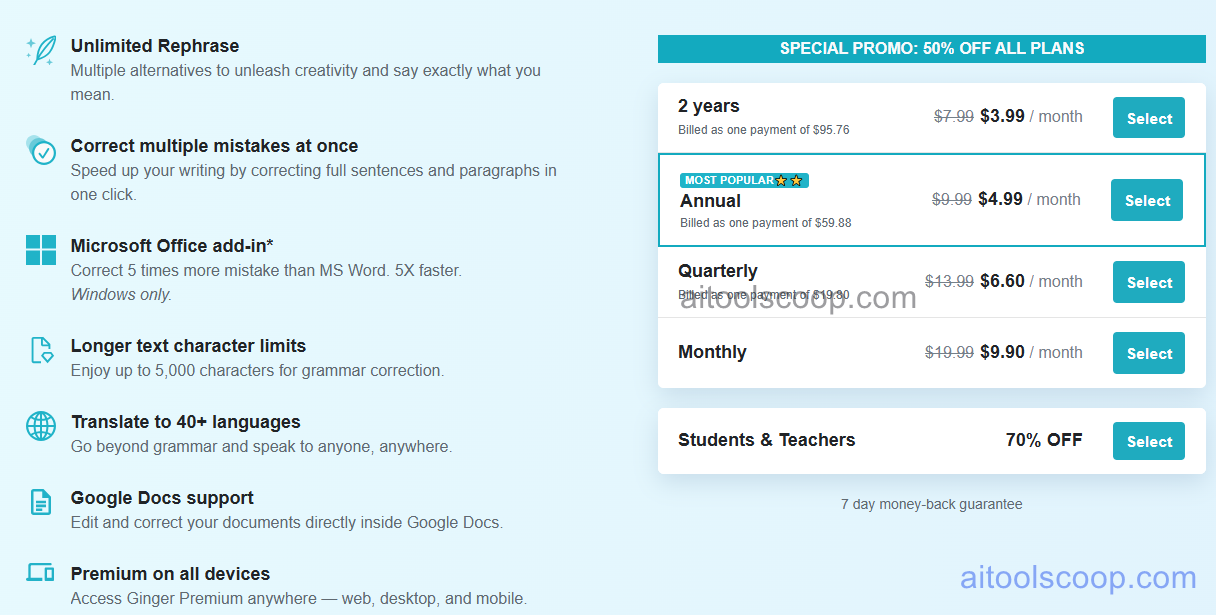
| Plan | Monthly | Annually | Key Features |
|---|---|---|---|
| Premium | $9.99 | $4.99 | Full grammar and spelling correction, sentence rephraser, Personal Trainer, translator, text reader, all platforms |
Always check the latest rates on the official website. For more AI tool reviews, visit aitoolscoop.com.
Who Should Use Ginger Software?
Ginger Software is perfect for non-native English speakers writing professional emails and documents, ESL students improving academic writing and grammar skills, professionals with dyslexia needing real-time writing support, international business teams communicating across languages, bloggers and content creators polishing writing before publication, and anyone seeking affordable grammar checking across all devices and platforms. The annual plan at $4.99/month makes Ginger one of the most cost-effective grammar tools available.