
Raindrop.io (raindrop.io) is an all-in-one bookmark manager built for researchers, writers, designers, and knowledge workers who want a polished, organised alternative to the chaos of browser-native bookmarks. Unlike browser bookmark folders, which quickly become unmanageable hierarchies, Raindrop treats your saved links as a proper visual library — with nested collections, a tag-based system, a visual grid view showing page thumbnails, and cloud sync to every device through browser extensions for Chrome, Firefox, Safari, and Edge and native apps for macOS, Windows, iOS, and Android. The core platform is free for unlimited bookmarks, collections, highlights, and devices, making it one of the most generous free tiers in the bookmark management space.
In February 2026, Raindrop launched Stella, a private AI assistant that transforms your bookmark library into a conversational second brain. Stella lets you ask natural-language questions about your saved content, get answers grounded directly in your library, organise collections with natural language commands, and rediscover articles and resources you've forgotten you saved — all processed on Raindrop's own servers, with your data never shared with third parties. The Pro plan also adds practical housekeeping tools that the free plan lacks: AI-suggested tags that automatically classify new bookmarks based on page content, permanent web archive snapshots so saved pages remain accessible even when the original URL disappears, full-text search across all page content (not just titles and URLs), a broken-link and duplicate finder, and scheduled automatic backups.
How Raindrop.io Works
Users install the Raindrop browser extension or mobile app and begin saving links with a single click or tap. Each saved bookmark is organised into a collection (similar to a folder, but nestable and taggable), and Raindrop pulls a visual thumbnail and page metadata automatically. On the free plan, highlights can be added to any saved page, and collections can be shared and collaborated on with up to three people per shared collection. Pro users receive AI tag suggestions on save, and Stella can be invoked at any time to ask questions about the library in natural language, suggest reorganisation, or surface relevant saved content contextually. Permanent snapshots archive saved pages so content is available even after the original source goes offline or behind a paywall, and full-text search indexes the full content of saved pages rather than just titles and URLs.
Key Features
- Stella AI assistant — conversational AI that searches, organises, and resurfaces content from your bookmark library using natural language, running on Raindrop's private infrastructure
- AI-suggested tags — automatically analyses new bookmark page content and proposes relevant tags for consistent, hands-free organisation (Pro)
- Full-text search — indexes and searches the full content of saved pages, not just titles and URLs (Pro)
- Permanent web archive snapshots — saves a permanent copy of each bookmarked page so content remains accessible even if the original URL goes offline (Pro)
- Unlimited bookmarks, collections, and devices — no caps on saves or devices on the free plan
- Nested collections and tag system — organise bookmarks into nested collection hierarchies and a flexible tag taxonomy
- Visual grid and list views — browse saved links by thumbnail preview, list, or headline view depending on preference
- Browser extensions and native apps — extensions for Chrome, Firefox, Safari, and Edge; native apps for macOS, Windows, iOS, and Android
- Highlights and annotations — highlight and annotate web pages directly within saved bookmarks (unlimited on Pro, limited on Free)
- Broken-link and duplicate finder — detects dead links and duplicate saves in your library for housekeeping (Pro); plus daily backups and priority email support
Raindrop.io Pricing
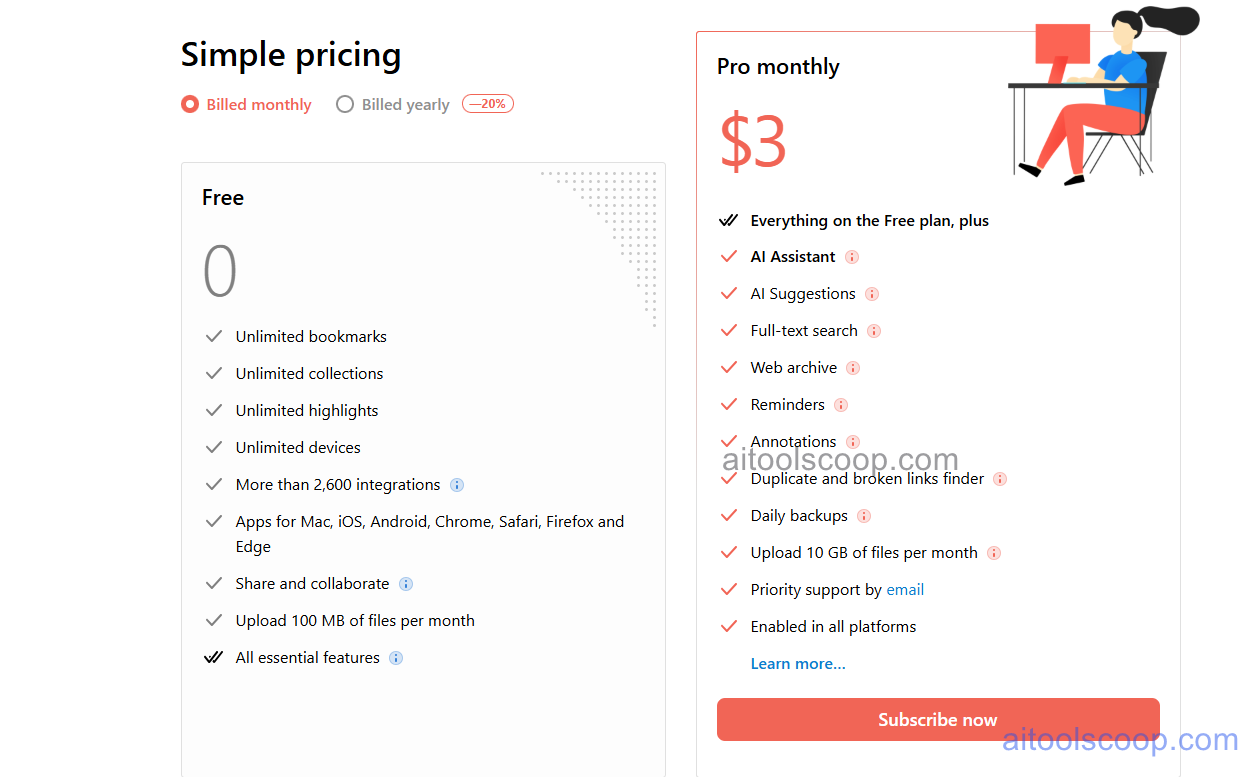
- Free — $0/month — Unlimited bookmarks, unlimited nested collections, unlimited highlights, unlimited devices and sync, more than 2,600 integrations, apps for Mac/iOS/Android/Chrome/Safari/Firefox/Edge, share and collaborate, and 100 MB of file uploads per month. All essential features included at no cost.
- Pro — $3/month ($28/year billed annually, saving 20%) — Everything on the Free plan plus: Stella AI assistant, AI tag suggestions, full-text search, permanent web archive snapshots of all saved pages, reminders, annotations, duplicate and broken-link finder, daily backups, 10 GB of file uploads per month, priority email support, and access enabled across all platforms.
Pro is available as a monthly subscription at $3/month or as an annual plan at $28/year (equivalent to approximately $2.33/month). Always verify current rates at raindrop.io/pro.
Who Should Use Raindrop.io?
Raindrop.io is the bookmark manager most recommended by researchers, writers, designers, and knowledge workers who save large numbers of links and want them to remain findable and accessible long-term. The generous free tier — unlimited bookmarks, unlimited collections, unlimited devices — makes it excellent for anyone who simply wants a better bookmark experience at no cost. The Pro plan at $28/year is remarkable value for the feature upgrade: permanent snapshots, full-text search, the Stella AI assistant, and AI-suggested tags make the library genuinely intelligent and resilient against link rot. Teams looking for a full project management or note-taking platform will need additional tools, as Raindrop is purpose-built for link and file archiving, not broader knowledge management or writing workflows.
Frequently Asked Questions
What is Raindrop.io?
Raindrop.io is an all-in-one visual bookmark manager that lets users save, organise, tag, highlight, and search links across every device through browser extensions and native apps. In 2026, Raindrop added Stella, a private AI assistant that answers questions about your saved library in natural language and helps reorganise your collections.
Is Raindrop.io free?
Yes — Raindrop.io's free plan includes unlimited bookmarks, unlimited nested collections, unlimited highlights, unlimited devices, more than 2,600 integrations, and apps for all major platforms. The Pro plan at $3/month (or $28/year) adds the Stella AI assistant, full-text search, permanent web snapshots, AI tag suggestions, and other advanced features.
What is Stella in Raindrop.io?
Stella is Raindrop's AI assistant, launched in February 2026. It lets you ask natural-language questions about your saved library, get answers grounded in your actual bookmarks, organise collections through conversation, and rediscover content you've forgotten you saved. Stella runs on Raindrop's own private infrastructure, keeping your data on their servers rather than sharing it with third-party AI providers.
What are permanent snapshots in Raindrop.io Pro?
Permanent snapshots are web archive copies that Raindrop saves for every bookmarked page on the Pro plan. When a page goes offline, changes significantly, or moves behind a paywall, the snapshot preserves the page as it was when you saved it, keeping the content accessible in your library indefinitely.
How does Raindrop.io compare to browser bookmarks?
Browser bookmarks are basic lists stored locally in your browser with no search beyond titles and URLs, no visual thumbnails, no tagging system, no cross-browser sync, and no protection against link rot. Raindrop.io adds visual grid views, nested collections with tags, cross-browser and cross-device sync, highlights and annotations, and — on Pro — full-text search, permanent snapshots, AI-suggested tags, and the Stella conversational assistant.