

GetContrast (getcontrast.io) is a webinar platform built around a specific problem: the hour of content created during a live session usually dies the moment the stream ends. Repurpose Ai and Clip Ai are built directly into the studio, turning a finished webinar into blog posts, social clips, and newsletter copy in a click rather than requiring a separate video editor or writing tool afterward. The company positions this against manually rewatching a recording, taking notes, and hiring editing help to get the same output.
The platform is aimed at marketing teams and content managers running regular webinars, particularly companies that already lean on HubSpot for their broader marketing stack, since that integration is one of GetContrast's more established connections. Branding controls — logo, color, and font applied across the registration page, the live studio, and every AI-generated clip — are central to the pitch, letting a webinar look like an owned brand experience rather than a generic conferencing tool.
How GetContrast Works
A webinar is set up through a branded registration page, with reminder emails and calendar invites generated automatically, then run live in a browser-based studio that supports up to eight speakers, a private backstage area, live polls, and Q&A. Pricing scales with unique monthly registrants rather than live viewer count, since GetContrast counts on-demand replay viewers as part of the audience too. Once a session ends, Repurpose Ai generates a transcript-based summary, blog post, and newsletter draft, while Clip Ai scans the transcript for moments likely to perform well on social media and produces short, subtitled clips automatically styled in the account's brand kit. Both tools also let a user manually select any part of the transcript to generate a custom clip or excerpt instead of relying only on the automated suggestions.
Key Features
- Repurpose Ai: turns a finished webinar's transcript into a blog post, newsletter draft, and summary with key highlights, generated on demand rather than through a separate writing tool
- Clip Ai: automatically identifies moments likely to perform well on social media and produces short, branded, subtitled clips from every webinar
- Branded webinar experience: applies a account's logo, colors, and fonts across the registration page, live studio, and every AI-generated clip
- Browser-based studio: supports up to eight speakers with no downloads required, plus a private backstage area for pre-session prep
- Engagement tools: live Q&A, polls, emoji reactions, and a branded chat interface built into the live session
- HubSpot integration: native, one-click connection that syncs registrant and engagement data directly into HubSpot workflows
- Automated replays: generates chaptered, on-demand replay pages on the same registration link so every registrant can access the recording afterward
- Webinar channel: a single branded page listing upcoming events and past replays for ongoing thought-leadership content
GetContrast Pricing
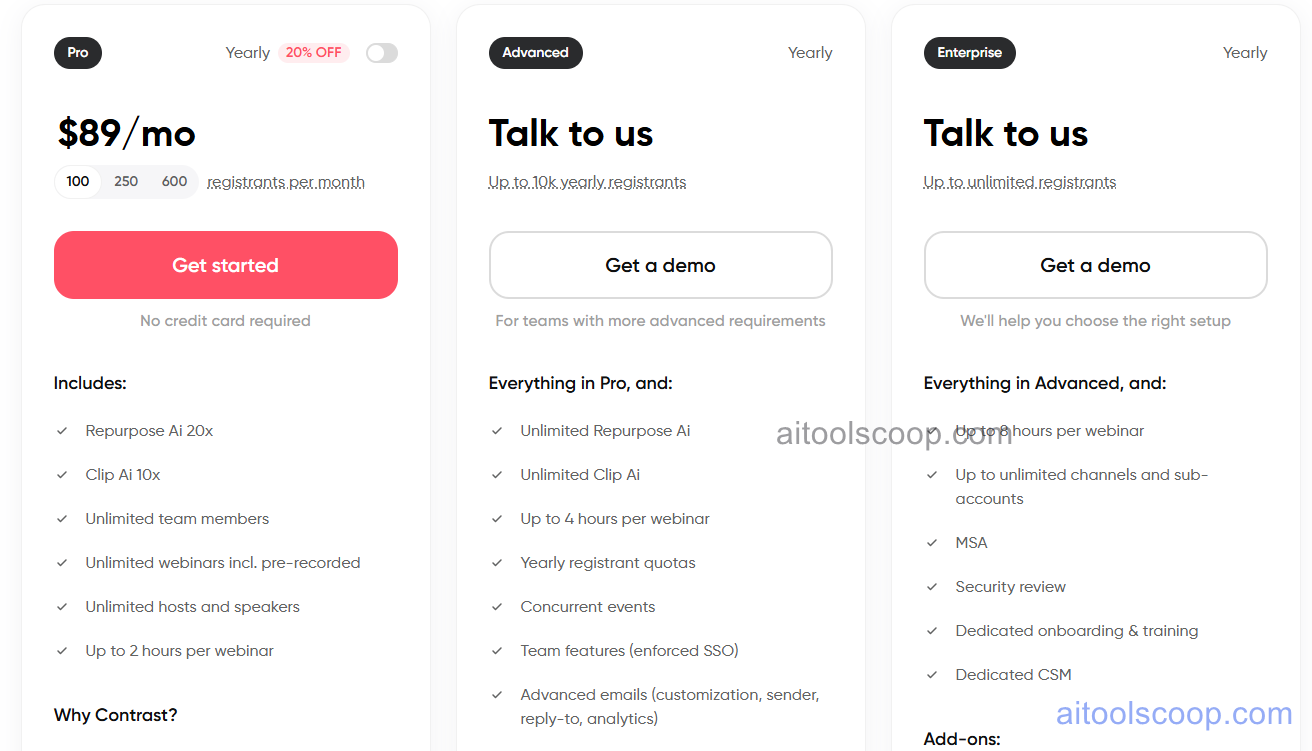
- Free — $0/month — up to 30 unique registrants per month, unlimited team members, and full access to the core webinar and repurposing tools, aimed at smaller teams just getting started with webinars.
- Pro — $89/month (from $69/month billed annually) — a configurable registrant tier (100, 250, or 600 registrants per month), Repurpose Ai available 20 times and Clip Ai 10 times per month, unlimited team members, unlimited webinars including pre-recorded sessions, unlimited hosts and speakers, and webinars up to 2 hours long.
- Advanced — custom pricing ("Talk to us") — everything in Pro, plus unlimited Repurpose Ai and Clip Ai usage, webinars up to 4 hours long, yearly registrant quotas, support for concurrent events, enforced SSO team features, and advanced email customization with sender and reply-to controls.
- Enterprise — custom pricing ("Talk to us") — everything in Advanced, plus webinars up to 8 hours long, unlimited channels and sub-accounts, an MSA, a security review, dedicated onboarding and training, and a dedicated customer success manager.
Pricing is based on unique monthly registrants rather than live viewers, and annual billing brings the Pro plan down to $69/month. Advanced and Enterprise require contacting GetContrast directly for a quote. Pricing verified against getcontrast.io; rates may change — always confirm current pricing at getcontrast.io.
Who Should Use GetContrast?
Teams running occasional webinars with a small audience can comfortably start on the Free plan, since it comes with unlimited team members and the core repurposing tools rather than a stripped-down trial experience. Growing marketing teams running regular sessions with a few hundred monthly registrants are the clear fit for Pro, where the 20-per-month Repurpose Ai and 10-per-month Clip Ai allowances line up with a webinar or two each month. Companies running frequent, longer-form webinars — concurrent events, sessions past two hours, or needing enforced SSO and dedicated support — will outgrow Pro's caps and need to talk to sales about Advanced or Enterprise instead.
Frequently Asked Questions
Is GetContrast's free plan actually usable, or just a limited trial?
The Free plan supports up to 30 unique registrants per month with no credit card required, and it includes unlimited team members and the core webinar and repurposing tools rather than a time-limited trial — the main constraint is the monthly registrant cap.
How does Repurpose Ai turn a webinar into a blog post?
After a webinar ends, GetContrast generates a transcript, and Repurpose Ai uses that transcript to draft a blog post, a newsletter, and a summary with key highlights — all trained on the account's own content rather than producing generic output.
Why is pricing based on registrants instead of live attendees?
GetContrast counts on-demand replay viewers as part of the audience, not just people watching live, so pricing is tied to unique monthly registrants across both the live session and the replay page.
What happens to the AI tools if usage goes over the Pro plan's monthly limit?
Pro includes Repurpose Ai up to 20 times and Clip Ai up to 10 times per month. Teams that consistently need more than that should look at the Advanced plan, which removes the cap entirely for unlimited Repurpose Ai and Clip Ai usage.
Does GetContrast integrate with a CRM?
Yes, GetContrast has a native HubSpot integration that syncs registrant and engagement data directly into HubSpot workflows. Salesforce integration is listed as part of the higher Advanced and Enterprise tiers.