Plottr (plottr.com) is a visual story planning and novel outlining application designed specifically for fiction writers, particularly those working on complex narratives with multiple plotlines, large character casts, or multi-book series. Unlike general-purpose writing tools, Plottr is built around a visual timeline — the core interface displays plot events on a scrollable, colour-coded grid where writers can see how story threads, subplots, and character arcs intersect and progress across the narrative.
Plottr runs as a desktop application on Mac, Windows, and Linux, and also offers a web version, making it available offline for writers who prefer to work without an internet connection. The platform includes a template library with pre-built story structure frameworks — including the Hero's Journey, Save the Cat, and the three-act structure — which can be applied to a new project to provide a structural starting point. Plottr stores all story data locally in a file that writers own and control, which appeals to authors who want full ownership of their creative work.
How Plottr Works
Writers create a new project and begin adding plotlines and scenes to the visual timeline grid. Each scene card can contain notes, tags, and chapter assignments. Multiple plotlines appear as horizontal rows on the grid — the main plot in one row, subplots below — so the relationship between story threads is immediately visible. Characters, locations, and notes are tracked in dedicated sections with custom fields and images. For series writers, Plottr supports multiple books within a single project file, with series-level and book-level views to plan the overarching story arc alongside individual book plots. The timeline can be exported as an outline document for reference during drafting in a separate writing tool.
Key Features
- Visual timeline planner — colour-coded scrollable grid showing plot events, subplots, and character arcs across the full story timeline
- Multi-plotline support — add unlimited plotlines (main plot, subplots, character arcs) as separate rows on the timeline grid
- Character and location tracking — dedicated character and location profiles with custom fields, notes, images, and scene tagging
- Series management — plan multiple books within a single project with series-level and individual book views
- Story structure templates — pre-built frameworks including Hero's Journey, Save the Cat, Three-Act Structure, and more
- Scene cards with notes — each scene card holds a title, description, tags, chapter assignment, and custom notes
- Offline desktop app — native Mac, Windows, and Linux desktop app for fully offline use with local file storage
- Web version — browser-based access for working across devices without the desktop app
- Outline export — export the timeline as a structured outline document for reference during drafting
- Custom templates — create and save custom story structure templates for reuse across projects
Plottr Pricing
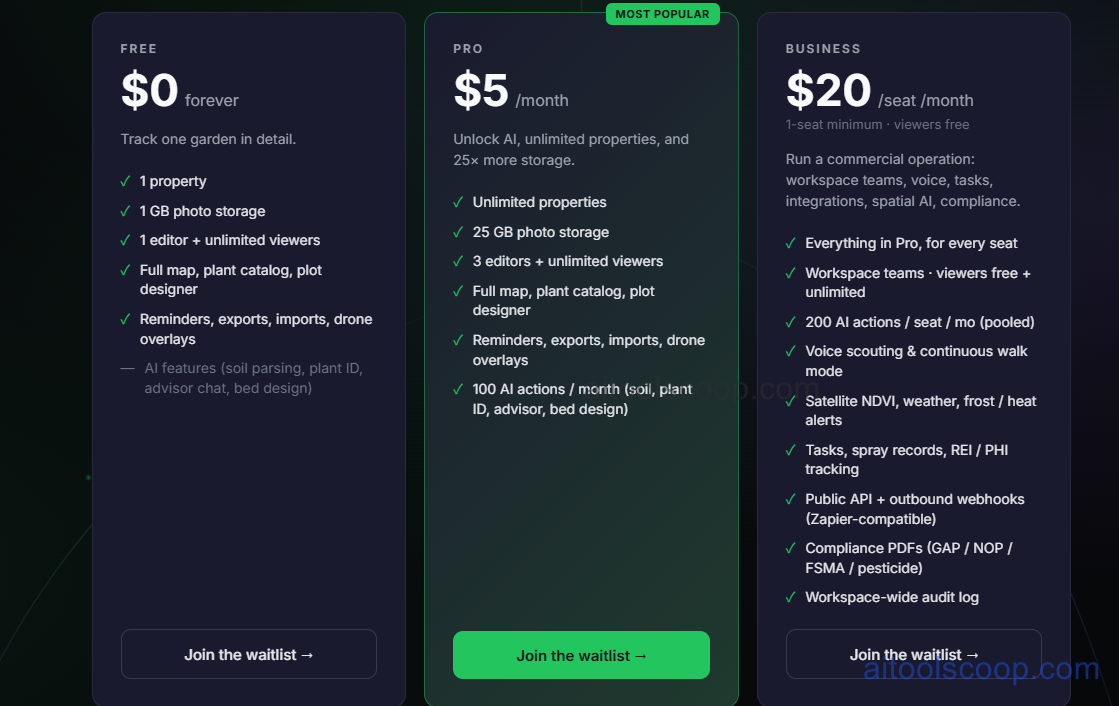
Plottr offers a free plan alongside paid plans with expanded project limits and features. Annual plans offer significant savings over monthly billing.
- Free — limited number of projects, access to core timeline, character, and location features, and offline desktop app. Suitable for writers working on a single novel.
- Monthly — $5/month (annual: $50/year, ~$4.17/month) — more projects, full template library, and series management.
- Monthly — $20/month (annual: $200/year, ~$16.67/month) — unlimited projects, all features, priority support, and access to new features as they launch.
The free plan is permanently available with no credit card required. Always verify current rates at plottr.com/pricing.
Who Should Use Plottr?
Plottr is an excellent fit for fiction writers — particularly novelists, series authors, and screenwriters — who are plotters or planners by nature and want a dedicated visual tool to map their story structure before drafting. The visual timeline is especially valuable for writers managing multiple POV characters, complex subplots, or multi-book series where keeping track of story threads is challenging. The free plan is sufficient for writers working on a single project at a time. Paid plans suit prolific writers managing multiple projects or series. Plottr is a planning tool, not a writing tool — it does not replace Scrivener or Word for drafting, and writers typically use it alongside a dedicated writing application.
Frequently Asked Questions
Is Plottr free to use?
Yes. Plottr offers a permanently free plan that includes the core visual timeline, character and location tracking, and offline desktop app access. The free plan limits the number of active projects, making it most suitable for writers focused on a single novel at a time. No credit card is required to sign up. Paid plans unlock more projects, the full template library, series management, and priority support.
Is Plottr a writing tool or a planning tool?
Plottr is a story planning and outlining tool, not a drafting tool. It is designed to help writers map and structure their story before and during drafting — plotting scenes on a timeline, developing characters and locations, and organising series arcs. Writers use Plottr alongside a separate writing application such as Scrivener, Microsoft Word, or Ulysses for the actual prose drafting. Plottr's outline export feature helps bridge the planning and drafting phases.
Does Plottr work offline?
Yes. Plottr has native desktop apps for Mac, Windows, and Linux that work fully offline. All story data is stored in a local file on the writer's computer, so no internet connection is required to access or edit a project. The web version requires an internet connection. Writers who prefer offline working or want full local control of their story files will find the desktop app particularly well suited to their workflow.
How much does Plottr cost?
Plottr's paid plans start at $5/month ($50/year) for expanded project limits and the full template library, and $20/month ($200/year) for unlimited projects and all features including priority support. The free plan covers core features for a single project at no cost. Annual billing is significantly cheaper than monthly — the $5/month plan drops to roughly $4.17/month annually, and the $20/month plan to around $16.67/month annually.
Can Plottr handle series planning?
Yes. Plottr is particularly well suited to series authors. It supports multiple books within a single project file, with both a series-level overview and individual book views. Series-level characters, locations, and notes are shared across books, while each book has its own timeline and scene structure. This makes it possible to plan overarching series arcs — character development across books, world-building continuity, and series-level plot threads — alongside the detailed plot of each individual book.