

Kome.ai (kome.ai) is a browser extension rather than a standalone app, built to summarize and save content without ever leaving the page a user is already reading. A single click condenses an article, a YouTube video, or a PDF into a short summary, and the same extension doubles as a bookmark manager that captures highlights, quotes, or entire pages for later use. The pitch is speed: reading faster by skimming a summary first, then deciding whether the full piece is worth the time.
The audience leans toward students, researchers, and content creators doing a lot of daily reading across articles, papers, and video — people who want the gist of ten sources before committing to reading any one of them in full. Because it works directly inside Chrome, Edge, Opera, Brave, and Arc, it fits into an existing browsing habit rather than asking someone to copy links into a separate web app.
How Kome.ai Works
Once installed, Kome.ai sits in the browser toolbar and can be triggered with a keyboard shortcut (⌘+E on macOS, Alt+E on Windows) from any webpage, YouTube video, or PDF. Selecting the summarize option processes the page's content and returns a condensed summary of the main points, while the bookmark manager lets a user save a paragraph, table, or video clip rather than only the whole page, then search and retrieve it later. The Compose feature pulls from a user's saved bookmarks to draft emails, tweets, or blog post outlines, using previously saved content as source material instead of starting from a blank prompt.
Key Features
- AI-powered summarizer: condenses articles, news, websites, YouTube videos, and PDF files into a short summary with a single click
- Bookmark manager: captures specific paragraphs, tables, or video segments rather than entire pages, with search to find saved items later
- Compose with AI: drafts emails, tweets, or blog posts using previously saved bookmarks as reference material
- Email address extractor: pulls every email address on a webpage in a single click
- Colour palette extractor: captures and saves a website's colour palette for later reuse
- Self-organizing bookmarks: automatically sorts saved content without requiring manual folders or tags
- Cross-browser support: works across Chrome, Edge, Opera, Brave, and Arc for a consistent experience regardless of browser choice
Kome.ai Pricing
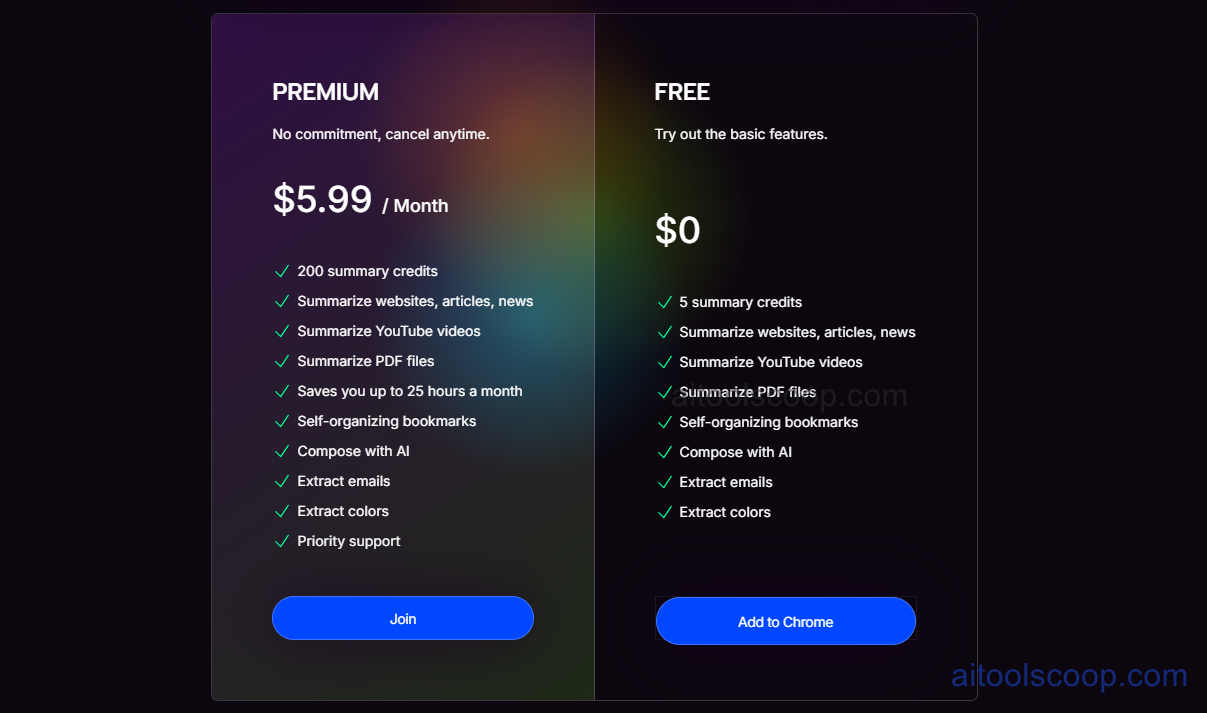
- Free — $0/month — 5 summary credits, plus full access to website, article, news, YouTube, and PDF summarization, self-organizing bookmarks, Compose with AI, email extraction, and colour extraction.
- Premium — $5.99/month — 200 summary credits per month, the same full feature set as Free, plus priority support, with the platform estimating it saves up to 25 hours of reading time a month at that usage level.
No credit card is required for the Free plan, and Premium can be cancelled at any time. Pricing verified against kome.ai; rates may change — always confirm current pricing at kome.ai.
Who Should Use Kome.ai?
Students and researchers skimming a high volume of articles and papers get the clearest benefit from Free, since 5 summary credits a month is enough for occasional use, and every core tool — bookmarking, Compose, extraction — is unlocked even without paying. Anyone summarizing daily, across a real reading habit of articles, YouTube videos, and PDFs, will run through 5 credits quickly and is the natural candidate for Premium's 200-credit allowance. Because Kome.ai's summaries can miss nuance in complex or highly technical material, it suits people using summaries as a triage step before deeper reading rather than as a replacement for reading anything that actually matters.
Frequently Asked Questions
Which browsers does Kome.ai actually work on?
Kome.ai supports Chrome, Microsoft Edge, Opera, Brave, and Arc, so the same extension and shortcuts work consistently regardless of which of these browsers is being used.
Is the Free plan good enough for regular use, or just a trial?
Free includes every core feature — summarization, bookmarking, Compose, and both extractors — but limits summaries to 5 credits per month, which suits occasional use rather than daily summarizing across many sources.
How accurate are the AI-generated summaries?
Summary quality can vary depending on how a page is structured and how nuanced the source material is; the tool works best as a fast way to grasp the main points, and complex or highly technical content may still need a full read to confirm details.
What does the Compose feature actually generate?
Compose draws on a user's saved bookmarks to draft emails, tweets, or blog post outlines, using previously captured content as reference material instead of starting from an empty prompt.
Does upgrading to Premium unlock any features that Free doesn't have?
No — both plans include the same full feature set. Premium's $5.99/month mainly buys a much larger monthly summary allowance (200 credits instead of 5) plus priority support.