

Home/ AI Tools /AI Video Tools /Clideo
Clideo Freemium
🤖 AI Video Tools
#38 in AI Video Tools

Clideo

Clideo is a simple online video editing toolkit with 30+ tools for trimming, merging, and converting videos. Pro plan $9/month or $6/month annually.

3.9 / 5 Freemium From $9/mo
Quick Info
💰 Pricing$9/mo
⭐ Rating3.9 / 5
🆓 Free Plan✅ Yes
📂 CategoryAI Video Tools
🌐 WebsiteVisit ↗
🕐 Last UpdatedApr 12, 2026
🔀 Alternatives41 tools
Verified Data Updated Apr 12, 2026
Independently Reviewed No paid placements
Detailed Analysis Hands-on testing
Key Features
  • 30+ specialized tools including trim, crop, merge, compress, convert, and subtitle
  • Support for 500+ file formats with automatic conversion between types
  • AI auto-subtitles with automatic caption generation and manual editing
  • AI background removal creating green screen effects for videos and images
  • Video compression reducing file sizes up to 90% with quality preservation
  • Format conversion between MP4, AVI, MOV, WebM, and hundreds of formats
  • Watermark addition with logo and text overlays plus position control
  • Cloud processing handling all encoding on Clideo servers
  • Batch processing applying same edits to multiple files simultaneously
  • Direct Google Drive and Dropbox integration for upload and save
3.9
Overall Rating
Ease of Use
4.1
Features
3.9
Value
3.6
Performance
4.0
Support
3.8
Pros & Cons
👍 Pros
  • Extremely affordable Pro plan at $6/month annually
  • Simple single-purpose tools eliminate overwhelming feature complexity
  • Supports virtually any video format without manual codec research
  • Free plan genuinely usable for occasional quick edits
  • No software installation or updates required
  • Fast processing times even on free plan for shorter videos
  • Batch operations on Pro plan save time for repetitive tasks
👎 Cons
  • Free plan watermark covers significant portion of video
  • 500MB file size limit on free plan restrictive for high-quality footage
  • Lacks comprehensive editing features like timeline-based cutting
  • Processing queue times increase during peak usage hours
  • No mobile apps — browser-only limits on-the-go editing
  • Tool-by-tool workflow tedious for complex multi-step edits
  • Limited customization compared to dedicated video editors
📖

About Clideo

Clideo (clideo.com) is a browser-based video editing suite offering 30+ specialized tools for quick video modifications without complex software. Each tool focuses on a single task — trim, crop, merge, compress, add subtitles, remove backgrounds, convert formats — making Clideo ideal for users needing fast, straightforward edits without learning comprehensive editing platforms. Processing happens entirely in the cloud with support for 500+ file formats, and tools work independently so users only access what they need when they need it.

How Clideo Works

Navigate to the specific tool needed (e.g., Video Trimmer, Video Merger, Subtitle Generator) from Clideo's homepage. Upload your video file from device, Google Drive, Dropbox, or via URL. The tool loads your video in a simple interface tailored to the specific task. For trimming, drag handles to select keep/remove sections. For merging, upload multiple files and arrange order. For subtitles, the AI auto-generates captions which you can edit. Adjust settings specific to each tool (resolution, format, quality), then process the video in Clideo's cloud. Download the result or save directly to cloud storage. Tools can be chained together — export from one tool and immediately import to another for multi-step workflows.

Key Features

  • 30+ specialized tools — separate utilities for trim, crop, merge, compress, convert, subtitle, and more
  • 500+ format support — handles virtually any video, audio, and image format with automatic conversion
  • AI auto-subtitles — automatic caption generation with manual editing and customization
  • Background removal — AI-powered green screen effect for videos and images
  • Video compression — reduce file sizes up to 90% while maintaining visual quality
  • Format conversion — convert between MP4, AVI, MOV, WebM, and hundreds of other formats
  • Watermark addition — add logos and text overlays with position and transparency control
  • Cloud processing — all encoding happens on Clideo servers, no local hardware required
  • Batch processing — apply same edits to multiple files simultaneously on Pro plan
  • Direct cloud integration — upload from and save to Google Drive and Dropbox

Clideo Pricing
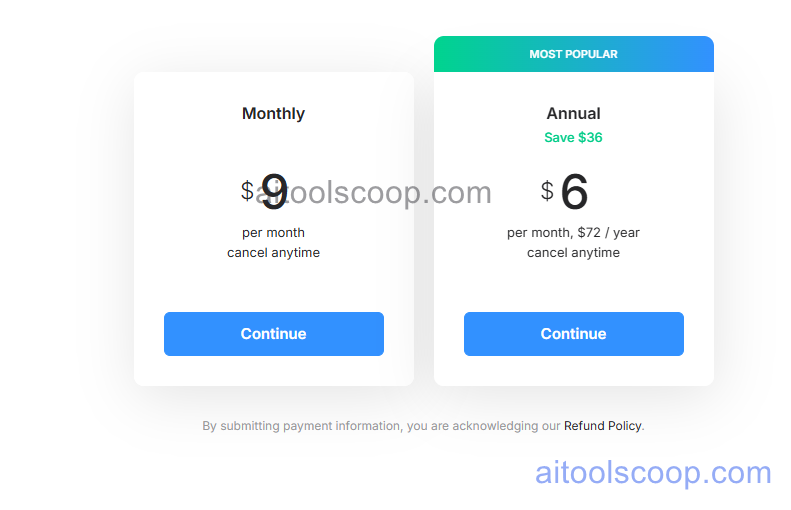
Clideo pricing plans
Clideo pricing — screenshot from clideo.com
  • Free — $0/month — access to all 30+ tools, 500MB file size limit, standard processing speed, Clideo watermark on exports.
  • Pro — $9/month or $6/month billed annually ($72/year) — no watermark, 4GB file size limit, faster processing, batch operations, HD exports, priority support.

Always check the latest rates on the official website. For more AI tool reviews, visit aitoolscoop.com.

Who Should Use Clideo?

Clideo is perfect for casual users needing occasional quick edits without subscription commitment to full editing suites, small business owners compressing videos for email and website optimization, social media managers converting content between platform-specific formats, students and educators creating simple video projects and presentations, remote workers preparing video files for sharing and collaboration, and anyone seeking no-installation video tools accessible from any browser. The free plan suits infrequent users willing to accept watermarks, while the Pro plan at $6/month annually offers exceptional value for regular use with watermark removal and batch processing.


💰

Pricing Plans

Plan Price Includes
Pro $9/mo Full access + priority support
Check Current Pricing →
Affiliate Disclosure: This page contains affiliate links. If you click and make a purchase, we may earn a small commission at no extra cost to you. We only recommend tools we genuinely believe in.

🎯 Explore More

Discover other curated resources from our platform

🛠️ AI Tools View All →
Lets Enhance
Lets Enhance
★ 4.2
Photoroom
Photoroom
★ 4.2
Claude
Claude
★ 4.8
⚔️ VS Comparisons View All →
ChatGPT vs Gemini: Which AI Writing Tool Wins in 2026?
ChatGPT vs Gemini: Which AI Writing…
Claude vs ChatGPT
Claude vs ChatGPT
Claude 3.7 Sonnet vs ChatGPT GPT-4o
ChatGPT vs Grok: 2026 Comparison — Pricing, Features & Verdict
ChatGPT vs Grok: 2026 Comparison —…
ChatGPT vs Grok
💡 Free Prompts View All →
💡
How Consulting Professionals Can Use ChatGPT…
🔥 4.6K uses
💡
Why Healthcare Education Marketing Specialists Struggle…
🔥 7.4K uses
💡
How Journalists in Healthcare Can Use…
🔥 11.2K uses
💡 Free Prompts