

Home/ AI Tools /AI Audio & Voice /Audo Studio
Audo Studio Freemium
🤖 AI Audio & Voice
#16 in AI Audio & Voice

Audo Studio

Audo Studio is an AI audio cleaning tool that removes noise and enhances voice quality. Free plan available, paid plans from $12/month.

4.2 / 5 Freemium From $12/mo
Quick Info
💰 Pricing$12/mo
⭐ Rating4.2 / 5
🆓 Free Plan✅ Yes
📂 CategoryAI Audio & Voice
🌐 WebsiteVisit ↗
🕐 Last UpdatedApr 14, 2026
🔀 Alternatives23 tools
Verified Data Updated Apr 14, 2026
Independently Reviewed No paid placements
Detailed Analysis Hands-on testing
Key Features
  • One-click processing with automatic noise removal, echo reduction, normalization
  • AI noise reduction removing background noise while preserving voice quality
  • Echo cancellation eliminating room echo and reverberation from recordings
  • Volume normalization ensuring consistent loudness across recordings
  • Voice enhancement improving clarity and presence of vocal recordings
  • Batch processing cleaning multiple files with identical settings
  • Format support handling WAV, MP3, M4A, and other common audio formats
  • Browser-based operation requiring no software installation
  • Before/after comparison for previewing processing results instantly
  • Fast cloud rendering delivering results in minutes
4.2
Overall Rating
Ease of Use
4.4
Features
4.2
Value
3.9
Performance
4.3
Support
4.1
Pros & Cons
👍 Pros
  • Extremely simple — zero learning curve for basic audio cleanup
  • Browser-based accessibility eliminates software installation
  • Free plan 30 minutes/month adequate for occasional users
  • Starter plan at $12/month affordable for regular podcasters
  • Processing quality competitive with manual audio editing
  • Batch processing saves time for multi-episode workflows
  • Fast rendering speeds enable quick turnaround
👎 Cons
  • Limited customization compared to professional audio software
  • Free plan 30 minutes/month restrictive for weekly podcasters
  • No annual pricing discounts offered on any tier
  • Aggressive noise reduction sometimes removes voice nuance
  • Creator plan expensive at $20/month for features offered
  • Browser dependency requires stable internet connection
  • Cannot fix fundamental recording issues like clipping or distortion
📖

About Audo Studio

Audo Studio (audo.ai) is a browser-based AI audio processing tool designed to clean and enhance voice recordings with one click. Built for podcasters, video creators, and anyone recording voiceovers, Audo Studio uses machine learning to remove background noise, reduce echo, normalize volume levels, and improve overall voice clarity without manual audio editing. The platform emphasizes simplicity — upload a file, click process, and download professional-quality audio within minutes. With support for long-form content and batch processing, Audo Studio serves creators seeking fast audio cleanup without learning complex audio software.

How Audo Studio Works

Visit Audo Studio in your web browser and create an account. Upload your audio file (WAV, MP3, M4A) recorded with any microphone or device. Audo's AI analyzes the audio and automatically applies noise reduction, echo cancellation, and volume normalization. Preview the processed audio to compare before and after quality. Adjust processing intensity if needed using the simple slider controls. Download the cleaned audio file ready for publication or further editing in video editing software. For multiple files, enable batch processing to clean entire folders with consistent settings. Premium plans unlock longer file processing, faster rendering, and commercial usage rights.

Key Features

  • One-click processing — automatic noise removal, echo reduction, and volume normalization
  • AI noise reduction — removes background noise while preserving voice quality
  • Echo cancellation — eliminates room echo and reverberation
  • Volume normalization — ensures consistent loudness across recordings
  • Voice enhancement — improves clarity and presence of vocal recordings
  • Batch processing — clean multiple files with identical settings
  • Format support — handles WAV, MP3, M4A, and other common audio formats
  • Browser-based — no software installation required, works on any device
  • Before/after comparison — preview processing results instantly
  • Fast rendering — cloud processing delivers results in minutes

Audo Studio Pricing
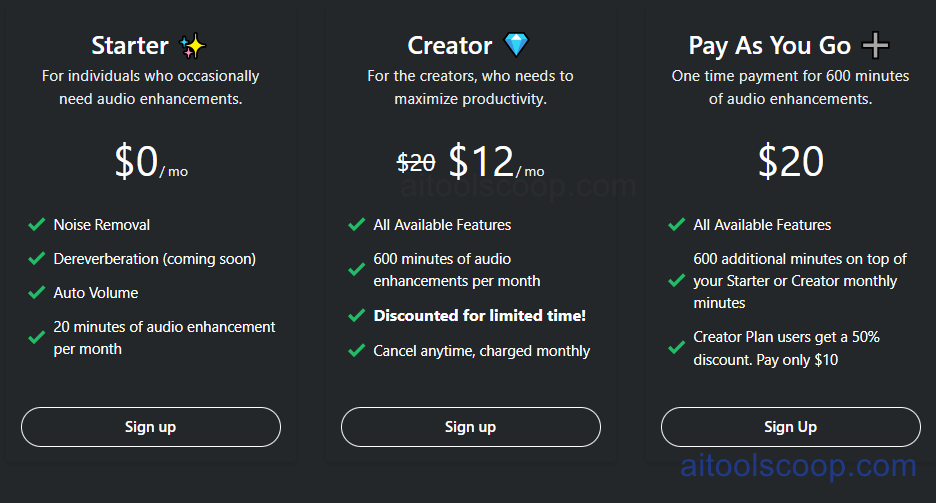
Audo Studio pricing plans
Audo Studio pricing — screenshot from audo.ai
  • Free — $0/month — 30 minutes processing/month, standard quality, basic noise reduction, personal use only.
  • Starter — $12/month — 5 hours processing/month, high-quality processing, batch processing, commercial license, priority support.
  • Creator — $20/month — 20 hours processing/month, ultra-high quality, advanced noise reduction, API access, dedicated support.

Always check the latest rates on the official website. For more AI tool reviews, visit aitoolscoop.com.

Who Should Use Audo Studio?

Audo Studio is perfect for podcasters cleaning interview recordings and remote guest audio, YouTube creators enhancing voiceover quality for videos, educators recording lectures and course materials in non-studio environments, remote workers improving audio quality for video presentations, content creators producing consistent audio across varied recording conditions, and anyone needing quick audio cleanup without learning complex DAW software. The free plan suits casual users with occasional cleanup needs, while the Starter plan serves regular creators. The Creator plan fits professionals with high-volume audio processing requirements.


💰

Pricing Plans

Plan Price Includes
Pro $12/mo Full access + priority support
Check Current Pricing →
Affiliate Disclosure: This page contains affiliate links. If you click and make a purchase, we may earn a small commission at no extra cost to you. We only recommend tools we genuinely believe in.

🎯 Explore More

Discover other curated resources from our platform

🛠️ AI Tools View All →
SeaArt
SeaArt
★ 3.7
Kaiber
Kaiber
★ 3.9
Civitai
Civitai
★ 3.8
⚔️ VS Comparisons View All →
ChatGPT vs Gemini: Which AI Writing Tool Wins in 2026?
ChatGPT vs Gemini: Which AI Writing…
⚔️
ChatGPT vs Gemini for Writing in…
ChatGPT GPT-4o vs Gemini 1.5 Pro
ChatGPT vs Claude: 2026 Comparison — Pricing, Features & Verdict
ChatGPT vs Claude: 2026 Comparison —…
ChatGPT vs Claude
💡 Free Prompts View All →
💡
7-Day Japan Itinerary Planner for First-Time…
🔥 18.4K uses
💡
Gemini for Enterprise Curriculum Developers: Expert…
🔥 8.8K uses
💡
The Intermediate Full Stack Developer's Guide…
🔥 13.5K uses
💡 Free Prompts